Mobile Application Testing: Stepwise Method

Mobile Application Testing: Stepwise Method

Today, the invention of smartphones single-handed, changed the course of human life. It has become an identity. With this rise, the consequential boom in the employment of web developers and software testers was quite obvious. Applications in the mobile are the heart of it. Many youngsters have found their way of a career in the software industry, developing these apps.

Though it has become a large arena for people to explore new things, only a few of them survive in people’s pockets. It is agreeable that only original and unique app ideas will survive the race but that’s not the only parameter in play here.

The application will not last long if the user experience is full of errors. The consumer will only hold on to your app if he/she is having a smooth experience. And we assure you that he/she will uninstall it if it is not the case.

So, what to do? Here comes the equally main part of the process. Testing the application at the initial stage and even constantly monitoring it after the release becomes of utmost importance.

Okay, let’s see what goes under mobile application testing.

What is it?

Here we run tests on these apps to ensure the best user experience. It is done on some aspects like usability, functional, consistency glitches, etc.

Important Factors

One might think of Mobile Application testing similar to Website testing or software testing, but it’s not the same. There are some things which one is supposed to consider which are specifically needed for mobile application testing. Let’s list them.

  • Screen resolution
  • GPS
  • Screen orientation (landscape, portrait)
  • Manufacturers of various devices
  • OS
  • Type of Mobile Application

Mobile Application: Types

Yes, it matters! The process of testing varies slightly for different types of apps. The apps are categorized into 3 types, which are as follows.

  1. Mobile web applications: Web pages that you open through the browser on mobile.
  2. Native Apps: Apps that are developed for one particular platform like iOS, Android, etc.
  3. Hybrid: Amalgamation of the above 2 categories.

Mobile Application Testing: Strategy

Like any other task in our life, strategizing the testing helps. Doing it step by step saves time and effort of the testing team. So, how to go about it?

Below are the steps you should refer to while doing it.

1. Device selection

Now that you have arrived at this stage, testing of the application must be done on a real device. It’s the best way to go about it. But, which device to use? Well, that’s up to your preferences but here are some of the things you can do to save time while doing this time-consuming task.

  • Do your research. Search for the most used mobile in the market and try to get a hold on it.
  • You can check out mobiles with different screen resolutions.
  • The same variation can be done with various OS.
  • Different aspects of the mobile like Compatibility, memory size, and connectivity are not to be ignored.

2. Emulators vs simulators

If not the real device, nowadays, many testers use Emulators or simulators. Don’t get confused. These are the tools that, like their name, emulate or simulate the behavior of a mobile device.

But don’t get confused about their similarity either. Though the definition is similar, there is a difference between them. Explained below.

Emulator: Original device standby that runs applications on the devices without modifying them. Preferred to test mob web applications.

Simulator: Sets up an analogous environment as of your original device’s OS without imitating its hardware. Preferred to test mobile applications.

3. Mobile Application Testing: Cloud-based

Actual mobile devices can sometimes be a problem even simulators cant substitute them with full precision. That’s why using a cloud based system to test the applications is said to be a more efficient method.

Mobile manual vs Automated testing

There can’t be only one way of testing. It is a most discussed argument now and we know the answer. A Pro tester would never take sides of only one type of testing. By now, he/she should realize that amalgamation of both methods is the key to the future. After all different elements need different methods.

Finally, here we are. lets now start to understand the actual steps of mobile application testing


Mobile application testing: Stages

1. Documentation

Like in any other stream app testing also requires proper documentation before starting the process though, testers are known to be working after the app is developed, they are supposed to be provided with many necessities before starting the development of the app. screen layouts, navigational charts are some of them.

Here the tester should analyze the needs for any inconsistencies. If he/she finds any discrepancies it is supposed to be resolved before starting the process.

Also, this is the stage where Test Cases, Test Plan, Traceability Matrix are created and analyze.

2. Functional testing

This type of testing ensures your application’s functionality concerning the requirement specification. Below are the aspects of functional testing which you should consider :

  • Consumer pool. E.G. students, businessmen, companies, etc.
  • Distribution streams. E.G. app store, play store, etc.
  • The functionality of the app concerning the business. E.G. social networks, food delivery, gaming industry, etc.

Another list of things you need to verify in functional testing :

  • Device resources testing
  • Constant users feedback testing
  • Fields testing
  • Interruptions testing
  • Installing and running the application
  • Business functionalities testing
  • Update testing

3. Usability Testing

This is the part that will impact the user experience directly. This is about creating an interface that is intuitive and also conforms to the market standards. your customers are going to indirectly judge you based on the following three aspects :

  • Effectiveness
  • Efficiency
  • Satisfaction

You should consider these while testing the app

4. UI (User Interface) testing

This the testing of your company’s face value. It makes sure that the app’s GUI is completing the required specifications.

5. Compatibility testing

Here, the validity of the Configuration of your device is tested. It is done on different handsets considering various aspects like screen resolution, size, hardware version. It also helps to validate:

  • Device Configuration
  • Browser Configuration
  • OS Configuration
  • Network Configuration
  • Database Configuration

Further divisions include:

Cross-browser testing: Compatibility testing in different browsers.

Cross-platform testing: Compatibility testing with different Operating systems.

Database testing: Compatibility testing in different database configurations like Oracle, DB2, MSSQL Server, Sybase, MySql, etc.

Device Configuration testing: Compatibility testing on different devices. This is done based on 2 criteria:

  • Device type
  • Device configuration

Network configuration testing: Compatibility testing in different network configurations (GSM, TDMA) and standards (3G, 4G).

6. Performance testing

This can help in analyzing the application’s reaction and consistency when a certain workload is exerted on it.

Characteristics:

  • Stress Testing: Tests the application’s ability to bear stress. Verifies app capability to work in untimely stress.
  • Volume Testing: Tests the application’s performance when a large amount of data is to be processed.
  • Concurrency testing: Tests performance at the time when a large number of users are logged in.
  • Load Testing: Checks the application’s actions under normal and heavy loads.
  • Stability Testing: Tests durability of the app in normal load.

7. Security testing

This type authenticates the Security of your app and runs an analysis of the probability of harm given to more delicate data by application hackers, viruses, etc.

8. Recovery testing

If anything goes wrong on the consumer’s end, This type of testing helps them to successfully and smoothly recover data in vulnerable situations like software issues, hardware failures, or communication problems.

9. Localization testing

This is done to the adaptability of the app based on local or cultural grounds. Catering to different sets of target audiences.

10. Change-related testing

This is the aftermath. When all these given types of testing are done, a report is made to change the lines of codes that have created the bugs. After this, A final checking should be done to ensure a full bug-free app. This includes:

  • Confirmation testing: Re-testing for a final check.
  • Regression testing: Checking if any new bugs have not formed due to change in code to remove earlier bugs.

11. Beta testing

Some of you must be Beta users yourselves. As you might know, Beta testing is the type of testing where actual users on their actual devices test the final product to verify if everything is alright. Functionality, Reliability, Usability, Compatibility are some of the aspects which these beta users test.

But remember, before entering into the beta testing zone, consider the following factors:

  • Duration of the tests
  • Demographic coverage
  • Number of testing participants
  • Shipping
  • Costs

Beta testing gives you a good insight into your target customer’s mind and is a good way to create a user-friendly app.

12. Certification testing

This is quite the most formal part of application testing. It confirms if your app is meeting the standards set by the market. Things like licensing agreements, terms of use, etc. Also the requirements of various digital stores like the App Store, Google Play, etc.

Challenges:

  • Availability of multiple UI.
  • Deadlines.
  • Complications while testing touch screens.
  • A testing approach based on device.
  • Security issues.
  • Testing in this constantly changing technical culture.
  • User Experience & Issues with App Performance.

Tips:

Now, the main part is done and we are on to the exciting part of this article. Some perks for you to perform while testing mobile apps.

  1. Know your app well. Be very familiar with all its ins and outs.
  2. Lets the testing be app-specific and generalized.
  3. Consider the hardware specifications and operating system of the device before testing.
  4. Whenever possible, use real devices. The results are better.
  5. Pick tools based on your comfort and not its popularity.
  6. Use cloud mobile testing.
  7. Maximum times, use development menu options.
  8. Use Emulators and simulators if required. They can be your protectors.
  9. Prioritize Performance testing.
  10. Balance the modes. Manual is as important as Automated testing.
  11. Beta testing is a bonus. Don’t miss it.
  12. Plan your time.

Popular tools

Remember, these are just to give you an idea about what is available in the market. Use whichever you feel comfortable with.

Functionality testing: Appium, Selendroid, Robotium, Ranorex.

Usability testing: Reflector, User Zoom, Loop.

Mobile application interface testing: iMacros, FitNesse, Jubula, Coded UI, LoadUI.

Compatibility testing: Cross-BrowserTesting, BrowserStack, Browsera, Litmus, Rational ClearCase, Ghostlab.

Performance testing: Apteligent, NeoLoad, New Relic.

Security Testing: OWASP Zed Attack Proxy, Retina CS Community, Google Nogotofail, Veracode, and SQL Map.

So, this way you can test your mobile application. We hope that we have covered all the aspects of it.

In conclusion, Understand the benefits of mobile application testing and execute it by giving it that much importance which you will give to developing the app. It is as necessary. And remember to constantly monitor and analyze the app even after its release.

Happy Testing!


Namrata Shinde — Functional Testing Expert, VTEST

Namrata is a Functional Testing Expert at VTEST with deep experience in mobile, UI, and end-to-end testing. She ensures every release is thoroughly validated and bulletproof before reaching end users.


Related: Mobile App Testing: The Need of the Hour

Outsourcing Software Testing: 5 Benefits

Outsourcing Software Testing: 5 Benefits

Managing a software development company is a hard job. There are various complex situations that one has to tackle while doing it. And if the company needs to survive in today’s competitive market, the task becomes harder. With all the ongoing developmental work, it is difficult for the management to look after other aspects that are as much important as development.

That’s why it is recommended and suggested to most of the software companies that they should outsource the software testing of the software to another organization.

But why do they do this? Apart from the management angle, what is the point of outsourcing software testing?

Well, there are multiple benefits to doing this like cost-cutting, an unbiased and newer perspective, competitive benefits, etc. In this article, we will discuss them.

1. Management

As noted earlier, all the extra work related to hiring and managing the testers cuts down. It saves a lot of effort and time of the management as the company hired for software testing takes care of all the management related to software testing. It is also a fact that when outsourced, the software testing becomes more efficient as the testers are specialized in their job, without any other pressure.

The work also gets completed on time as the testers have no other task to complete and are focused on their work. Due to this concentration, they can stick to the consumer needs and goals of software testing, resulting in a more fine product.

2. Infrastructure Budget

The costing of all the tools and pieces of equipment which are to be used by the software tester is saved as the company which you hired has all the necessary infrastructure for the tester. If you do software testing in-house, the problem occurs when a large scale project is in consideration. It needs a more infrastructural budget. With outsourcing, the project scale doesn’t matter.

3. Ego issues

It is a general observation that developers and testers do not go along well with each other. It is not true for all times but we can’t ignore that this happens quite a lot. It is the ego of both teams which create these clashes. Developers usually don’t want to hear about their mistakes.

This whole situation can be easily avoided by outsourcing. As the teams don’t know each other fully and do not work under the same roof, It makes them work more efficiently and finely as there are now no other ego issues to think upon. Only work. With increased efficiency, the product becomes finer.

4. Time efficiency

When you outsource, you divide and rule. As both the developing and software testing teams are different, the pressure of completing the project has been divided. Due to this division of pressure and increased efficiency, the project can be completed on time. Without any load. The precise time-to-market can be achieved without any obstacles.

5. Integration Cycle

If you are working on an international project, the time zones differ. This situation can be a big problem while working in-house as the timings won’t match. For example, if you are in India and having a project from Australia, the timings differ and hence the working hours don’t match. It can be hectic for the team.

When you outsource software testing, the software testing company can manage the timing accordingly. It can be seen as a difficult working but if done rightly, it’s quite helpful.

In conclusion,

You must have understood by now the different reasons to outsource the software testing process. Apart from these reasons, it is important to understand that the software testing company which you are hiring to outsource the software testing should be of a certain quality. The evaluation of their work ethics, Past projects, etc. should be done beforehand.

Check out another blog from our website to know about the things to consider while hiring a software testing company.

Evaluate the provider’s quality, and Go for it!


Shak Hanjgikar — Founder & CEO, VTEST

Shak has 17+ years of end-to-end software testing experience across the US, UK, and India. He founded VTEST and has built QA practices for enterprises across multiple domains, mentoring 100+ testers throughout his career.


Related: Software Testing Outsourcing: 15 Points to Consider

An All-in-One Guide to Performance Testing

An All-in-One Guide to Performance Testing

Performance testing is often treated as an afterthought — something that happens in the final sprint before release, or not at all until a high-traffic event exposes the gaps. That approach is expensive. Systems fail at the worst possible moment, and the engineering effort required to diagnose and fix performance problems found in production dwarfs what would have been needed to find them earlier. This guide covers everything a QA team or engineering organisation needs to design, execute, and act on performance testing as a first-class engineering discipline in 2026.

What Is Performance Testing and Why It Matters

Performance testing is a category of non-functional testing that evaluates how a system behaves under a defined workload. The goal is not just to verify that the system works — functional testing answers that question — but to determine how well it works: how fast, how reliably, under how much load, and for how long.

The business case is straightforward. A one-second delay in page load time reduces conversions by approximately 7%. Large-scale outages caused by unplanned traffic spikes cost organisations millions of dollars per hour in direct revenue loss and long-term brand damage. Regulatory environments in finance, healthcare, and critical infrastructure increasingly require documented performance baselines. Performance testing is how organisations generate those baselines, identify bottlenecks before they affect users, and make confident decisions about infrastructure capacity.

Types of Performance Testing

Performance testing is not a single test. It is a family of test types, each designed to answer a different question about system behaviour. Using only one type gives an incomplete picture.

Load Testing

Validates system behaviour under expected production load. Load tests simulate the number of concurrent users or transactions the system is designed to handle and confirm that response times, error rates, and resource utilisation remain within acceptable thresholds. Load testing answers the question: does this system meet its performance requirements at normal operating load?

Stress Testing

Pushes the system beyond its designed capacity to identify the breaking point and observe failure behaviour. Stress tests answer two questions: at what load does the system fail, and does it fail gracefully? A system that returns meaningful error messages under extreme load is preferable to one that crashes silently and corrupts data.

Spike Testing

Simulates a sudden, sharp increase in load — a flash sale, a product launch announcement, a viral event — rather than a gradual ramp. Many systems that pass load tests fail under spike conditions because they cannot scale fast enough to absorb an abrupt surge. Spike testing validates auto-scaling behaviour, connection pool behaviour under burst conditions, and queue handling under sudden demand.

Endurance (Soak) Testing

Runs the system at sustained load for an extended period — typically hours, sometimes days — to identify problems that only emerge over time. Memory leaks, connection pool exhaustion, log file bloat, and database cursor accumulation are examples of issues that pass short-duration tests but cause degradation or failure in production over time. Endurance testing is frequently skipped and frequently the cause of the most puzzling production incidents.

Volume Testing

Evaluates system behaviour when the data volume is very large. This is distinct from load testing: the concern is not concurrent users but database record counts, file sizes, or queue depths. A report generation feature may function correctly with 10,000 records but time out or exhaust memory with 10 million. Volume testing is particularly important for systems with growing data stores.

Scalability Testing

Systematically measures performance characteristics at increasing load levels to determine how the system scales. Unlike stress testing, the goal is not to find the breaking point but to characterise the scaling curve — does doubling the load double the response time (linear), increase it less than proportionally (sub-linear, desirable), or more than proportionally (super-linear, problematic)? Scalability testing informs infrastructure investment and architectural decisions.

Capacity Testing

Determines the maximum load the system can handle while still meeting defined service level objectives. Capacity testing is the foundation of capacity planning: it answers how many users the current infrastructure can support before additional resources are needed, and provides data for forecasting.

The Performance Testing Process

Planning

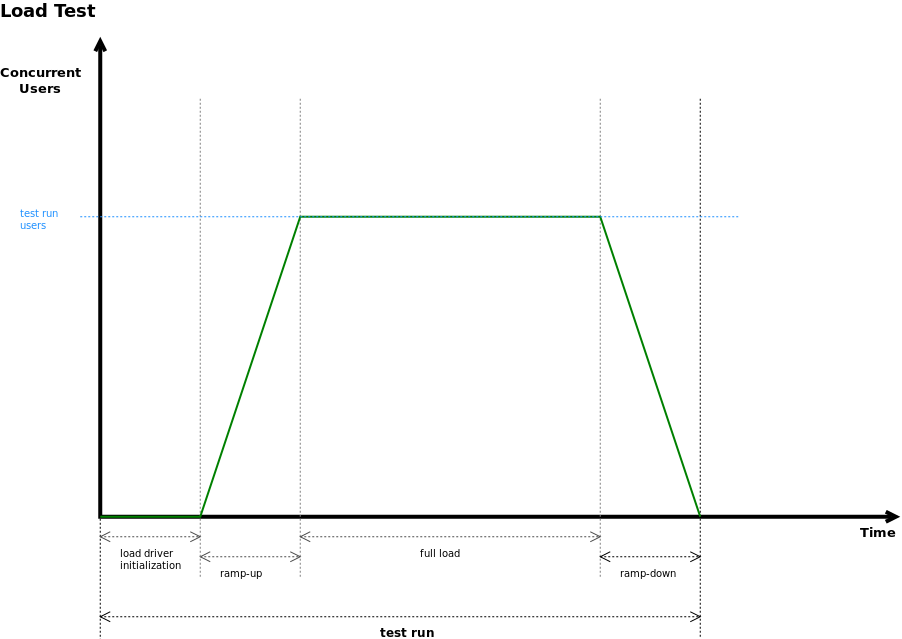
Effective performance testing begins with clearly defined objectives. The planning phase establishes: what user scenarios to simulate, what load profiles to apply (ramp-up rate, peak load, hold duration), what success criteria define acceptable performance (response time thresholds, error rate limits, resource utilisation ceilings), and what the test environment should look like relative to production. Testing against an environment that is significantly smaller or differently configured than production produces results that do not transfer reliably to production behaviour.

Scripting

Test scripts simulate real user behaviour at scale. Well-written performance scripts parameterise user data to avoid cache hits masking real behaviour, implement realistic think times between requests, handle session tokens and authentication correctly, and target the right API or transaction boundaries. Scripts that only test static content or that make the same request repeatedly with identical parameters produce misleading results.

Execution

Performance tests must be run from load injectors that can generate sufficient traffic volume without the injector itself becoming the bottleneck. For large-scale tests, distributed load generation across multiple nodes or cloud instances is required. The test environment must be monitored end-to-end during execution: application server CPU and memory, database query times, network latency, garbage collection behaviour, and external service dependencies.

Analysis

Raw performance test results require interpretation. Identifying whether observed degradation originates at the application layer, database layer, network, or infrastructure tier requires correlating test results with server-side metrics collected during execution. Analysis identifies specific bottlenecks — a slow database query, an inefficient serialisation path, an under-configured connection pool — that can then be addressed.

Reporting

Performance test reports serve different audiences. Engineering teams need detailed metrics and identified bottlenecks. Management needs a summary against SLA thresholds and a clear pass/fail verdict. Reports should include the test configuration, load profile, key metrics across the test run duration, comparison against baselines or previous test runs, and specific actionable findings.

Key Performance Metrics

  • Response time: The elapsed time from the moment a request is sent to the moment the full response is received. Typically reported as mean, median, and percentile values. Mean response time is misleading without percentile data — a 200ms average can hide a significant tail of 5-second requests.
  • Throughput: The number of transactions or requests the system processes per unit of time (requests per second, transactions per minute). Throughput indicates the system’s capacity to handle work volume.
  • Error rate: The percentage of requests that result in an error (HTTP 5xx, application errors, timeouts). An error rate above 0.1% under load typically indicates a significant problem. The error rate at peak load is one of the most important acceptance criteria.
  • Concurrent users: The number of virtual users actively engaged with the system simultaneously during the test. This is a test parameter, not a result — it defines the load level being applied.
  • Apdex score: Application Performance Index — a standardised metric that classifies individual response times as Satisfied (below a defined threshold T), Tolerating (between T and 4T), or Frustrated (above 4T). Apdex converts response time distributions into a single score between 0 and 1, making it easy to track performance quality over time and communicate it to non-technical stakeholders.
  • Percentile latency (p95 / p99): The response time value below which 95% or 99% of requests fall. p95 and p99 latency are the most operationally meaningful metrics because they characterise the experience of users at the tail of the distribution — the users most likely to abandon or complain. SLAs should be defined in terms of percentile latency, not mean response time.

Performance Testing Tools

k6

Developed by Grafana Labs, k6 has become the go-to tool for teams that want performance testing to be a first-class citizen in CI/CD pipelines. Tests are written in JavaScript, making them accessible to developers already working in that ecosystem. k6 has a low resource footprint compared to JMeter, excellent CLI output, native Prometheus and Grafana integration, and a clean threshold-based pass/fail system that integrates naturally into pipeline gates. k6 Cloud extends this with managed load generation infrastructure.

Gatling

A Scala and Java-based load testing tool known for its high-performance engine and exceptional HTML reports. Gatling’s simulation DSL is expressive and version-control friendly. It can generate very high load from a single machine due to its asynchronous, non-blocking architecture. Gatling is a strong choice for teams working in JVM ecosystems and for organisations that need detailed, shareable HTML reports without additional tooling.

Apache JMeter

The most widely used open-source performance testing tool. JMeter has an extensive plugin ecosystem, supports a broad range of protocols (HTTP, JDBC, SOAP, MQTT, and others), and benefits from a large community and years of documentation. Its thread-per-user model consumes more memory than modern alternatives at very high concurrency levels, but for most enterprise use cases it remains a reliable, well-understood choice. JMeter XML test plans are not the most developer-friendly format, but tooling like Taurus simplifies CI integration.

Locust

A Python-based load testing framework where test scenarios are written as ordinary Python code. Locust is particularly accessible for development teams already working in Python. It uses an event-driven, gevent-based architecture to support high concurrency with low resource overhead. Locust’s distributed mode enables scaling test runners across multiple machines. Its real-time web UI provides live visibility into test progress.

NBomber

A .NET-based performance testing framework designed for teams working in the Microsoft ecosystem. NBomber supports C# and F# for test authoring, integrates with .NET observability tooling, and is the natural choice when the engineering organisation is primarily .NET-centric and wants to keep performance testing in the same language and toolchain as the application under test.

Artillery

A Node.js-based performance testing platform supporting HTTP, WebSocket, Socket.io, and gRPC. Artillery tests are defined in YAML with optional JavaScript extensions for complex scenarios. It has good CI/CD integration, supports serverless execution via AWS Lambda for distributed load generation, and is a strong fit for teams in the Node.js ecosystem testing modern API backends.

Cloud-Based Performance Testing

Generating realistic load at scale from a single physical machine is often impractical. Cloud-based performance testing solves this by distributing load generation across cloud infrastructure, enabling tests that simulate tens of thousands of concurrent users from geographically distributed origins.

  • AWS Load Testing: AWS Distributed Load Testing (built on AWS Fargate) allows test containers to be distributed across AWS regions, making it straightforward to simulate geographically dispersed user bases. Integration with CloudWatch provides real-time visibility into infrastructure metrics alongside load test results.
  • Azure Load Testing: Microsoft’s managed service supports Apache JMeter test plans and runs them at scale on Azure infrastructure. It integrates with Azure Monitor and Application Insights, making correlation of load test results with application telemetry straightforward for teams already on the Azure stack.
  • BlazeMeter: A commercial platform supporting k6, JMeter, Gatling, Locust, and Selenium scripts with managed cloud execution. BlazeMeter provides advanced reporting, CI/CD integrations, and test data management features that reduce the operational overhead of running large-scale performance tests.

The core advantage of cloud-based testing is realism. Load generated from a single on-premises machine does not replicate the network conditions, geographic distribution, or scale of actual production traffic. Cloud platforms make realistic testing accessible without permanent infrastructure investment.

AI-Assisted Performance Testing

Artificial intelligence is beginning to change how performance testing is planned, executed, and analysed. The impact is practical and already observable in current tooling.

  • Intelligent load pattern generation: AI models trained on production traffic logs can generate load patterns that more accurately replicate real user behaviour — including session durations, think times, request sequences, and traffic distribution across endpoints — rather than relying on manually constructed scenarios that may not reflect how users actually interact with the system.
  • Anomaly detection in results: Performance test result sets are large and multi-dimensional. AI-powered analysis identifies anomalies — unexpected latency spikes for specific transaction types, unusual resource utilisation patterns correlated with specific load levels — that a human analyst reviewing summary statistics might miss.
  • Predictive capacity analysis: By analysing historical performance test data alongside production growth trends, AI models can predict at what load level the system will breach defined SLA thresholds and provide lead time for capacity planning decisions before they become urgent.

These capabilities are increasingly embedded in commercial platforms (Dynatrace, Datadog APM, New Relic AI) and are beginning to appear in open-source tooling. Teams that build performance testing into their CI/CD pipelines accumulate the historical datasets these models require to produce useful predictions.

Performance Testing in CI/CD Pipelines

Shift-left performance testing means integrating performance validation earlier in the development lifecycle, not waiting until a dedicated performance testing phase immediately before release. In practice this means:

  • Running lightweight performance smoke tests (a small fixed load, brief duration) on every pull request to catch regressions introduced by individual changes
  • Running targeted performance tests against specific endpoints or services as part of every deployment to a staging environment
  • Defining pipeline gates that automatically fail a deployment if key metrics (p95 latency, error rate, throughput) breach defined thresholds
  • Storing performance test results as time-series data to enable trend analysis across releases, making regression detection proactive rather than reactive

k6, Gatling, and Artillery all have strong CLI interfaces and documented CI/CD integration patterns for GitHub Actions, GitLab CI, Jenkins, and Azure DevOps. The infrastructure investment to implement basic performance gating in a CI pipeline is modest. The payoff — catching performance regressions at the commit level rather than in production — is significant.

Common Performance Testing Mistakes to Avoid

  • Testing in an environment that does not resemble production: Results from an environment with one-tenth the database records, different infrastructure sizing, or a different network topology are of limited value. Test environment fidelity is one of the most important investments a QA organisation can make.
  • Using mean response time as the primary metric: Mean response time hides tail latency. Always report and set acceptance criteria on p95 and p99 latency.
  • Not warming up the system before measuring: JVM-based systems, connection pools, and caches require warm-up time before reaching stable operating state. Measurements taken during the ramp-up phase skew results downward.
  • Skipping correlation and parameterisation: Scripts that send the same request with identical parameters repeatedly will hit caches and produce unrealistically fast results. Parameterise user data, session tokens, and search terms to exercise realistic execution paths.
  • Not monitoring the system during the test: Load test results without corresponding server-side metrics (CPU, memory, I/O, database query times) cannot be used to diagnose bottlenecks. Monitoring is not optional.
  • Running performance tests only before major releases: Performance regressions are introduced continuously. Testing only at release boundaries means regressions accumulate, become harder to attribute to specific changes, and require more effort to fix.
  • Ignoring third-party dependencies: Many production performance incidents originate in external APIs, payment gateways, or CDN behaviour. Performance tests should account for these dependencies or specifically isolate them to understand their contribution to end-to-end response times.

How VTEST Approaches Performance Testing

At VTEST, performance testing is a structured, evidence-based practice. We begin every engagement with a scoping workshop to define realistic load profiles, success criteria, and test environment requirements — because performance tests built on incorrect assumptions produce results that cannot guide decisions. Our team is experienced across k6, Gatling, JMeter, and Locust, selecting the tooling that best fits the client’s technology stack and CI/CD environment.

We deliver end-to-end performance testing engagements: scenario design, script development, distributed test execution, server-side monitoring, bottleneck identification, and a clear written report with specific, actionable findings. For teams building performance testing capability in-house, we also provide advisory services covering tool selection, CI/CD integration patterns, and performance monitoring strategy. If your system has not been tested under realistic load conditions — or if performance testing has been limited to pre-release snapshots — contact VTEST to discuss what a structured performance testing programme would look like for your environment.

Further Reading

Related Guides

Imran Mohammed — Salesforce Expert & Scrum Master, VTEST

Imran is a certified Scrum Master and Salesforce testing specialist at VTEST. He brings structured agile discipline to test planning and delivery, ensuring every project is executed with precision and quality.

Importance of Software Testing industry: 7 MythBusters

Default Image

As we all realize, A Tester’s job in the process of making software is as important as the developer. Once the software is developed, it becomes essential to test it and check for bugs and errors. If in this process, the tester has any misconceptions and prejudices about the method, it becomes a problem. Because then the testing is not done with the precision it demands. Nowadays, many people working in the field have numerous misbelief about the testing process. This culture ultimately affects the user experience and harms much good software’s future.

Even when we look at the testing capabilities of a tester and the pressure that has been put on him, the gap is vividly large between expectations and reality. It is also a common myth that software testers are not that important.

In this article, we debunk 7 fallacies that surround the work of a software tester and the testing process itself. Let’s have a look.

1. Software Testing is easy and boring.

Many of the officials in the technological field think that testing is an easy and regular job.

Contrary to this, testing software needs constant brainstorming and monitoring. A tester’s job is not at all mundane if one is passionately following the method and constantly thinking of new ideas to test the respective software. Just like we eat every day to gain energy, the software also needs testing at regular intervals to be a good experience for the users. Hence, the job of a tester should not be ignored and should be given respect as it is the maintenance that matters the most.

And, FYI, there is some serious hard work that goes into the process of testing. If the job seems boring, the tester is not doing it right. Constant explorations, Consistent monitoring, and Creative mindset are the primary abilities a tester should have. If these are present, then the work becomes fun and fun becomes work!

So, if you can’t change the perspective, change the mindset. When the tester enables himself to have a fresher take on his work, the work becomes more challenging and breaks through from the monotonous zone to a challenging arena.

2. A Tester can do any type of testing

This is another mindless argument that a tester can test anything. How senseless of people to think that she/he can test anything without having the resources, time, budget, infrastructure she/he needs.

The disappointment is obvious if you expect a software tester to be able to test all the test cases with limited resources and lesser time. A tester who is a pro always gives priorities to the requirements and builds crucial test scenarios. The quantity of these test scenarios is large and it becomes impossible for the tester to do it all. Hence, People in the industry should not just assume that after testing the software, all the bugs and errors are gone.

The obvious question here is why a tester can’t resolve all the bugs. It’s not all in tester’s hand. The companies and the investors should provide the tester with all the necessary amenities. Good Infrastructure, necessary resources, more time are some of the things which the tester needs. Afterall, Testing can only show what is present and not what is absent. So, the officials should expect less and provide more.

3. Tester’s job is to find bugs

It’s not completely false but it’s not the whole truth. Surely, A tester’s one of the jobs is to find errors in the software. But other than that, a tester works on various aspects for the maintenance of the software.

Apart from detecting bugs, testers need to review the architecture of the software, analyze and study the requirements, report a review and feedback to develop the software more, and design it as such that it will be more user friendly. He also needs to authenticate the help documents for the software. These are just a few of the additional tasks. The point is that one should not underestimate the tester’s responsibilities.

4. Testers are of no worth to the software

A straight-out myth! Yes, software testing is not the same as software development but its high time that people should realize that it’s no less either. It’s like saying that analysis is less important than creation. It requires the same amount of intellect and knowledge about the method as development does.

A software tester who is great at his/her work will always know the ins and outs of the respective software. The programmers who develop the software always work on specified areas, modules, and functions of the software. On the other hand, the tester has to have an overall knowledge of the software. The analysis and understanding of the software are done by the tester from start to end. The tester’s job demands this analysis be done as he needs to check whether there are any errors in the product.

5. Automation will replace humans in the testing industry

This rumor is spread by the people who are involved in the automation industry. It is not at all true and if we have to recognize one bad effect of this then it is the effect on upcoming software testers. It’s because of this rumor, techno-geeks don’t consider testing as their career.

It’s not going to happen. If you are thinking why not, let me tell you. Some years ago, people used to say that AI will take over the world in a few years. Well, I don’t see any regular AIs roaming around.

Full automation is not the way of the future. We need to understand that humans created machines. It’s all our brainchild. One primary thing which these machines lack is ‘Instinct’. Without human instinct, not even humans can do what is needed. It’s a natural gift we have as a species.

Yes, we agree that test automation can help in so many basic things like detecting colors, fonts, layout, etc. but it can never be creative and tell you that which color you should use so that the layout will look good. Its things like these that confirm that it’s not gonna happen yet.

One of the other main things is that not all tests can be automatized even in the future. Some tests should only be done by a human precisely.

Sure, we should not discard Automation testing. It helps and will help in the future too to do some vigorous calculations and tasks which are too time-consuming for the human testers. E.g. Processes like Performance testing and load testing require automation testing as it saves a lot of time for the human tester.

Hence, Replacement is not the key but Collaboration is.

6. Testers get a kick by breaking your code

If anyone is helping the software to be one step better than before, it is the tester. First of all, People should get this clear that Testers are not against the developers or programmers. They are both on the same side. They don’t get any pleasure in breaking your code.

The Irony is that testers detect the problems in the code done by the programmers. The problem already exists and the tester detects it by analyzing and reports them to the developer so that changes can be made which will ultimately help the software look good. See, you all are on the same side!

Frankly speaking, It won’t’ be possible for developers and stakeholders to build perfect software without testers!

7. Testers and Developers are enemies

If you are on a managing board of a software company, and you are promoting this villainous behavior, then you are setting a wrong precedent. Friendly behavior should be promoted between these two fields. Both of them are like Yin Yang. The whole picture won’t be complete if any one of them is not present.

You should see it step by step. First, the developer creates the code, and then the tester checks if there are any bugs in it. After this, he reports the bugs found to the developer, and then after coding the software again, the tester again checks if any bug is still present. In this give and take, it necessary that the communication between these teams should be smooth. They can’t be enemies as they are the 2 legs on which the software is standing. Rather both of them should coordinate. The tester should ask the developer for some tricks and ways to find the bugs. As the developer has written the code, he might know if anything is doubtful.

Only such a harmonious environment in a company can help build an empire.

Conclusion

To summarize, the testers are as important in the software industry and one should not discriminate them. The job of testing is hard and it is quite evident that the digital world won’t be like it is today, if not for testers doing their job perfectly.

The workspace of software development companies should promote a healthy environment by giving testers enough and good resources to work with and by not creating enmity between them and new automation technology.

As Automation is not the enemy, neither are the developers. A good bond should be created between testers and programmers for the betterment of the software and ultimately to give the user a memorable experience.

So, these were the most misunderstood facts about the testing industry and the testers. Get them straight in your mind. Its high time for these basic myths to be debunked but better late than never!

Let’s make this world a better place by creating some genius software!


Shak Hanjgikar — Founder & CEO, VTEST

Shak has 17+ years of end-to-end software testing experience across the US, UK, and India. He founded VTEST and has built QA practices for enterprises across multiple domains, mentoring 100+ testers throughout his career.


Related: Software Testing: A Handbook for Beginners

Importance of Cloud Testing

Importance of Cloud Testing

When cloud testing first entered the QA conversation, it meant running existing tests on cloud-hosted machines instead of local infrastructure. The value proposition was straightforward: more compute, less hardware maintenance, easier scalability. That framing served the industry for a while, but it no longer captures what cloud testing means in 2026.

The applications being tested have changed fundamentally. Microservices architectures have replaced monoliths. Containers have replaced long-lived servers. Serverless functions handle event-driven workloads that never touch a traditional server. Multi-cloud deployments span two or three cloud providers. Infrastructure is defined in code and provisioned on demand. Testing these systems requires strategies that are native to the cloud environment — not adaptations of approaches designed for a different era of software architecture.

What Cloud Testing Means in 2026

Cloud testing in 2026 encompasses several distinct activities that are often conflated. There is testing applications that run in the cloud — validating that cloud-native architectures behave correctly, perform adequately, and remain secure. There is using the cloud as a platform for testing — leveraging elastic compute, geographic distribution, and cloud device farms to test applications at scale. And there is testing the cloud infrastructure itself — validating that the infrastructure-as-code configurations, IAM policies, storage configurations, and deployment pipelines that define your cloud environment are correct and secure.

These are meaningfully different activities with different tools, skills, and failure modes. Treating them as a single topic leads to coverage gaps. A team that runs functional tests in a cloud environment but never validates their Kubernetes configuration or IAM policies is testing the application while leaving the platform untested. Comprehensive cloud testing requires attention to all three dimensions.

Why Cloud Testing Matters: Elasticity, Distribution, and Architecture

The characteristics of cloud environments that make them valuable — elasticity, geographic distribution, managed services — are also characteristics that introduce unique failure modes. An autoscaling group that provisions new instances under load should be tested: does the new instance join the load balancer correctly? Does application state persist across the scaling event? Does the system scale back down as expected, or does it accumulate idle resources?

Geographic distribution matters for applications serving global user bases. A CDN configuration that works correctly from North America may have different cache behaviour from Southeast Asia. A database with read replicas in multiple regions may exhibit different consistency characteristics depending on where a request originates. Cloud-native testing must account for these geographic variables, not assume that behaviour in one region generalises to all regions.

Microservices architectures introduce complexity that monolithic applications do not have. Service-to-service communication can fail in ways that user-facing tests will not detect. A downstream service that returns a 200 response with a malformed payload, a service that degrades gracefully under load in isolation but fails cascadingly when multiple instances are stressed simultaneously, a message queue that delivers events out of order under specific conditions — these failure modes require testing strategies specifically designed for distributed systems.

Serverless Testing Challenges

Serverless functions — AWS Lambda, Azure Functions, Google Cloud Functions — have become a standard architectural pattern for event-driven workloads. They offer genuine operational advantages: no server management, automatic scaling, pay-per-invocation pricing. But they introduce testing challenges that teams frequently underestimate.

Cold starts are among the most visible. A function that has not been invoked recently may take several hundred milliseconds to initialise before executing. For latency-sensitive workflows, this is not just a performance concern — it is a correctness concern if downstream systems have timeout assumptions. Testing cold start behaviour means deliberately triggering it under representative conditions and validating that the overall system handles the latency gracefully.

Function timeout limits require careful test design. A Lambda function with a 30-second timeout that processes a variable-length input may complete successfully for small inputs and time out for large ones. Testing the boundary conditions around timeout behaviour — and the error handling in upstream systems when a function times out — is necessary but often overlooked. Event-driven flows, where a function is triggered by an S3 upload, an SQS message, or a DynamoDB stream, require testing the full chain: the trigger mechanism, the function logic, and the downstream effects of the function’s output.

Local emulation tools — LocalStack for AWS services, AWS SAM for Lambda and API Gateway, Azure Functions Core Tools for Azure Functions — allow developers to test function logic without deploying to a live cloud environment. These tools accelerate the development feedback loop and support integration testing in CI pipelines, but they are imperfect replicas of production cloud behaviour. Testing that passes against LocalStack must still be validated against a real cloud environment before deployment.

Container and Kubernetes Testing

Containerisation has become the standard packaging mechanism for cloud applications, and Kubernetes has become the dominant orchestration platform. Testing containerised applications requires attention to layers that did not exist in pre-container architectures: the container image itself, the Kubernetes manifests that define how it runs, and the interactions between services in a cluster.

Helm chart validation is a practical starting point. Helm charts define the Kubernetes resources for an application, and errors in chart configuration — incorrect resource limits, misconfigured liveness and readiness probes, missing environment variables — produce failures that are often difficult to diagnose without understanding the chart structure. Static validation tools can catch many configuration errors before deployment, reducing the cycle time for finding environment-specific issues.

Kubernetes chaos testing — deliberately introducing failures into a running cluster to validate resilience — has matured significantly. Tools like Chaos Monkey, LitmusChaos, and Chaos Mesh simulate pod terminations, node failures, network partitions, and resource exhaustion. The goal is to validate that the application’s fault-tolerance design works as intended: that pods restart correctly, that services route around failed instances, and that persistent storage is not corrupted by unexpected terminations. Chaos testing is not a one-time activity — it should run regularly against staging environments to catch regressions in resilience as the system evolves.

Multi-Cloud and Cloud Portability Testing

Many enterprises now operate across multiple cloud providers, either by design — using the best service from each provider — or as a result of acquisition, regulatory requirement, or vendor diversification strategy. Multi-cloud environments introduce portability testing as a genuine concern: does the application behave consistently across AWS, Azure, and GCP?

Cloud provider-specific behaviour is more common than infrastructure-as-code abstractions suggest. Managed database services have different consistency guarantees. Object storage services have different eventual consistency models for certain operations. Network behaviour, DNS resolution timing, and TLS certificate handling vary. Testing multi-cloud deployments requires executing the same test scenarios against each cloud environment and validating equivalence, not assuming that infrastructure code abstracts away all platform differences.

FinOps and Cost Testing

Cloud spending has become a significant engineering concern, and testing has a role to play in keeping it under control. FinOps testing — validating that cloud cost-related configurations behave as intended — is an emerging practice that addresses several real failure modes.

Autoscaling policies should be tested: does the system scale up under representative load? Does it scale back down promptly when load decreases, or does it leave expensive instances running? Data retention policies should be tested: are objects being moved to cheaper storage tiers or deleted on the intended schedule? Most critically for testing teams, resource cleanup after test runs must be validated. Test environments that provision cloud resources and fail to tear them down completely are a common source of unexpected cloud spend — and a form of infrastructure pollution that can affect subsequent test runs.

Cloud Security Testing

Cloud infrastructure security testing addresses the configuration layer that application security testing misses. An application that is secure in its own logic can be exposed by misconfigured cloud infrastructure: an S3 bucket with public read access, an IAM role with excessive permissions, a secrets management system that leaks credentials through environment variables, or infrastructure-as-code templates that provision insecure defaults.

IAM policy testing validates that service accounts and roles have least-privilege permissions — they can do what they need to do and nothing more. This is harder to test than it sounds; IAM policies interact in complex ways, and the only reliable approach is systematic validation that each identity can perform its intended actions and cannot perform actions outside its intended scope. Storage configuration validation for S3 buckets and Azure Blob Storage containers is essential: public access settings, encryption at rest, versioning, and cross-region replication must all be verified against policy.

Infrastructure-as-code security scanning tools — Checkov and tfsec for Terraform, along with CloudFormation-specific linters — integrate into CI pipelines to catch insecure configurations before they reach production. Running these scanners as part of every infrastructure change, treating security policy violations as build failures rather than warnings, shifts security left in the infrastructure lifecycle in the same way that SAST shifts application security left in the code lifecycle.

Cloud Device Farms for Mobile and Cross-Browser Testing

Cloud testing infrastructure extends to the device layer. Mobile and cross-browser testing have historically required maintaining physical device labs or browser grids — expensive, time-consuming to maintain, and difficult to scale. Cloud device farms solve this problem at scale. BrowserStack, AWS Device Farm, and LambdaTest provide access to hundreds of real devices and browsers on demand, enabling test coverage across device and OS combinations that no on-premises lab could match economically.

For mobile applications, cloud device farms support both automated test execution using Appium or Espresso/XCUITest frameworks and manual exploratory testing on real devices. For web applications, they enable visual regression testing and cross-browser compatibility validation across the full matrix of browser versions that real users are running. Integrating these platforms into CI pipelines means that every pull request can be validated against a representative device and browser matrix rather than a handful of configurations available in a local environment.

VTEST and Cloud Testing

At VTEST, cloud testing is a core competency, not a supplementary service. Our engineers design and execute testing strategies that match the architecture of modern cloud-native systems — from serverless function testing and Kubernetes chaos validation through to IaC security scanning and multi-cloud portability assessment. We help organisations understand not just whether their application works, but whether their cloud infrastructure is configured securely, cost-efficiently, and resiliently. If your cloud testing strategy needs to evolve alongside your architecture, we would like to help.

Akbar Shaikh — CTO, VTEST

Akbar is the CTO at VTEST and an AI evangelist driving the integration of intelligent technologies into software quality assurance. He architects AI-powered testing solutions for enterprise clients worldwide.


Importance of testing an E-Commerce Application

Importance of testing an E-Commerce Application

Let’s say you buy a book from Amazon or Flipkart, unknowingly you are becoming a part of an industry which is not just about you getting that book but much more.

Sure, online stores are a very important aspect of E-commerce but it’s not just that. As B2C did, B2B professionals are also relying on E-commerce today. It is an efficient way of business and has already acquired good taste in the market. Today, many businesses are trading their products and conducting monetary transactions through online modes.

Supply chain management, Online fund transfer, integrated inventory management, digital marketing, are some of the elements in this culture that have radically changed the way businessmen looked at their work. The growth is exponential and still easy to grasp. It is said to be the way of the future as it proposes many benefits which the traditional method lacked.

One of the most prominent features of this is that It’s more transparent. It also helps in the organization of real-time inventory management and finances in a Business to Business model. And what impact does it have on Business to Consumer scenario? Well, you can see what a giant consumer service company Amazon is today!

So, the actual face for the daily workings of this method is the Software and Applications that are available in almost everyone’s pocket or at home. So, it becomes of utmost importance to test these applications to ensure a safe and growing future.

Let’s have a look at some main reasons to do so!


1) User-Friendliness

It’s not false when they say ‘Consumer is god’. On the contrary, it is quite the ultimate truth in the B2C working environment. Here, one needs to design an app considering the taste of the target consumer group. Without providing features that are user friendly, they won’t survive. But, while doing this, it is important to take care of the functionality of the application. It might be because of the technical load that these websites go through. Sometimes too much traffic loads the application and affects the functionality of the website.

That’s why testing the functionality of the site becomes an important task. Mainly at the time of load. It should be done to ensure a user-friendly experience even at the high-traffic times.


2) Browsers variation

The world is a democratic place. People from different cultures behave differently and use different things. It’s not just history. Even in the techno-driven world today, people are going to use different methods to do different things. Just like devices, there is a variety in the browsers.

Any E-commerce website today is filled with different features and options. There are Images, Videos, Social Media Plug-ins, and whatnot. Sure, it helps the consumer to get a good idea about the product or the company but it also becomes difficult if it doesn’t appear in the supposed layout.

One should expect it to happen as these websites are accessed by people from various browsers like Internet Explorer, Google Chrome, Mozilla Firefox, etc. Here the tester comes in. The testing of these websites to work in different web browsers should be done pre-release. And not to ignore that Post-release constant monitoring and testing is needed. It must be done to ensure smooth experience to the consumer regardless of the browser she is using.


3) Devices variability

On the similar lines as the earlier point, the devices also differ. Not everyone is going to use the website or application from their smartphones. It could be anything like Computers, laptops, tablets, and whatnot.

So, it is necessary to test the website or application concerning the usage of different devices. It should be a smooth experience for the consumer.


4) Secure Applications

Out of all the applications, The E-commerce type is the most vulnerable. It is highly probable that the security of these apps and websites could get breached as the transactions and trade here is monetarily important to both a businessman and a consumer.

Important personal data about the consumer like a PIN number, Debit/Credit card number, etc are at a threat if the security testing of these apps is not done right away. Also, remember to test the security regularly as the danger is present all the time.


5) Billing

The companies should be aware of processing the billing process of these websites correctly. There should not be any error or problem in the billing as it would make a bad impression on their consumer base, ultimately impacting the business.

When companies offer discounts and offer on their products this way, they need to ensure that the processing of that discount is done finely as the consumer won’t be happy if anything goes wrong. It is necessary to make sure that the customer feels happy about your company and have a safe and easy experience while performing these formalities.

Things like adding taxes, generation of the invoice, Emailing the bill to the consumer should go without any error to give the customer the satisfaction and to make her/him feel safe.


In conclusion,

We know that this is an ever-growing market. Many new companies are starting their business with the help of this and many big companies have already made their mark based on this digital manifesto.

Both these businesses should constantly test their sites and applications for the given reasons. If not, there are very fewer chances of them surviving in the market. While doing this, they should make sure that they are testing the sites by selecting the correct methods and performing the right tests.

This will only guarantee them more consumers and most importantly, happy once!


Namrata Shinde — Functional Testing Expert, VTEST

Namrata is a Functional Testing Expert at VTEST with deep experience in mobile, UI, and end-to-end testing. She ensures every release is thoroughly validated and bulletproof before reaching end users.


The Ultimate Guide to Load Testing for Mobile Applications

The Ultimate Guide to Load Testing for Mobile Applications

Now-a-days, when any discussion lands on the sustainability and consistency of the GenZ, “The Attention span of the new generations is becoming lesser” is a commonly heard sentence. Even if some of us belong to this younger lot, we will agree upon it because deep inside we all know that it’s true. The world is a different place now. On that will sell which succeeds to engage the target customers.

In this cultural shift, it is even harder to keep up if you have a company and an application in the software market. Interestingly, around 26% of the apps that has been installed from various app stores like Google Play store, App Store etc. are uninstalled within an hour’s period. So your app should be enough interesting and engaging to make its own place in a Millennial’s mobile for at least more than a month. If that kind of reach is possible, then only your company will survive in this world. After all, that app is the face of your company in everyone’s pocket and mind.

So to make it to the top bunch, what should one do?

Performance seems to be the key! And to test the performance Load testing is necessary. Let’s go a bit further here to know about Load testing!


Definition

Load testing is basically a method where one creates artificial environments for the respective app, which are heavily loaded. This enables the tester to examine the stability of the app in these conditions.

How to do Load Testing?

  1. Checking the variables and Creating a Model

Below are the variables which affect the testing.

  • Response Time:
    The time code in which the app responds to certain inputs is the response time.
  • Communication Rate:
    The rate at which the software can send and receive requests is the communication rate.
  • Resource Utilization:
    While the test is going on, when the system interacts with the app, it takes load. The quantity of that load should be regularly noted.
  • User Load:
    Simultaneous user load the application can tolerate.


  • The Work Load Model


This is basically a work load model which ensures that the app is being administered with appropriate load variables at different points of time.

The Load test is done in different time periods.


Test Cases

Quite clearly, first, one has to create test cases. While doing it, on needs to check that the anticipated result should have a Pass or Fail column for ticking it. It will be of use later in the process.

While doing this, confirm that:

  • Actions and scenarios of the testing procedure are in place.
  • Customization of the test case for various inputs has been done.

Also, replay test cases several times for checking the simulation.

Execution

While running the test, confirm that the increment of the load is gradual against the user profile. In the time between two tests, ensure the breathing time for system to stabilize. Don’t rush! And lastly, while increasing, check that the output of the test is being recorded.

The gradual increment of the load ensures that the threshold point is noted well.

Perform the test in cycles so that each cycle should have an increase in the load. After each study, results should be verified.

Report Analysis:

Detecting the bug in an application is like an art. Precise artwork is needed to do it for the good health of the app. To do this, an experienced testing engineer or an established software testing company is required. Only these guys can do the chart analysis and various other forms of mathematical data interpretation that are needed.

To have a more clear idea, the result of the test should be compared with the respective industrial standard benchmark.

Benefits of Load Testing

  • Validation of all the features of the app
  • Measurement of speed and stability.
  • Guaranteed user experience.
  • Rectification of the issues before the deployment.
  • Improvement in load capability.

Load Testing – Some factors to check

  • App Loading time
  • Consumption of power
  • Integration with other apps
  • Consumption of memory
  • Behavior of the app if its retrieved from background
  • Hardware /software integration

Load Testing – Factors to be checked while the API/ Server Interaction

  • Transfer of data between app and the server
  • Number of app calls generated to the server
  • Server switch time

Load Testing – Factors to be checked while the Network Performance

  • Delay time in receiving information from network
  • The request to the server should be resent, in case of packet loss.
  • Network speed

Load Testing – Challenges

  • Device fragmentation.
  • Cell phones come in various sizes. It’s hard to organize them. Different operating systems is also an affecting variable.
  • Different app types such as native, web app and hybrid app can be challenging to test.
  • The cloud server’s security (which performs testing)

Load Testing – Reliable Tools Used

  • Gatling:
    Having around a million users throughout the world, this tool is written in Scala based DSL.
  • Jmeter:
    Currently, one of the most used open source modular GUI oriented tool.
  • Locust:
    Known for its User friendly nature, this one is written in Python. It is quite developer friendly.

So, these were our few tips and tricks to perform Load testing. The world is at a stage now that if the users of your app have any bad experience while using your app, they will immediately uninstall it, review it badly and what not.

So, test to survive!

Imran Mohammed — Salesforce Expert & Scrum Master, VTEST

Imran is a certified Scrum Master and Salesforce testing specialist at VTEST. He brings structured agile discipline to test planning and delivery, ensuring every project is executed with precision and quality.


Related: An All-in-One Guide to Performance Testing

Related: Mobile App Testing: The Need of the Hour

Automation Testing – Myths & Realities

Automation Testing – Myths & Realities

Though automation testing is the method of the new era, many techno-geeks and testers prefer the old-school manual testing method. We know that it’s hard to get around the new method and get adapted to the Automation but if not done, it’s your loss.

Automation testing provides many benefits which one cannot achieve through manual testing. Instant feedback, more frequency of the test execution, more test coverage to the development team, quicker releases are a few of them.

In spite of these, there are certain common misconceptions about automation testing. Today, we have decided to clear out these myths from your mind and to make sure that your work flow will get faster and efficient.

So, come on, let’s clear them out.


Disbelief about automation testing.

#1: Automation testing is superior to manual testing.

  • Deciding which kind is better is, in this case, an irrelevant discussion. The purpose and intention of both the methods is different. First of all, we cannot say that automation testing is testing as such. It’s a process of checking facts. Facts about the system. When we have to tally our knowledge of the system, we perform automation testing, to confirm that understanding with the truth.

Well, Software testing is like an investigation. It gives away new data and knowledge about the respective system. So, as said earlier, it will be rookie mistake to choose only one. For quality results, it is an unavoidable decision to use both methods for a more efficient work ethic.

#2: Doing 100% Automation testing.

  • It’s hard to achieve 100% test coverage. Almost impossible. It’s same for the test automation. Though we can increase test coverage by utilizing more data, configurations, covering various operating systems and browsers, 100% is an unachievable target.

Unfortunately, it’s a false equation that more the number of tests, better the quality. Quality of the test is directly dependant on how precise and good your test design is. So, rather than trying to get full coverage, the prime goal of your test should be to concentrate on the more prominent areas of functionality of the product.

#3: Deciding a quick ROI each time.

  • When you execute a test automation result, a clear development of the precise regions of interests is important to support operations. This Framework creation can be useful and will give more meaning to test case selection, reporting etc. This is supposed to be considered as a project in itself. Due to this treatment, it requires multiple skilled developers and takes a lot of time.

Even with a fully working framework, making scripts of automated checks takes more time at the start. So, to have a quick result or feedback of the new feature, one should check it manually.

#4: Automated Checks are having higher Error Recognition Rate

  • Even if it is true that vendor-supplied or home-made test automation solutions are greatly capable of performing complicated operations; it’s quite impossible that they will ever replace a human tester. A tester’s capabilities are much beyond and precise. She can detect the most invisible anomalies in the application.

Though it is called an ‘automated’ test, an automated check is not automatic until written. It will only perform according to the program written. Hence, the programs are only as good and precise as the person who wrote them. So it should be quite clear to you guys that if any automation program is not written properly, it can directly ignore some prominent errors in the systems. In essence, Automation testing can see if there are any errors in the system but can’t confirm that they are the only errors present. There might be more undetected defects due to bad program writing.

#5: Unit Test Automation is everything we need.

  • This is a quite common misconception. But one should get it clear that a unit test only identifies programmer’s errors. It does not show his failures. A much larger element of testing comes ahead when all the components are joined together to form a system. Many of the organizations have their automated checks at the system UI layer.

The process of writing scripts of the automated checks is a complicated task because the functionalities during the development are absolutely volatile. So, don’t spend your precious time on automating a functionality which might not be a part of the final application. It can create problems later.

#6: System UI Automation is the whole ball of wax.

  • It’s a mistake to depend solely on automated checks, that to at UI layer. The period of development comes with a number of changes in the UI in various forms like enriched visual design and utility. A fallacious impression about the application’s condition is noted in the checks if a similar change hasn’t taken place in the functionality.

The automation checks in the unit and API layers have a higher execution speed than the UI layer. Hence, the feedback process becomes slow. And because of the exact location of the error is yet unknown, the analysis of the root cause takes much longer. Hence, identifying the layers where the utility of automated tests may become helpful becomes a must.


All in all, if you decipher these misconceptions as we did, you will notice a dynamic shift in your working. It will become more fast and efficient.

Understand that automated checks are not something which you do once and you are done. It’s a constant process of updating and monitoring. Make sure you are aware of the limitations of it and have targets which are realistic.

After all, you must not stick only to manual testing and get the most out of automated checks too!

Vikram Sanap — Test Automation Expert, VTEST

Vikram is a Test Automation Expert at VTEST with deep expertise across multiple automation tools and frameworks. He specialises in transforming manual workflows into efficient, reliable automated test suites.


Related: Best Practices for Test Automation Framework

Compliance Testing is crucial to your business. Learn why!

Compliance Testing is crucial to your business. Learn why!

For obvious reasons, all you testing geeks indirectly give more preference to Functional testing of your software products. Though it’s true that it makes the product easier to use and responsive, it is not enough. A fine tester always gives equal importance to the Non-Functional testing.

There are so many aspects of non-functional testing which affect the health and performance of your software product in the long run.

Beware! It can ultimately become hazardous to the success of your product.

Out of those various aspects, Compliance testing is one of the fundamental elements of Non-Functional testing and also testing in general. It is the technique that validates if the product is considering the organizational standards or not. So to have a long run with your product, Compliance testing is a must.

Here we discuss the theory in regard to Compliance testing.

What is it?

It is basically the validation or evaluation of your software product with respect to the Regulations and standards that it has to be in boundaries of. An assessment of a sort. An Assessment of whether the product is completing the requirements and specifications that it has to complete. As it confirms the validity of the product, it’s also commonly known as, Conformance testing. As it is a type of non-functional testing, it is quite an auditable test.

Elements

Compliance testing is done for various aspects. As there is a deviation in the defined standards, many elements of the software get affected. Through Compliance testing, those can be assessed.

Check out the list below of those elements.

  • Performance
  • Functions
  • Rigorousness
  • Interoperability
  • System Behavior

Importance

For performing this test, first we need to understand that why is it important. Our mind should be clear about why do we need it? To answer this question, following points are to be considered.

  • Validation of the product about completing all the requirements of the system and the standards.
  • Assessment of the documents.
  • Authentication of the software design, development, and to again evaluate the product as per the standards, guidelines, specifications and norms.
  • To check if the system maintenance is defined as per specified standards and suggest approach.
  • Making sure that your product is free from any kind of complaints from regulatory organizations.
 

Who does it?

Generally, companies do not implement compliance testing. It isn’t considered as compulsory. But the Application of Compliance testing is largely dependent on the company’s management. If the management decides to do the compliance testing, they get a tester from outside or sometimes they just ask the company team to execute it.

Many of the companies also arrange a board of experts in the field to evaluate and authenticate different policies, specifications, regulations and guidelines.

What to test?

The testing is started by the managing board of the company. They first try to completely understand the team considering different regulations, specifications, guidelines, etc.

To make sure the results are best and to assure the quality, all the Standards and guidelines must be clearly stated to the team to avoid any vague steps.

  • Scope of requirements
  • Call of the software to be developed
  • Requirement objectives
  • Execution Standards

When to do it?

Whenever one needs to check the comprehensive ability and reliable nature of the software along with assessing how accurate the product is with respect to the requirement specifications.

How to do it?

As stated earlier, the Compliance testing is more like an audit. It does not require any specific method.

It can be done easily like we the other testing processes. Though here is not a specific method to it, we tried to break down the process for you in the following points.

  • The initial stage is to get hold of all the precise data regarding all the rules and regulations and other standards and norms.
  • Secondly, one needs to document all the collected data in first step properly.
  • After that, a clear and precise assessment of all the development phases against the documented standards and norms id required. It should be done to detect and note any deviations or errors in the executed process.
  • Next, a report should be made including all the errors to the respective team.
  • And finally, a re-verification is required to authenticate the affected areas after the errors have been fixated. It is to make sure the conformance of the standards required.
  • This is not a mandatory step but if needed, provision of a certificate can be made for the compliance

To make things easy for you, there are many tools available in the market to execute the compliance testing. You can choose any tool based on your system typ and required standards.

Check them out! After all, anything which saves time and efforts is worth a try. Right?

  • MAP2.1 conformance testing tool
  • Software Licence Agreement OMS Conformance Tester 4.0
  • EtherCAT conformance testing tool
  • CANopen Conformance test tool

Advantages

Though Compliance testing is not a compulsory element of the SLTC, but it is recommended to execute it to make sure your software is performing better and overall software compliance.

Still not convinced? Here is a list of some advantages

  1. It guarantees proper application of required specifications
  2. It authenticates interoperability and portability
  3. Authentication of whether the required standards and norms are properly obeyed to.
  4. Validation of the workings of the interfaces and functions.
  5. Helps in detecting the areas which are yet to be confirmed with those which are not to be confirmed like Semantics and Syntax

Challenges

Yes, Compliance testing does not have a specific methodology. Yes, It can be performed like any other testing. But still, there are challenges. It is not as easy as it seems. But the challenges are not vague. They are known and test the strength of the tester’s abilities.

We have listed some of the challenges for you.

  1. Identification of the class of the system and then testing according to the class by going through a suitable methodology. This will promise you the best of results.
  2. Specifying specifications into Profiles, Levels, and Modules.
  3. Having a complete know-how of different standards, norms and regulations of the system which is to be tested.

Conclusion

In closing, Functional testing of your software product is necessary but it would not be fair to the subscribers of your product if you ignore the Non-functional testing. To have a smooth and uninterrupted experience for a long time, Non-functional testing is as important and Compliance testing assures that the user will be satisfied. So, Test it ASAP!


About VTEST


Related: Penetration Testing: Definition, Need, Types, and Process

Namrata Shinde — Functional Testing Expert, VTEST

Namrata is a Functional Testing Expert at VTEST with deep experience in mobile, UI, and end-to-end testing. She ensures every release is thoroughly validated and bulletproof before reaching end users.

Why ignoring Security Testing will cost you time and money

Why ignoring Security Testing will cost you time and money

Security Testing

Software testing has a massive impact in our lives today. Its indirect and Invisible but it affects our world in a huge way. Its present and growing fast like a bamboo in every sector that the world consists of. Its almost impossible to work efficiently in this digital world, if one is not fully taking benefit of the perks that the digital platform offers. For managing their businesses, many companies already use different web-systems and IT solutions. But every coin has two sides. Though the digitalisation makes it easy to do business like ease of method of Payment and banking related procedures, Stocks, Sales and Purchases of the products etc., it surely has a big danger of the security breaches. That’s why it is important for companies and businesses today to test their securities and tighten the ropes for the dangers to come, Making Security testing one of the most prominent aspects of software maintenance. So, come on, let’s check these basics of security testing.

1. Accessibility

Everywhere in the world, where there is security, there is always a question of accessibility. It should be the primal goal to make sure the accessibility of the security is bound in fair rules and good hands. It’s for your own customers’ good. It includes two main factors, Validation and Authorization. Authorize a person who will access the security and make sure to confirm how much accessibility have you given to the person. To help ensure that the information and data is safe from external as well as internal breaches, conduct the accessibility test. For this test, you need to test the responsibilities and roles of employees in your company. Getting a tester who is good at what He/she does is always preferable. The tester is supposed to generate multiple user accounts, consisting of various roles. Those accounts will then help you know the security status from the Accessibility point. This test can also be consisting of the Default login feature, Captcha test, Password Quality and strength, and other login and signup related tests.

2. Data Protection Level

Your data’s security is dependent on the following factors:

  • Data usability and transparency
    It is about how much data on your website your users can see. How much of it is visible.
  • Data storage
    This is about the security of your information database.

After testing and noting the vulnerabilities, Proper security testing measures are needed to get assurance about the effectiveness of the storage of the data. If a tester is professional, he /she could surely test the database for every type of critical and prominent data such as passwords, billings, user accounts, etc. There should be end-to-end encryption while the data is being transmitted. Also, the database should have all the important data. Checking the ease of decryption of the encrypted data is also one of the signs of a fine tester.

3. Malicious Script tests

Most of the times, Hackers use SQL and XSS injection to hack a website. They do it by injecting a malicious script into the system of the website allowing them to manipulate and take control of the hacked site. A tester makes sure that your website is safe from these harmful practices. This can be solved by the tester by adding a restriction on the maximum length of characters allowed in the input fields. This avoids the entry of malicious scripts from hackers.

4. Access Points

Human mind can’t work without collaboration. We need other human to survive. And this reflects in our behaviour. One business needs the other business to survive in the market. Hence collaboration becomes one of the prominent factors of this large pit of Businesses. Let’s take an example. If there is a Stock trading app, it has to constantly give access to the users to the latest information and database and to the upcoming users as well. But, as we know, this open access gives way to another big problem known as unwanted breach. Checking the entry points for the app and making sure that the access requests are coming from reliable IPs and applications is what a tester does to avoid these kinds of problems. And if not, The System of your app must have the capacity to cancel and reject those requests.

5. Session Management

Session management test is also another important aspect. A session on the web consists of the response transactions between the browser and your web server. The testing involves various actions such as maximum lifetime of termination, expiry time of the session after a certain idle period, session end time after a user logs out etc.

6. Error Handling

As a user, you must have seen websites going down with errors like Error:404, Error :408 etc. A bit annoying right? Error handling tests are the tests where these kinds of error codes are handled. Here, the tester performs directed actions to ultimately reach such pages and makes sure that the visible page is not having any important piece of data or information. It also involves checking up the Stack traces. Basically, making sure that the hackers will get disappointed!

7. Other Functionalities

Though this is the last “etc.” test, it should not be ignored. Features like Payments, File uploads etc. require vigorous testing as any breach can harm the website, ultimately harming the business. Here tester should be careful on testing the delicacies related to payments like insecure storage, Buffer overflows, Password guessing etc. And Obviously, Malicious files must be restricted.

Well, these are the few tests that we suggest. Obviously, if the tester recommends and suggests other tests for your particular business model, you should do them. Anyway, The more the merrier. Afterall, every business model has its own needs and requirements. So, Start your testing now. Conduct the tests and tighten the security of your software. Because as we all know, one who owns the digital market, owns the market. And to own it, one should take care of the security of his/her Digital persona.


Shak Hanjgikar — Founder & CEO, VTEST

Shak has 17+ years of end-to-end software testing experience across the US, UK, and India. He founded VTEST and has built QA practices for enterprises across multiple domains, mentoring 100+ testers throughout his career.


Related: Penetration Testing: Definition, Need, Types, and Process

Talk To QA Experts