Software Testing Outsourcing: 15 Points to Consider

Software Testing Outsourcing: 15 Points to Consider

Software testing outsourcing has changed substantially since the pre-2020 era of large offshore staff augmentation contracts and time-and-materials arrangements. The combination of remote-first work culture, AI-augmented QA tooling, and a maturing global talent pool has created a more sophisticated outsourcing market — one that offers enterprises genuine quality leverage if they evaluate and engage vendors correctly. This guide covers the 15 critical considerations for any organisation evaluating software testing outsourcing in 2026.

Why Organisations Outsource Software Testing

Before evaluating vendors, it is worth being clear on what outcome you are purchasing. Organisations outsource QA for different reasons, and the right vendor, engagement model, and governance approach vary accordingly:

  • Capacity scaling: Surge coverage for a major release without permanently growing headcount
  • Specialist skills: Security testing, performance engineering, or mobile automation expertise the internal team lacks
  • Cost efficiency: Accessing quality QA execution at lower cost than building the same capacity internally in high-cost markets
  • Speed: Bypassing the 3–6 month ramp-up of internal hires for an immediate-start engagement
  • Independent validation: A third-party quality assessment that is free from the confirmation bias that sometimes affects internal teams

Knowing your primary driver shapes every subsequent decision.

15 Points to Evaluate When Outsourcing Software Testing

1. Domain and Technical Expertise

The most important question is whether the vendor has genuine expertise in your domain and technology stack. A firm that excels at fintech QA may not be the right fit for a healthcare SaaS product. Ask for specific case studies in your domain, the credentials of the engineers who will work on your account, and evidence of familiarity with your tech stack — not just generic claims of “experience with all technologies.”

2. AI and Automation Capability

In 2026, a QA vendor that cannot demonstrate AI-assisted testing capability is behind the curve. Evaluate whether they use modern automation frameworks (Playwright, Cypress, Appium), whether they have integrated LLM-based test generation into their workflows, and whether they can implement self-healing automation for your application. AI capability is now a baseline differentiator, not a premium add-on.

3. Engagement Model Flexibility

Rigid engagement models that don’t match your development cadence create friction. Evaluate whether the vendor can support your sprint rhythm: participating in sprint planning, delivering test results within the sprint, and adapting test scope as requirements evolve. Fixed-scope waterfall testing contracts rarely work well with agile development teams.

4. Team Continuity and Stability

High attrition is endemic in some outsourcing markets, and every team change sets back the contextual knowledge the vendor has built about your application. Ask about average tenure of QA engineers, how the firm retains talent, and what their continuity plan is if a key resource leaves your account mid-engagement. Reference checks with existing clients about team stability are particularly revealing.

5. Communication and Time Zone Alignment

The working hours overlap between your team and the vendor team is more important than the cost differential between time zones. A vendor with a 1-2 hour overlap per day will create significant coordination overhead — async communication on defect queries, delayed responses to clarification requests, and sprint review meetings at inconvenient hours. Consider whether the vendor’s working hours provide sufficient overlap for your collaboration style.

6. Toolchain Compatibility

The vendor’s tools need to work with yours. Ask how they will integrate with your project management system (Jira, Linear, Azure DevOps), your CI/CD pipeline (GitHub Actions, Jenkins, GitLab CI), your defect reporting workflow, and your communication channels. A vendor who insists on their own separate toolchain creates a data silo and increases coordination overhead.

7. Security and Data Handling

Outsourced QA teams typically access your codebase, test environments, and potentially production-representative data. Security due diligence is non-negotiable. Evaluate: background check and vetting processes for engineers, access control practices (least privilege, MFA), data handling policies for test data containing PII, NDA and IP ownership terms, and whether the vendor has relevant security certifications (ISO 27001, SOC 2).

8. Quality of Defect Reporting

The value of outsourced testing is largely delivered through the quality of defect reports. Ask for sample bug reports from existing engagements. Good defect reports include: clear reproduction steps, environment details, actual vs expected behaviour, severity and priority reasoning, and supporting evidence (screenshots, logs, network captures). Vague defect reports waste developer time and create friction instead of value.

9. Test Coverage Transparency

You should have clear visibility into what is being tested, what is not, and the rationale for coverage decisions. Ask how the vendor documents test coverage — whether through test plans, test case repositories, coverage matrices, or automated coverage reports. Lack of coverage transparency is a risk management gap: you cannot manage quality risk you cannot see.

10. Scalability

Can the vendor scale up quickly when you need additional capacity? A vendor who can only serve your account with 2–3 engineers and cannot expand within a reasonable timeframe may not be the right partner for a growing organisation. Equally, can they scale back during low-demand periods without contract penalties that make the engagement uneconomical?

11. Post-COVID Distributed Work Maturity

The pandemic normalised fully remote engagement models, and the best outsourcing vendors now have well-developed remote collaboration practices: documented processes, asynchronous-first communication protocols, video standup culture, and tooling that gives clients visibility without requiring constant check-in meetings. Evaluate whether the vendor’s remote work practices are mature or whether they are still adapting a pre-2020 office-centric model to remote delivery.

12. Pricing Model Transparency

Understand exactly what you are paying for before signing. Common pricing models include time-and-materials (hourly rates for actual hours worked), fixed-price per sprint or milestone, and dedicated resource retainers (fixed monthly fee for a defined team). Each has trade-offs. Watch for vendors who low-ball the initial estimate and rely on change orders to make margin — reference checks with existing clients about whether engagements came in on budget are valuable here.

13. Onboarding and Knowledge Transfer Process

The first 2–4 weeks of any outsourcing engagement are a ramp-up period where the vendor learns your application, processes, and priorities. Ask the vendor how they structure this: what documentation they need from you, how long before their team is fully productive, and what you can do to accelerate the ramp-up. A vendor with a structured onboarding process is more likely to become productive quickly than one that relies on ad-hoc knowledge transfer.

14. Client References and Case Studies

Ask for 2–3 client references in similar industries or use cases and actually speak to them. Key questions: Did the vendor find defects that mattered? Were they proactive about quality risk or purely reactive? Did team composition stay stable? Would they engage them again? Case studies on a vendor’s website are marketing material; reference calls are intelligence.

15. Cultural and Process Fit

The intangible that often determines whether an outsourcing engagement thrives or merely survives is cultural fit: whether the vendor’s team communicates with appropriate directness, escalates quality risks without prompting, pushes back constructively on unrealistic timelines, and operates with genuine ownership of quality outcomes rather than a compliance mindset. This is hard to evaluate from a sales presentation — pilot engagements and reference calls are the best proxy.

Outsourcing Models to Consider in 2026

The outsourcing market now offers more varied engagement models than the traditional “offshore team” arrangement:

  • Dedicated QA team: A fixed team of VTEST engineers embedded in your development process — best for ongoing product development with consistent QA demand
  • Release-based engagement: QA coverage scoped to specific releases — best for organisations with variable release cadences
  • Specialist service: Specific expertise purchased for a defined scope — security testing, performance engineering, accessibility audit — without building ongoing capacity
  • QA advisory: Strategy and process consulting without execution — best for organisations building internal QA capability who need expert guidance

Why VTEST

VTEST has been delivering outsourced QA to clients across the US, UK, and India since our founding. Shak Hanjgikar, our Founder and CEO, built VTEST specifically to address the quality gaps he observed in early career as a QA practitioner working across enterprise and startup environments. Our team has domain depth in fintech, healthcare technology, e-commerce, and enterprise SaaS. We work in your tools, adapt to your sprint cadence, provide transparent coverage reporting, and hold ourselves accountable to your quality outcomes — not just hours delivered. If you are evaluating outsourced QA partners, we would welcome a conversation.

Further Reading

Related Guides

Shak Hanjgikar — Founder & CEO, VTEST

Shak has 17+ years of end-to-end software testing experience across the US, UK, and India. He founded VTEST and has built QA practices for enterprises across multiple domains, mentoring 100+ testers throughout his career.

Website Testing: Do You Really Need It ?

Website Testing: Do You Really Need It ?

In today’s world, may it be any individual or any organisation, if one needs to mark his presence and reach out to masses, having a website is a must. Its like having a name. That’s how people are going to know about you. It’s all you. Your Mission and Vision, Contact Information, Your work, basically anything and everything about you. Now if people are going to get to know about you through your website, it has to be user friendly and mainly bug-free. This is where this blog will help you. To make your website smooth and sharp to use, Test it! Now, what are the basic factors one needs to consider while testing a website? Is it the same as testing other software? Don’t worry! We will answer all questions regarding this kind in this article.

What is Website testing?

Naturally, the basic concept of testing remains the same but website testing differs in the way the testing develops. Overall, the process of testing is done aiming at removing bugs and making the website cleaner to use.

Why should one do it?

Oh! There are a lot of reasons. Check them out below.

  • None of us like it when an error comes while we are using a website. Phrases like “Couldn’t load Image” or “Tap to retry” annoy us. It is necessary for a website to be handy to the users in all its aspects, may it be Search box, Form submission or whatever. For that smooth experience, Website testing is necessary.
  • Internet is a democratic place from the first click in a way that there are various browsers from which one can browse websites. It is important for a website to work at all the browsers as smoothly as the another.
  • Website testing helps in considering how a website is being accessed and how is it performing for the thousands and sometimes millions of users it has.
  • For having a go at ranking higher on google, testing the website for web standard compliance is also important.
  • We all access various websites from our phones, tabs, computers and whatnot. Its not just the PC. For a website to work seamlessly in all these devices, Website testing is quite a necessity.
  • The digital world can also get dark sometimes. It’s the primal need of any website to have a tight security code. Website testing helps for identifying and solving these security related issues.
  • Whether the content on your website is comprehendible or not is another problem which can occur if you have a website. Content testing is another aspect of website testing.
  • Search Engine Optimization testing also known as SEO testing helps you by assuring your website a high rank on different search engines like Google, Yahoo etc.
  • Improvement of your website’s conversion rate can be done through A/B or Multivariate testing. This is another aspect of Website testing.

Website Testing Checklist

For Website Testing, follow a proper methodology. Make a list of all the aspects of it and what are the things each aspect needs.

1. Functional Testing

  • Confirm HTML usability.
  • Validation of various elements like Combo box inputs, text boxes, dropdowns, radio options, check boxes, links etc.
  • CSS (Cascading Style Sheet) verification.
  • Validation of the links to appropriately connected to the expected pages of your website as well as external websites.
  • Assurance of Email links functioning properly.
  • Check that there are no any broken links running on your website.
  • Validation of the consistency of the web forms. Also check that they are holding necessary input and output controls. Lastly, check that the data is being captured properly.
  • For the data to be effectively processed, Validate the database.
  • To make sure that the security is tight, do the cookie testing.
  • Check whether your website is displaying expected error messages.
  • Check whether the handling of optional and required fields is proper.
  • For proper storage of sensitive data, re-confirm the security measures.

2. Performance Testing

  • Giving the website different load conditions, test the aspects like Responsiveness, Scalability, Speed, Stability etc.

3. Web Usability Testing

  • Check if the Load-time of your website is appropriate.
  • Take a look at the text. Check its different aspects like line spacing, font size etc. The text should be easily readable.
  • Make sure the usage of Add-ons and Flash.
  • Validation of the correct use of ALT Tags for all the images.
  • If the internal link is broke, the error message which is being displayed should be proper.
  • Website logo’s and Tagline’s placement.
  • Contact details verification.
  • Check if the navigation system is easy and understandable to the users and the Labels used there are compact and clear. Also check if the buttons and links used for navigation are working correctly.
  • As you know, it is a common practice to connect the link of company logo to the Home page. Though it’s not mandatory, you may do it.
  • Validate the usage and proper positioning for the Search button.
  • The heading should be understandable but still illustrative.
  • Validate the usage of heading tags like H1, H2, etc.
  • Make sure that the critical content is being shown in average screen resolution at the start.
  • Check if the font styles and colors used across your website are consistent.
  • Use words and phrases which are easy to comprehend. Don’t hesitate to use slangs if needed to engage the users.
  • The titles should be accessible and relevant.

4. Compatibility Testing

For this, Check the mutual workings of your website with the following platforms.

  • Various browsers and their versions
  • Various Operating systems and their versions.
  • Hardware configurations.
  • Network environments.
  • Screen resolutions.

5. Web Security Testing

  • Validation of password cracking of your website.
  • Checking and testing the threat exposure of the website.
  • Validation of URL management.
  • SQL injection verification.
  • Cross Site Scripting (XSS) validation.


Website Testing: Types

There are various ways and parts of the process of Website testing.

  1. Functional Testing
    This is where you ensure the functionality of your website according to the requirement.
  2. Browser Compatibility Testing
    As mentioned earlier, every other person is using a different browser, so it is necessary for your web site to work smoothly on various browsers. Hence, to make sure it does, Browser compatibility testing is a must.
  3. Usability Testing
    The layout, navigation design and in hand experience of your website must be smooth for you user. These things come under the Usability Testing.
  4. Accessibility Testing
    This is a sub-type of Usability testing. This testing takes into account the niche user experience of people with disabilities. This specifically considers them as a user and makes sure that the experience is smooth.
  5. Performance Testing
    Every website performs under its own average load. It is a necessity that you test your website’s Performance considering its average load. This is important for the stability and responsive nature of your website.
  6. Stress and Load testing
    Continuing earlier point, if and when your website will take heavy load, it should work as smooth as earlier even in those conditions. Testing of your website in those heavy load conditions is called as Stress and load testing.
  7. Site Monitoring
    Constant monitoring of your website for analysing its downtime should be done. This avoids the regular down times and gives your users a good experience.
  8. Conversion Rate Testing
    One of the favourites of the current generation, this testing is a kick to marketing minds. This is where the testing for converting visitors into users is done.
  9. Security Testing
    To avoid hacking and other security related issues, Security testing is a must.
  10. Word proofing
    Its still annoys us if we see a nicely designed website having crushed the impression it made by having wrong grammar and spelling mistakes in the copy. Thorough Wordproofing should be done.

To reduce your website testing labour: Some Methods

Implement these techniques to reduce your work load while testing.

  • Automated testing
    As implied in the name, Automated testing lets you work on the creative and innovative part of the process by taking the work load of manual execution of every test case.
  • Mobile emulators and simulators
    As discussed earlier, it is a necessary but still so much work to test your website’s workings with different mobiles and Browser. First checking individually and then by combining various browsers with various handsets, it becomes so much extra work load. Mobile emulators and Simulators are an easy help to do this.
  • Live web testing
    By doing the testing through cloud, Live web testing allows you to make a website bug-less on various operating systems and browsers.

Tips!

At last, here are some quickies to make testing a good journey for you!

  1. Integration of Exploratory testing and Conventional testing methods
    Though it needs less preparation and attractive in executing, exploratory testing can have a few disadvantages. One can easily get over those by combining different testing methods. Also, you get two more advantages, Reliable test results and Reduced testing time!
  2. Sanity testing
    To reduce ore testing time, don’t forget about sanity testing!
  3. Validation of All Plug-ins, Extensions and Third-party apps
    Check the compatibility of the Plug-ins and Extensions. If any defects found, debug them. Don’t forget that this can badly affect your website’s performance.
  4. Chat box testing Automation
    The testing of Chatbots need to be done in various testing scenarios and also the Bot coordination testing is a necessity. Though it’s a time taking and hard process it needs to be done. So, automation of chat box testing can decrease your efforts.
  5. URL String Consistency
    Considering the security of your website, constantly check that the URL string of your website is unaltered. Hackers tend to alter it to hack important data or sometimes they redirect your website to some other spiteful link. Avoid that by URL string consistency.
  6. Beat a hacker by being one!
    Reverse psychology always works, think like a hacker and try to detect hacks so that by eliminating them, you will be ready to go.
  7. Being a part of the Development team.
    Be adaptive and work with different developers, customers and business analysts. With new methods like DevOps and Agile Methodology in the market, the need for collaborations is ever-growing.

Some tools for Website Testing

And here is the cherry on the top. Some tools to use while testing for having an easy testing experience.

  1. SoapUI
  2. TestingWhiz
  3. SOAPSonar
  4. SOAtest
  5. TestMaker
  6. Zephyr
  7. vRest
  8. HttpMaster
  9. Runscope
  10. TestRail
  11. WebInject
  12. Storm
  13. Qase

Conclusion

In conclusion, Websites are like identities of organisations in today’s world. It marks a company’s or individual’s existence in the digital world. And if one couldn’t build an impressive identity in the digital world, it’s hard to make an impact in the real world. Hence, Website testing is a prominent step towards building your identity in the world today. To give a smooth and seamless experience to your users.

Test your website now!


Namrata Shinde — Functional Testing Expert, VTEST

Namrata is a Functional Testing Expert at VTEST with deep experience in mobile, UI, and end-to-end testing. She ensures every release is thoroughly validated and bulletproof before reaching end users.


All You Need to Know About iOS Automation Testing

All You Need to Know About iOS Automation Testing

iOS automation testing has come a long way since the early days of UI Automation and brittle record-and-playback scripts. The tools, frameworks, and practices available to iOS QA engineers in 2026 are faster, more reliable, and more tightly integrated with the development workflow than at any previous point. This post covers everything you need to know about iOS automation testing today — including Xcode 16, the Swift Testing framework, XCUITest best practices, and Appium’s role in cross-platform automation.

Why iOS Automation Testing Requires Dedicated Attention

iOS is not simply a smaller version of a web application. Its testing requirements are shaped by the platform’s distinctive characteristics: a closed hardware and software ecosystem, annual major OS releases that consistently change API behaviour and UI conventions, strict App Store review requirements, and an increasingly sophisticated privacy model that directly affects how applications access device capabilities. Testing an iOS application correctly requires understanding the platform deeply — not just running generic functional test scripts through a WebDriver wrapper.

The iOS Automation Testing Stack in 2026

XCUITest — Apple’s Native UI Testing Framework

XCUITest is the foundation of iOS UI automation. Built into Xcode and tightly integrated with the iOS runtime, XCUITest tests run directly on the simulator or a connected physical device, execute significantly faster than equivalent Appium tests, and have first-class support in Xcode’s test navigator. Tests are written in Swift or Objective-C, making them natural to maintain alongside the application code they test.

XCUITest uses the Accessibility API to interact with UI elements — the same API that powers VoiceOver — meaning well-tested applications also tend to be more accessible. Locating elements by accessibility identifier, accessibility label, or element type is the recommended approach. Hard-coding locators based on internal implementation details creates brittle tests that break with every refactor.

Swift Testing Framework (Xcode 16)

Xcode 16 introduced the Swift Testing framework as a modern replacement for XCTest for unit and integration tests. Swift Testing uses Swift macros for clean, expressive test declarations (`@Test`, `@Suite`), supports parameterised tests natively, provides better parallel test execution, and produces cleaner failure messages. While XCUITest (which runs on top of XCTest) remains the UI testing layer, Swift Testing is the new standard for unit and integration tests in Swift codebases.

Teams with active iOS development should migrate new unit tests to Swift Testing and progressively update existing XCTest suites, particularly for complex test logic that benefits from parameterisation and better diagnostic output.

Appium 2.x with XCUITest Driver

For teams that need cross-platform automation covering both iOS and Android with a single test framework, Appium 2.x with the XCUITest driver remains the practical choice. Appium wraps XCUITest under the hood for iOS automation, exposing a WebDriver-compatible API that can be used with Java, Python, JavaScript, or any other WebDriver client. The trade-off is performance — Appium tests run slower than native XCUITest due to the additional communication layer — but for teams that cannot maintain separate iOS and Android automation codebases, the productivity benefits of a shared framework outweigh this.

WebdriverIO with Appium

WebdriverIO has emerged as a popular Appium client for JavaScript/TypeScript teams, offering a clean async API, excellent TypeScript support, built-in parallel execution, and good integration with test runners like Mocha and Jasmine. Teams already using WebdriverIO for web automation can extend the same framework to mobile with relatively little additional setup.

iOS 18 Testing Considerations

iOS 18 introduced several changes that directly affect automated testing:

  • Apple Intelligence integration: Features like Writing Tools, image clean-up, and Siri enhancements introduce AI-powered UI elements that may not be consistently testable via standard accessibility identifiers. Tests for features using Apple Intelligence should focus on the application’s handling of AI inputs and outputs rather than the AI features themselves.
  • Home Screen and icon tinting: Applications should be tested to confirm that icon visibility and brand recognition hold up under user-applied tinting. While not automatable via XCUITest, this is a manual visual test case for every major release.
  • Contacts permission granularity: iOS 18 allows users to grant access to individual contacts rather than the full contacts database. Applications that request contacts access must handle partial grants gracefully — a test scenario that should be in every automated functional suite for contact-using applications.
  • Control Centre controls: Third-party controls added to Control Centre must be tested for correct state reporting and interaction handling, including background state and conflict scenarios with other controls.

Best Practices for iOS Automation

Use Accessibility Identifiers Consistently

The single most impactful practice for robust iOS automation is adding explicit accessibility identifiers to all interactive UI elements. This decouples test locators from implementation details (view hierarchies, internal labels) and makes tests resilient to UI refactoring. Make accessibility identifier assignment a developer standard — part of the definition of done for any UI component — not an afterthought added by QA during test scripting.

Test on Physical Devices for Performance and Hardware Features

Simulators are appropriate for functional testing and CI pipelines, but they do not accurately represent performance characteristics, camera behaviour, biometric authentication, NFC, and GPS on physical hardware. Any test scenario that involves hardware-dependent features must run on a real device. Cloud device farms (BrowserStack Real Device Cloud, AWS Device Farm) provide access to a physical device matrix without maintaining a device lab.

Manage Test Data Explicitly

iOS applications frequently maintain local state in UserDefaults, Keychain, Core Data, or SQLite. Tests that don’t clean up this state between runs produce inconsistent results depending on execution order. Use app launch arguments and environment variables (supported natively in XCUITest) to reset application state to a known baseline before each test rather than relying on UI flows for setup and teardown.

Parallel Execution on Simulators

Xcode supports parallel test execution across multiple simulator instances. Properly isolated test suites can run in parallel, reducing overall execution time significantly. Ensure tests do not share state through global resources, file system paths, or network endpoints — shared state is the primary cause of race conditions in parallel test runs.

CI/CD Integration with Xcode Cloud or GitHub Actions

iOS automation should run in CI on every pull request. Xcode Cloud (Apple’s native CI service) integrates directly with App Store Connect and requires no simulator infrastructure management. GitHub Actions with macOS runners is the most flexible option for teams using GitHub-centric workflows. Both support running XCUITest suites on simulators, uploading results, and failing builds on test failures.

What to Automate vs What to Test Manually

Not every iOS test case benefits from automation. The cases best suited for automation are stable, repeatable regression scenarios: core user flows (login, checkout, key feature interactions), API integration tests, and performance baselines. The cases best suited for manual testing are: new feature exploratory testing, visual design validation, usability assessment, and edge cases that are infrequent but high-impact. Trying to automate everything — including inherently subjective or infrequent scenarios — produces brittle suites that consume more maintenance effort than they save.

VTEST’s iOS Automation Capability

VTEST’s automation team has delivered iOS automation frameworks across consumer applications, enterprise mobile tools, and fintech applications. We work with XCUITest for native iOS automation and Appium for cross-platform requirements, implementing CI/CD integration from day one and building suites around the accessibility identifier standards that make automation maintainable long-term. Whether you need an automation framework built from scratch or an audit and improvement of an existing iOS suite, our team can help.

Vikram Sanap — Test Automation Expert, VTEST

Vikram is a Test Automation Expert at VTEST with deep expertise across multiple automation tools and frameworks. He specialises in transforming manual workflows into efficient, reliable automated test suites.


Related: Best Practices for Test Automation Framework

Social Media Application Testing

Social Media Application Testing

If anyone had to pick one primary thing which shaped the day-to-day human culture in the past 20 years, it has to be the Internet and the explosion of social media applications. It’s like a part of daily routine of the current generation. All of us use social media for various direct and indirect purposes. To connect with the world, Entertainment, Businesses, Finding or offering jobs, Information gathering… the list is endless. But as we depend on them so much, it is necessary that these apps should be authenticated and verified thoroughly. Otherwise, they could bring about high-security breaches, which is unhealthy for the culture. Moreover, thousands and millions of Businesses and People are using these apps to make the ends meet. Any improper use of them in any strand can lead to a severe issue. Therefore, it becomes prominent to test these Social Media apps properly. Here, we are going to talk about the Proper Testing of Social media applications.

Why is it necessary to do the testing?

As estimated in a recent study by our folks at Statista, the number of users of Social media apps is to rise to about 3.2 Billion users in 2021. Considering this, any major error in the testing of these apps is quite affordable as the error might affect half of the worldwide population.

Different Models of Social Media Testing

Testing social media apps is not as easy as using it. It requires a dedicated expertise in the field, a sense of the digital culture and a proper skillet. The types of testing include:

    • Enterprise software testing: These apps are generally very vigorous to test as they are used by a large number of users and hence require crisp security testing and a technically sophisticated enterprise testing remedy.
    • Web 2.0 Testing: Early involvement of testers is essential to the testing process as these apps are Web 2.0 Applications. Due to their susceptibility to frequent changes, the test cases of these apps should be preferably automatized.
    • The Web Testing of these social media apps should be done considering its Compatibility, Functionality, Security Testing, Performance and Database testing etc.
    • SaaS testing: Software as a Service model also known as SaaS testing is a method to authenticate correct functioning of these apps.
    • Web Analytics Data: As Social media holds and works along with large amount of data, it collects, analyses and reports the data based on user’s earmarks. Web analytics testing helps in doing so.
    • Acceptance Testing: This includes tests for apps’ engaging and user-convenient attitude.
    • Content Management Testing: As we know that there is an enormous amount of content on these applications. Every day, thousands and millions of users upload large bunch of content. YouTube, Facebook, Instagram, Snapchat and many other applications are used for content creation. To keep check on what is being posted and to check whether its appropriate or not is a constant task. It is a requirement to manage this content and avoid any content-related concern.
    • SEO testing: Search Engine Optimization testing, commonly known as SEO testing is a necessity to boost up your applications online. It guarantees your application’s growth and development.
    • Online Advertisement Application Testing: In the current Scenario, Online advertisement is largely used by people to promote their businesses. Authentication of the functioning of these Online Advertisements becomes a key factor in testing.

Testing Process

A proper step by step testing process is a sign of authentic app testing.

      • Requirement Analysis
        Analysing test requirements is the primary step. It includes scope determination and listing objectives of test. Basically, listing down how many and what resources you will need and how much time the test will take.
      • Test Planning
        Like in any other project methodology, Test planning has to be done on the basis of tester’s objective. One should be clear in his mind about what does he want to achieve through the test. Based on that, a proper plan should be made.
      • Resource Allotment
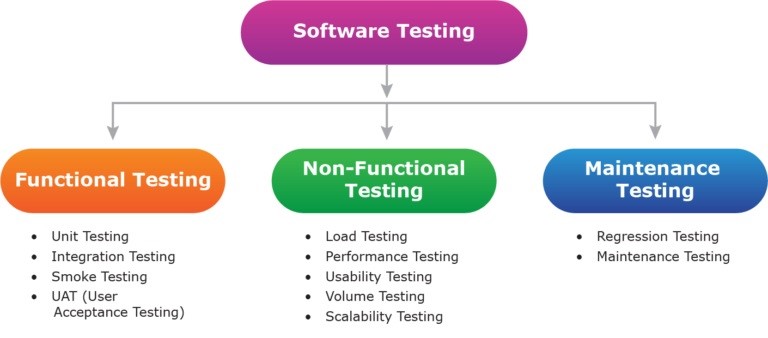
        Now based on your planning and analysis, allocate human and other resources for the testing. Decide the timing. Now before starting the test, consider the different methods used in Application testing as shown in the picture below.


        Here, for functional testing, jot down a few things like which OS you are using, various device platforms, networks, etc. And for Non-functional testing, select from various methods like Scalability testing, Performance Testing, Load testing etc.
      • Creation of test cases
        As we get near to actual testing, this is the primal necessity for testing. Here one should create test cases considering the planning done in earlier stages. A proper Document should be made which must include all the features and functions of the application. Also, the test cases should mention all the test cases of both functional testing and Non-functional testing. Usability testing, Performance testing, etc. Other than this, It should also contain remaining test cases like Memory usability, Battery consumption, Data, and Speed related details, etc.
      • Automated and Manual testing
        It’s not all on only you neither it is all on the technology. It’s a collaboration between Automatic and Manual Testing. Hence defining the roles of each becomes important. Make sure you made different test scripts for both aspects.
      • Test Case execution
        The time has arrived. This is the step where you actually do the testing. One can choose where he wants to execute the testing. On cloud, in physical devices, or using testing tools.
      • Reviewing Errors
        All the bugs found in the testing should be reported to the Application development team to clear them.
      • Documentation
        Make sure you note down all the bugs, errors, and other notes which you have found in the testing. This Documentation helps in reviewing the test and also for later tests.
      • Completion
        The Application has to be tested again and again to make sure the bugs have been cleared. Also, to assure that the removal of bug did not affect the coding of the present functionalities. As we know, whenever any new code is added or replaced in the application, the test has to be done again. Hence there is no such thing as completion of the test. But still, A test is considered as complete when the bugs are removed.

For more effective testing, here are some expert tips.

      • For Social media apps, Autonomous authentication is important.
      • The tester has to be good at designing and implementing Web 2.0 testing.
      • All-inclusive website testing should be carried out.

In conclusion, Social Media Applications are the of our times. To keep up and increase the tempo of the usage of these apps, it is quite essential to make sure they work better and are secure. So, test them out!

      • Namrata Shinde — Functional Testing Expert, VTEST

        Namrata is a Functional Testing Expert at VTEST with deep experience in mobile, UI, and end-to-end testing. She ensures every release is thoroughly validated and bulletproof before reaching end users.


    Focus on testing the business and the application will be tested automatically

    Focus on testing the business and the application will be tested automatically

    Over the years, I have observed that testers often tend to focus on testing the application without understanding the business of the application. To ensure that you are conducting comprehensive testing, testers should first understand and test the business of the application. If you are covering business level scenarios in your test coverage then you will have more confidence in your test coverage.

    For testing the business, a good approach is to put yourself in place of the actual users. At vTEST, we simulate actual business scenarios by assigning different types of roles to different testers. Let’s say for testing an e-commerce application, you could assign 1 Tester as the Buyer and 1 Tester as the Seller. Now, try to simulate the actions that a Buyer and Seller would perform in an actual business transaction. Simple tests are like (sample list only) –

    1. What is the Seller selling and how?

    2. What is the Buyer buying and how?

    3. Can Buyer and Seller perform the business transaction by violating any of the set processes?

    4. Is Buyer satisfied with the user experience while performing the purchase?

    5. Is Seller receiving all the monetary benefits once the transaction is successful?

    6. In the next round of testing, swap the roles of Tester 1, Tester 2 and their different experiences will lead to additional defects/ improvements/suggestions.

    Overall emphasis should be on testing the business by utilizing the application under test as a media for it. Remember that application under test is only an enabler to get the business done and is trying to replace the existing manual or otherwise activities. If any business activity is being performed offline then intention should be to include that in the application itself.

    As always, happy testing and let the quality improve day by day!

    Shak Hanjgikar — Founder & CEO, VTEST

    Shak has 17+ years of end-to-end software testing experience across the US, UK, and India. He founded VTEST and has built QA practices for enterprises across multiple domains, mentoring 100+ testers throughout his career.

    Ohh! vTEST treats its employees as animals?

    Ohh! vTEST treats its employees as animals?

    For those who got irked by the headline of this article – please hold on until you read the full article.

    At vTEST, we all are testers in different capacity, skill set, years of experience and loads of passion to test anything and everything. As testers, we ought to be aggressive, pursuant and make things right by pointing out the wrong in it. Sounds ok?.

    We want all testers (and to start with our Testomaniacs) to be FEARLESS like a Tiger. A fearless tester that will strive for quality to ensure that the best software is released on time. We need to train ourselves to be strong and powerful to not compromise on quality at all levels. Many a times, testers tend to agree with approach that is defined by non-testers or business folks. We need to be able to speak up and communicate our approach to publicist with all stakeholders rather than accepting any approach that will jeopardize the quality.

    This is a shout out to all testers to be FEARLESS, be willing to bring the change even if it means to question the set standards. Yes, we treat all vTEST Testomaniacs like FEARLESS Tigers = Animals (as per the title of this article) that will be relentless to build and implement best testing practices. Happy Testing!.

    Are you testing the software OR is the software testing you?

    Are you testing the software OR is the software testing you?

    The headline of this article poses a simple question that all testers should be asking themselves.

    Before starting to test an application, testers are required to gather complete information about multiple aspects such as technology stack, application architecture, hosting details, testing scope, testing process, types of testing to be conducted, tools to be used and so on. If testers lack any of these information then it makes their life miserable and adds unnecessary delays in the testing lifecycle. Often testers tend to jump into logging defects and consider that as the most important deliverable of testing. It’s important to understand that defects are essential however it is equally or highly important for testers to first understand the application under test and conduct detailed analysis before starting to test.

    Testers hence need to ask themselves on whether you are testing the software? OR is the software testing you?. A good and well prepared start will help each tester to organise their efforts in the most effective manner. A marathon runner also starts in a crouch position but only to push himself / herself ahead and bullet ahead to take best start. If we (testers) start to test without complete information then we are allowing ambiguity, incomplete understanding, uncertainty and improper utilisation of time to step-in to our process. In such cases, it’s the software that is testing you as we ignore to focus on the testing aspect and only follow what the software provides us with. The application under test drives us rather than the testers driving the test efforts and fully control on what and how to be tested.

    Bottomline is for testers to start only when they have invested enough time on analysis, information gathering and understanding of what needs to be tested. All the best.

    Shak Hanjgikar — Founder & CEO, VTEST

    Shak has 17+ years of end-to-end software testing experience across the US, UK, and India. He founded VTEST and has built QA practices for enterprises across multiple domains, mentoring 100+ testers throughout his career.

    Does your current testing services vendor provide you with enough value?

    Does your current testing services vendor provide you with enough value?

    Your testing services vendor should be hitting it out of the park on each and every project they work with you on.

    Unfortunately, many vendors in the software testing services space leave a lot to be desired. I have talked to hundreds of clients over the past 10 years as a senior consultant in the testing industry. Over that time, at least 1 out of every 2 clients has told me that they wish their vendor stepped up in several areas, including: a.) Their engagement (work harder to understand their business and unlock hidden technology value), b.) Their capability to innovate (drive new tools and processes into their service areas), c.) Their efficiency and effectiveness (in a measurable way), or d.) Their process improvement skills (including using metrics to improve testing while becoming less reactive/more proactive).

    Many clients I have talked to also have told me that if a better service provider comes along with these attributes, they will not only listen, but seriously consider switching.

    So what should you look for in a testing services provider? Here are a few key things to look out for:

    • Make sure your vendor is responsive to your needs and is able to communicate well while working collaboratively across your organization.
    • Make sure your vendor is transparent with the metrics that show how efficient and effective their testing services are. You shouldn’t have to ask your vendor for these metrics, they should be providing them regularly. And, they should tell you what they are doing to improve monthly (if not more often). They need to earn your business every day.
    • Make sure your vendor is helping you discover defects as early as possible in your project life-cycle. This requires effort up-front and good planning, and almost always requires effective test automation and test-ops to be in place. The sooner defects are found, the better for your bottom line.

    Related: Software Testing Outsourcing: 15 Points to Consider

    Shak Hanjgikar — Founder & CEO, VTEST

    Shak has 17+ years of end-to-end software testing experience across the US, UK, and India. He founded VTEST and has built QA practices for enterprises across multiple domains, mentoring 100+ testers throughout his career.

    Can ONLY Engineers become Software Testers? – NOOOO…

    Can ONLY Engineers become Software Testers? – NOOOO…

    Few days back, someone asked me whether we at vTEST recruit ONLY Engineers for our Software Testing positions. I said a big NO and that’s when I thought of penning down this.

    My thoughts –

    –         I have been strongly advocating that you need not be an engineer to become a successful software tester. It has been observed that MNCs, SMEs or even startups have been restricting only Engineers to apply for their software testing positions.

    –         In my 15+ years of software testing experience, I have interacted with 1000s of aspiring and budding software testers that come from varied educational backgrounds. In the US, I have met and admired few strong software testers that would have very different educational qualifications like Psychology, Arts, and Literature. Whatever their educational background, for me it is important that they can test and yes effectively.

    –         I have often had healthy debates with folks from MNCs that would be adamant to hire ONLY Engineers and pay them better than any Non-Engineer. I have strongly differed against this school of thought.

    My recommendations –

    –         I would highly recommend that salaries be decided as per the skill set of an individual as against the educational background. I have nothing against Engineers per say, I myself am an Engineer.

    –         The important fact to be considered is that we are hiring a skill set and not mere education. Again, I am definitely not against any educational degree but just holding a particular degree does not make you a better tester than others. It might help you get an entry to a job requirement that wants to hire engineers only but definitely not get the work done for you.

    –         In India, there are 1000s of students that are unable to pursue engineering due to a number of reasons other than academic skills like lack of funds, lack of support, family commitments, and geographical location and so on. But should they be deprived of building their careers too?, absolutely not.

    –         For specific testing requirements, you might need a distinct skill set that can be trained. If training needs to be provided to engineer and non-engineer and if both can grasp well then why not train a non-engineer?.

    –         The best way to determine is your interview and that’s the time to judge engineer vs a non-engineer. If a non-engineer can get the job done with the right attitude, aptitude, communication skill and other secondary skills required then why not hire a non-engineer?.

    What is vTEST?

    –         vTEST is a team of “testomaniacs” that are ardent about quality and YES we hire non-engineers too.

    –         We call our testers – testomaniacs as they love each bit of testing and are zealous to deliver best quality software.

    –         Our testomaniacs are passionate in each testing type and equally professional. At hiring, we conduct tough interviews to ensure that we have the right talent joining us. After joining, training is provided to upgrade different types of skill sets and eventually make them awesome testers that rock!.

    –         All testomaniacs are experts on different types of testing and take full ownership of application under test. 

    –         vTEST provides testing services through dedicated and on-demand channels to multiple clients in 24×7 operating model. 

    –         vTEST certifies each application tested and provides a digital certificate accompanied with detailed test summary reports.

    Please note this is no way a marketing gig for vTEST. For any criticism / thoughts, feel free to reach me at [email protected]. Happy Testing!.

    Shak Hanjgikar — Founder & CEO, VTEST

    Shak has 17+ years of end-to-end software testing experience across the US, UK, and India. He founded VTEST and has built QA practices for enterprises across multiple domains, mentoring 100+ testers throughout his career.

    Talk To QA Experts