Mobile App Testing: Meeting Modern Quality Demands

Mobile App Testing: Meeting Modern Quality Demands

Mobile applications are now the primary interface between businesses and their customers. With over 7 billion smartphones in use globally and users spending more than 4 hours per day on mobile apps, the quality of a mobile application directly determines business outcomes. A single crash, a slow checkout flow, or a broken permission request can translate to immediate uninstalls, negative reviews, and lost revenue. This guide covers everything QA teams and product organisations need to know about mobile app testing in 2026.

Why Mobile App Testing Is More Demanding Than Ever

Mobile testing has grown significantly more complex over the past four years. The reasons are structural:

  • Platform fragmentation: Android runs across thousands of device models from dozens of manufacturers, each with custom OS modifications. iOS is more controlled but introduces significant testing scope with each annual major release.
  • New device categories: Foldable phones (Samsung Galaxy Z Fold series, Google Pixel Fold) and large-screen Android tablets require applications to support dynamic layout changes and multi-window modes that conventional phone testing does not exercise.
  • New OS versions: iOS 18 and Android 15 (released in 2024) introduced changes to privacy permissions, background app processing limits, predictive back gestures, and API behaviours that broke existing apps and required explicit test coverage.
  • AI features in apps: On-device AI (Apple Intelligence, Google Gemini integration) introduces non-deterministic behaviour that conventional test automation cannot assert against with simple string matching.
  • 5G and connectivity variability: 5G availability is uneven globally. Apps must be tested under varying network conditions — from gigabit 5G to congested 4G to offline mode.

Types of Mobile App Testing

Functional Testing

Verifies that every feature of the application works as specified. This includes all user flows, form validations, navigation, error states, and edge cases. Functional testing covers both happy paths (expected user behaviour) and negative paths (invalid inputs, network errors, permission denials). For mobile, functional testing must account for OS-level interruptions: incoming calls, notifications, low battery warnings, and app switching.

UI and Usability Testing

Validates that the user interface renders correctly and that interactions feel natural on a touchscreen. This includes checking tap target sizes (minimum 44x44pt recommended by Apple, 48x48dp by Google), gesture handling (swipe, pinch-to-zoom, long press), screen orientation handling, and accessibility compliance (VoiceOver on iOS, TalkBack on Android). UI testing across different screen sizes and resolutions must be part of every release cycle.

Compatibility Testing

Ensures the application works correctly across the target device matrix. Given the enormous range of Android devices and the fragmentation of OS versions in active use, compatibility testing requires a strategic approach to device selection. Industry guidance suggests covering the OS versions that account for at least 90% of your user base. Cloud device farms (BrowserStack App Live, AWS Device Farm, LambdaTest Real Device Cloud) make this practical without maintaining a large physical device inventory.

Performance Testing

Measures how the application behaves under load and in constrained conditions: launch time, screen transition speed, memory usage, battery consumption, and behaviour under slow or intermittent network connections. Tools like Android Profiler, Xcode Instruments, and Firebase Performance Monitoring provide the telemetry needed for performance analysis. Specific targets vary by category — a banking app is expected to launch in under 2 seconds; a game may have different acceptable thresholds.

Security Testing

Mobile applications present distinct security risks: insecure data storage, inadequate transport layer security, improper session management, and platform permission over-provisioning. The OWASP Mobile Security Testing Guide (MSTG) and the Mobile Application Security Verification Standard (MASVS) are the definitive frameworks for mobile security testing. Every app handling user credentials, financial data, or personal health information must be tested against these standards before release and after significant updates.

Interrupt Testing

Tests how the application handles real-world interruptions during use: incoming calls, SMS messages, push notifications from other apps, system alerts (low battery, storage full), network drops, and device rotation. Interrupt testing frequently uncovers crashes and data loss bugs that functional testing under ideal conditions misses entirely.

Localisation and Internationalisation Testing

For applications serving global markets, localisation testing validates that translated text fits UI layouts (German and Arabic translations frequently overflow containers designed for English), date/time formats are correct, currency symbols display properly, and right-to-left language support (Arabic, Hebrew) works correctly throughout the application.

Mobile Test Automation in 2026

Manual testing alone cannot scale to cover the device matrix and regression scope required for modern mobile releases. Automation is essential, but mobile automation has historically been challenging — slow, brittle, and difficult to maintain. The tooling has improved significantly.

Appium

The dominant open-source cross-platform mobile automation framework. Appium 2.x introduced a plugin architecture that significantly improved flexibility and driver management. It supports iOS (via XCUITest driver) and Android (via UIAutomator2 driver) using a WebDriver-compatible API, making skills transferable from web automation. The main limitation is speed — Appium tests run slower than native instrumentation tests.

XCUITest (iOS Native)

Apple’s native UI testing framework for iOS. XCUITest tests run directly in the Xcode simulator and on physical devices, are maintained as part of the Xcode project, and run significantly faster than equivalent Appium tests. For teams with iOS-focused products, XCUITest is the preferred automation layer for regression coverage.

Espresso (Android Native)

Google’s native Android UI testing framework. Espresso tests are tightly integrated with the Android build system, run fast, and have first-class support in Android Studio. Like XCUITest, Espresso is the preferred choice for Android-specific automation over Appium where team capacity allows.

AI-Powered Mobile Testing Tools

A new generation of tools is addressing the maintenance and scaling challenges of mobile automation. Platforms like Waldo, Sofy, and Repeato use AI to generate and maintain test scripts from recordings of manual test sessions, automatically adapting to UI changes. These tools are particularly valuable for teams that need broad test coverage but lack the engineering resources to build and maintain large native automation suites.

iOS 18 and Android 15: What QA Teams Need to Know

iOS 18 Key Testing Impacts

  • Apple Intelligence: AI writing tools, photo clean-up, and summarisation features require testing of AI-powered UX elements. Apps that integrate Writing Tools or Siri enhancements must validate these integrations specifically.
  • Home Screen customisation: Users can now place app icons anywhere and tint them. Test that app icons remain recognisable under various tint configurations.
  • Control Centre customisation: Third-party controls added to Control Centre must function correctly and not conflict with app states.
  • Privacy permission updates: New granular controls for contacts access require apps to gracefully handle partial permission grants.

Android 15 Key Testing Impacts

  • Predictive Back Gesture: Android 15 makes the predictive back animation a requirement for apps targeting API level 35+. Back navigation must be explicitly handled and tested.
  • Edge-to-edge display enforcement: Apps must render content edge-to-edge and handle system bar insets correctly. Layouts not updated for this requirement will have UI overlap issues.
  • Health Connect integration: Apps using health data must test updated Health Connect APIs and the new permission model.
  • Large screen and foldable support: Google has strengthened quality guidelines for large-screen compatibility, making foldable and tablet testing more important for Play Store ranking.

Building a Mobile Testing Strategy

An effective mobile testing strategy balances coverage, speed, and resource efficiency. The key decisions:

  • Device matrix: Define the minimum viable device set based on your analytics. Cover the top OS versions by user base (typically the latest two major versions per platform), top device models by market share, and any device categories relevant to your audience (tablets, foldables).
  • Automation scope: Automate regression coverage for all critical user journeys. Reserve manual testing effort for exploratory testing, new feature validation, and device-specific edge cases.
  • Cloud vs physical devices: Cloud device farms for broad compatibility coverage; physical devices for performance profiling and hardware-specific features (camera, NFC, biometrics).
  • Shift-left: Run fast unit and integration tests in CI on every commit. Run UI automation on every pull request targeting critical paths. Run full device matrix compatibility testing before release.

How VTEST Approaches Mobile App Testing

Mobile testing is one of VTEST’s core specialisations. Our team combines manual exploratory testing expertise with automation capability across Appium, XCUITest, and Espresso, running against real device clouds for compatibility coverage. We test across the full quality spectrum — functional, performance, security, accessibility, and interrupt testing — and adapt our testing scope to match your release cadence. Whether you need a one-time pre-launch audit or a dedicated mobile testing engagement integrated into your sprint cycle, our team can deliver the coverage your users expect.

Further Reading

Related Guides

Namrata Shinde — Functional Testing Expert, VTEST

Namrata is a Functional Testing Expert at VTEST with deep experience in mobile, UI, and end-to-end testing. She ensures every release is thoroughly validated and bulletproof before reaching end users.

Mobile Game Testing: Usability and Functionality Testing

Mobile Game Testing: Usability and Functionality Testing

Have you ever wondered how games are tested before they are launched? Who tests them?

A compelling mobile game testing system prompts a hassle-free and responsive gaming force to end-users. The gaming business is skyrocketing because of continuous improvements in the utilization of mobile applications. It is impossible to illustrate a universal procedure for game testing. That is because each game is different in its way. For starters, aspects of Functionality and Usability of each game must be studied carefully.

Usability and Functionality testing are normal for testing a broad array of applications. Since the merging of gaming and mobile technology, what one needs is exceptional and concentrated testing.

In the context of mobile game testing, the above-mentioned aspects work like this:

1. Usability Tests

As we all know, human beings have many flaws. Some of us may have weak eyesight, some may have abnormally large fingers which always tap the wrong buttons. We might misunderstand a command or even pick the wrong interaction. These and many other glitches may be found by consistent application users of our game. The purpose behind game testing is to find them before they do.

We conduct the usability test to get an idea about the game’s ease of use, navigation flow, and most importantly, to gauge the user experience your game delivers. Therefore, we must ensure that only genuine mobile phones and emulators are used for testing. For instance, performance slowdowns are easy to uncover while using genuine devices. During the test, it checks interferences, the impact of the charger on general performance and use, and battery consumption.

To comprehend fully the extent of usability and enjoyment our game is offering, it is vital to test the game for its execution. This will make the user encounter either positive or negative. These points affect considerably the user experience and the user’s enjoyment level in general.

Apart from these, the fundamental purpose of testing Usability is to find out whether:

  • The buttons are set in a similar area of the screen to avoid confusion to the user.
  • The logical menus are not over-loaded, defeating the purpose of rapid utilization.
  • The app alerts the user whenever they begin downloading huge data which might hamper application execution.
  • The approval for tapping the zoom-in and zoom-out features is equipped.
  • The app gives a strategy for undoing an action, in an adequate time, on the happening or non-happening of an event (Ex. Entering the wrong door)

The purpose of playing a game is fun. Consequently, gamers rely upon your games for entertainment, along with exceptional user experience.Evaluating the fun-factors requires some aesthetic imagination and critical thinking. Fun is conveyed just if every other part of the game cooperates accurately, and it requires a great effort to achieve. Higher the difficulty, the higher the satisfaction, as is the case of most things in our life.

Thus, usability testing validates the effort and time needed to accomplish a specified activity and finds out easily neglected mistakes. It includes user viewpoint testing, end-user interface testing, and user documentation testing.

2. Functional Tests

Functional Testing is the most well-known type of game testing. Functional testing implies playing games to discover bugs.If done manually, it requires playing the game while the testing is ongoing.It decides if the application is working as originally intended.

In some cases, automation is the right choice in a few domains of functional testing. To set up a test automation system, you should be able to comprehend your mobile application’s code. Automated functional testing for mobile games can reveal issues identified with UI and graphics, game mechanism, integration of graphics resources, and resistance.

It’s a complex testing strategy classified black box testing procedure. It sets aside more time to execute as analyzers search for graphics issues, gameplay problems, audio-visual issues, and so on. You have to get confirmations about the ease of installation, the application running in limited mode, whether the application permits social media choices, supports payment portals, among other things.

The most crucial test situations in functional testing can be considered to check whether:

  • All the required fields are functioning as intended.
  • The app goes into a minimized form if the user has an incoming call.
  • The mobile can perform the prerequisite multitasking whenever required.
  • The installed app does not preclude other apps from performing thoroughly, and it does not feed into the memory of alternate apps.
  • The navigation between significant modules in the app is as per the requirements.
  • Perform Regression Testing to reveal new programming bugs in existing zones of a framework after changes have been made to them. Additionally, rerun earlier performed tests to confirm that the program manner hasn’t changed because of the changes.

While functional testing is dependably a fundamental action in mobile game testing strategy, the actual difference between an extraordinary mobile game and any other mobile game is the importance given to the one of a kind characteristics and requirements of a mobile environment. End to end functional testing comprising of linear and non-linear action for your game should be done to guarantee that the gameplay is free of bugs and uniform with your planned design.

Characteristics of an Immersive Game

  • A complex, intriguing plot
  • Realistic graphics (including backgrounds, characters, and hardware) and sounds
  • Random plays to keep the player intrigued
  • Few known actualities to instruct the player
  • Facilitating players to play as a team if it’s a multi-player game

Conclusion

In today’s world, any product/service is ultimately judged by the user experience it delivers. It is even more true for games. A successful game is defined by how immersive it is. Game development is not just a great design and its implementation. The game designer’s part becomes dependent upon the prerequisites and proposals provided by the game tester. The game tester’s responsibilities are mostly divided into two parts:

1) identification and reporting of the game deformities. 2) assisting with analyzing and verifying.

How VTEST can help?

At VTEST, we have a team of enthusiastic and gifted game testers, who take pride in their work. We also have an excellent infrastructure for game testing. You’ve created a great game, now it’s our responsibility to make it even greater.

VTEST it!

Namrata Shinde — Functional Testing Expert, VTEST

Namrata is a Functional Testing Expert at VTEST with deep experience in mobile, UI, and end-to-end testing. She ensures every release is thoroughly validated and bulletproof before reaching end users.


Related: Mobile App Testing: The Need of the Hour

Blockchain Application Testing: 5 Things to Look Into

Blockchain Application Testing: 5 Things to Look Into

Blockchain testing has matured considerably since the early days of simple cryptocurrency transaction validation. The rise of DeFi (decentralised finance), NFT platforms, Web3 applications, and enterprise blockchain implementations has created a complex, high-stakes testing discipline where errors are often irreversible and the financial consequences of bugs can run to millions of dollars. This post covers the current state of blockchain application testing in 2026 — what has changed, what remains uniquely challenging, and the five areas every blockchain testing programme must address.

The Blockchain Testing Landscape in 2026

The blockchain ecosystem has differentiated significantly since 2020. The major segments requiring distinct testing approaches:

  • DeFi protocols: Decentralised exchanges, lending platforms, yield farming, and staking protocols built primarily on Ethereum, Solana, and Layer 2 networks (Arbitrum, Optimism, Base)
  • Web3 applications: Browser-based dApps (decentralised applications) with wallet integration (MetaMask, WalletConnect, Coinbase Wallet) and on-chain interactions
  • NFT platforms: Minting, trading, and royalty distribution for non-fungible tokens — including the ERC-721 and ERC-1155 standards and their cross-chain variants
  • Enterprise blockchain: Permissioned blockchain implementations using Hyperledger Fabric, Corda, and Quorum for supply chain, trade finance, and identity management use cases
  • Cross-chain applications: Bridges and interoperability protocols enabling asset and data movement between different blockchains — one of the highest-risk areas in the ecosystem

1. Smart Contract Testing

Smart contracts are the most critical testing target in the blockchain space. These self-executing programs run on the blockchain, handle real financial value, and once deployed, cannot be patched in the traditional sense — upgrading a contract requires a migration process or proxy pattern that itself introduces risk. The cost of smart contract bugs ranges from inconvenient (failed transactions) to catastrophic (complete fund loss).

Unit and Integration Testing

Smart contract unit testing uses frameworks like Hardhat (JavaScript/TypeScript), Foundry (Solidity-native, fast), or Truffle to test individual contract functions in isolation. Each function should be tested for: correct output under valid inputs, reversion under invalid inputs, correct event emission, access control enforcement (only authorised callers can invoke privileged functions), and boundary conditions (maximum values, zero amounts, empty arrays).

Integration testing verifies that contracts interact correctly when composed — a common source of bugs in DeFi protocols where multiple contracts interact in complex sequences.

Fuzzing and Property-Based Testing

Foundry’s built-in fuzzer and tools like Echidna automatically generate thousands of random inputs to find edge cases that manually written test cases miss. Property-based testing defines invariants — conditions that should always hold true regardless of inputs — and verifies them across a vast input space. For DeFi protocols, invariants like “total deposits always equals total withdrawals plus current balance” catch accounting errors that are invisible to unit tests.

Common Smart Contract Vulnerabilities to Test

  • Reentrancy: An external call to an untrusted contract that allows it to call back into the original contract before the first execution is complete. The original DAO hack (2016) and many subsequent exploits used this pattern. Test that state changes occur before external calls.
  • Integer overflow/underflow: Solidity 0.8+ includes built-in overflow protection, but contracts using older versions or unchecked arithmetic blocks remain vulnerable.
  • Oracle manipulation: DeFi contracts that rely on on-chain price oracles (Uniswap TWAP, Chainlink) can be manipulated through flash loan attacks. Test that oracle price feeds cannot be manipulated within a single transaction.
  • Access control failures: Functions that should be restricted to the contract owner or specific roles are accidentally left public. Test all privileged functions for correct access control enforcement.
  • Flash loan attack vectors: Test DeFi protocols under scenarios where an attacker can borrow unlimited capital within a single transaction to manipulate prices or drain liquidity.

2. Security Auditing

For any smart contract handling significant value, a formal security audit by an independent security firm is essential before mainnet deployment. Security auditors (Trail of Bits, OpenZeppelin, Consensys Diligence, Sherlock) conduct manual code review, automated analysis using Slither and MythX, and economic attack modelling specific to the protocol design. Audit findings are categorised by severity and must be addressed before deployment.

Audits are not a one-time activity. Any significant contract upgrade, new feature, or integration with a new protocol should trigger a scoped re-audit of the changed code.

3. Web3 Frontend and Wallet Integration Testing

The frontend of a Web3 application presents testing challenges distinct from traditional web testing:

  • Wallet connection: Test connection, disconnection, and reconnection flows across major wallets (MetaMask, WalletConnect, Coinbase Wallet). Test behaviour when the user switches networks, switches accounts, or revokes the application’s permission.
  • Transaction signing flows: Test that transaction parameters displayed in the wallet confirmation prompt match what the application is actually submitting. Test user rejection of transactions (the application must handle rejection gracefully without crashing).
  • Network compatibility: Applications supporting multiple chains (Ethereum mainnet, Polygon, Arbitrum, Base) must be tested on each supported network — contract addresses, gas estimation, and RPC behaviour vary by chain.
  • Error handling: Test all blockchain error states: insufficient gas, transaction reverted, network congestion, RPC endpoint failure. Users must receive clear, actionable error messages rather than raw hex error codes.
  • Gas estimation accuracy: Verify that gas estimates provided to users are accurate and that the application handles gas price spikes gracefully.

4. Performance and Network Conditions Testing

Blockchain applications have performance characteristics unlike traditional web applications. Transactions have confirmation times measured in seconds to minutes depending on the network and congestion level. Testing must account for:

  • Transaction confirmation waiting: The application must correctly display pending states during the confirmation period and handle the eventual confirmation or failure
  • Network congestion scenarios: Test behaviour when gas prices spike and transactions are stuck in the mempool for extended periods
  • Layer 2 and bridge delays: Cross-chain bridges have multi-hour finality windows. Applications must manage long-duration pending states correctly
  • Testnet vs mainnet differences: Testnets (Sepolia, Holesky for Ethereum) behave differently from mainnet in terms of gas costs, finality, and available liquidity. Testnet testing is necessary but not sufficient — pre-mainnet staging on a fork of mainnet provides more realistic conditions

5. Cross-Chain and Interoperability Testing

Cross-chain applications — bridges, multichain protocols, cross-chain messaging systems — are the highest-risk category in blockchain development. The majority of the largest DeFi exploits in 2022–2024 targeted bridge contracts, resulting in billions of dollars in losses. Cross-chain testing must address:

  • Message passing correctness — that the payload sent on the source chain matches what is executed on the destination chain
  • Replay attack prevention — that messages cannot be replayed on the destination chain after successful execution
  • Failure handling — that failed messages on the destination chain can be identified and handled, and that the source chain is notified correctly
  • Validator/relayer failure scenarios — testing behaviour when bridge validators or relayers go offline mid-transfer

Testing Tools for Blockchain Applications

  • Hardhat: JavaScript/TypeScript development environment with built-in local blockchain, testing utilities, and mainnet forking capability for realistic DeFi testing
  • Foundry: Solidity-native testing framework with the fastest test execution, built-in fuzzer, and excellent debugging tools. The current preference for security-conscious teams
  • Slither: Static analysis tool for Solidity — detects common vulnerability patterns automatically
  • MythX / Mythril: Symbolic execution-based security analysis for smart contracts
  • Tenderly: Transaction simulation, monitoring, and debugging platform — valuable for both testing and production incident analysis
  • Cypress/Playwright with Synpress: Synpress extends Playwright/Cypress with MetaMask automation support for Web3 frontend testing

VTEST’s Approach to Blockchain Testing

Blockchain application testing requires a combination of smart contract expertise, Web3 frontend automation capability, and security testing depth that few generalist QA teams possess. VTEST works with blockchain development teams to design and execute testing programmes covering all five areas described in this post — from smart contract unit testing and fuzzing through Web3 frontend automation and security review. If you are building or maintaining a blockchain application and want independent quality validation, get in touch to discuss what’s needed.

Akbar Shaikh — CTO, VTEST

Akbar is the CTO at VTEST and an AI evangelist driving the integration of intelligent technologies into software quality assurance. He architects AI-powered testing solutions for enterprise clients worldwide.


Unit Testing Tutorial: 5 Best Practices

Unit Testing Tutorial: 5 Best Practices

In software testing, Micro testing techniques should be given as much attention as the Macro manifestos. Unit testing is one of the prominent processes of Micromanagement in testing.

In this article, we will learn about some good practices to apply while performing the unit testing. Writing a good and efficient unit test code is an important task in the whole testing process. For that, first, we need to understand what is ‘Unit testing’.

In essence, the Unit testing is performed on smaller units of the whole system to check the performance of the whole system. The integration of each code with the whole architecture is tested.

Now, let’s try to define Unit testing and see the best pointers to consider while performing it.

What is Unit Testing?

Definition: The verification of the behavior of every component of the software, covering all the functionalities of the software. It consists of 3 parts:


  • Initialization:


    • A small part of the software in question is started. The software/application is called the System Under Test (SUT).


  • Stimulus:


After starting it, an incentive or a kind of stimulus is given to the software. A method which is containing the code of functionality testing is invoked while doing this.


  • Result:


In the third step, the result arrives. The comparison of expected and actual results should be done here. If verified, you are good to go. If not, the real error in the SUT should be detected and corrected.

Writing Unit Tests: 5 perks to write them good


  • Isolation of tests


As indicated by the name, every test case should be independent of the other. One can decide the sorting technique as it suits him/her but the clusters should be made and test cases should be defined separately as it helps the process.

If not happened in an above-mentioned way, the behavior of any case affects other cases. Don’t put in redundant assertions. The assertions should match with the certain behavior of the application and should be run in isolation.

This step should cover multiplication functionality assertions.


  • High Speed


The method doesn’t work if the tests are performed at a slow pace as they are designed to be performed multiple times to make sure all the errors are eliminated. If performed at a slow pace, the overall time of execution will increase.

Here,Using stream concept is a good idea. By using the stream concept, one can exponentially increase the speed of the whole execution process.


  • High Readability


Readability is always a necessary criterion for unit testing. A unit test should be clear and concise. It should precisely state the status of the test at any point in time.

One should quickly get what the test is trying to convey. Complex wording and use of difficult phrases is the last thing you need for writing test code. Readability should always be a priority while writing a test.

A proper name should be given to a given test case. Also, every small variable should be named properly. It should be logical and easy in wording. It should show the functionality and operation of the test.


  • Good Test Designs


Just because they are test designs, doesn’t mean that they should be given secondary preference. The test designs of unit tests should be drafted with the same intensity as the production tests. A good framework should be applied while doing this.

The coupling between production code and test code should be low. The dead code should be eliminated to increase efficiency. Memory should be carried and managed efficiently with time. The maintenance and re-factoring become smooth later if you have a good codebase.


  • High Reliability


The unit testing should be highly reliable and should be clear in what commands they are stating in the writeup.

Many a time, such scenarios are encountered by developers where the test fails even in the absence of any error/bug in the software. Sometimes, a certain unit case works fine when running individually but fails to deliver the expected outcome when integrated with the whole architecture.

This happens when there is a design flaw present in the system. Make sure the technical side of the process is strong and reliable.

Conclusion

These were the 5 tips from us to write and perform a good unit testing. By following these practices you will be able to execute the process of unit testing more finely. This will also help you in maintaining the code in the later part of the process.

Just by considering these 5 tricks, you will experience a radical shift in the execution time. It will ultimately lessen the cost of the process and thus giving out an optimum and efficient way to execute unit testing.

How can VTEST help

Here at VTEST, we focus on micromanagement as much as we do on the bigger things. Unit testing needs detailed knowledge as well as the attention of the testing team. Our team is filled with professionals in the testing field with expertise in both, Micro and Macro testing.

The testing team at VTEST is technically sound with a good managerial sense. VTEST it!

Vikram Sanap — Test Automation Expert, VTEST

Vikram is a Test Automation Expert at VTEST with deep expertise across multiple automation tools and frameworks. He specialises in transforming manual workflows into efficient, reliable automated test suites.


Related: Software Testing: A Handbook for Beginners

Mobile App Testing: Android vs iOS

Mobile App Testing: Android vs iOS

The Android vs iOS debate has evolved significantly since this post was first published. Both platforms have matured, converged on many capabilities, and diverged again in others. For QA teams responsible for mobile application quality across both platforms, understanding the meaningful testing differences between Android and iOS is essential — not as an academic exercise but as a practical guide to where testing effort should be concentrated and why. This post compares the two platforms across the dimensions that matter most to mobile testing in 2026.

Platform Overview: Where Each Stands in 2026

Android 15

Android 15 continues Google’s focus on large-screen and foldable device support, edge-to-edge display enforcement, and predictive back gesture requirements. Android’s open ecosystem means it runs across thousands of device models from dozens of manufacturers — Samsung, Google, OnePlus, Xiaomi, and more — each with custom UI overlays, pre-installed applications, and hardware configurations. Android has approximately 72% global mobile OS market share but iOS dominates in North America, Western Europe, Japan, and Australia — the highest-value markets for most commercial applications.

iOS 18

iOS 18 introduces Apple Intelligence — a suite of on-device AI features covering Writing Tools, image generation, Siri enhancements, and notification summarisation. iOS runs exclusively on Apple hardware, which means the device matrix is comparatively small and well-defined. Apple’s annual OS adoption rate is much faster than Android’s — typically over 70% adoption within a few months of release — meaning new iOS version testing is urgent in a way that new Android version testing often is not for consumer apps targeting Android’s fragmented installed base.

Key Testing Differences: Android vs iOS

Device and OS Fragmentation

Android: The most significant challenge. Android 13, 14, and 15 are all in active use simultaneously, with different manufacturers shipping different OS versions on different hardware tiers. A layout that renders correctly on a Samsung Galaxy S25 may overflow on a budget Xiaomi device with a non-standard screen aspect ratio. Testing must cover representative device/OS combinations, not just the latest flagship hardware. Cloud device farms (BrowserStack, AWS Device Farm, LambdaTest) are essential for practical Android compatibility testing.

iOS: Comparatively manageable. Apple supports the current and previous two major versions in practice, and the device hardware range — while broader than before with the addition of iPad models and different iPhone size tiers — is well-defined. Testing across iPhone 15/16 series and current iPad models covers the vast majority of the active iOS user base.

App Distribution and Review

Android: Google Play review is faster and more automated than Apple’s. Side-loading APKs directly to test devices requires only enabling a developer setting, making test builds easy to distribute. Android also supports multiple app stores, which is relevant for applications distributed through enterprise MDM channels or regional app stores.

iOS: Apple’s App Store review is more stringent and slower, requiring explicit consideration in release planning. TestFlight is Apple’s official beta distribution mechanism and is well-integrated with Xcode and App Store Connect. Direct device installation (outside TestFlight) requires developer certificates and explicit device registration, adding friction to test build distribution.

Automation Frameworks

Android: Espresso (Google’s native framework, fast, tightly integrated with Android Studio), UIAutomator2 (for cross-app and system UI interactions), and Appium with UIAutomator2 driver for cross-platform approaches. Espresso is the recommended choice for Android-specific automation.

iOS: XCUITest (Apple’s native framework, fast, integrated with Xcode), Swift Testing (new in Xcode 16 for unit/integration tests), and Appium with XCUITest driver for cross-platform. XCUITest is the recommended choice for iOS-specific automation.

Cross-platform: Appium 2.x covers both platforms through a unified WebDriver API. WebdriverIO, Detox (React Native), and WDIO are popular client frameworks. Cross-platform automation sacrifices some speed and native integration for the productivity benefit of a shared codebase.

Permission Models

Android: Runtime permissions (introduced in Android 6) require applications to request permissions at the point of use. Android 13+ granularised media permissions (separate permissions for photos, videos, audio). Android 14+ introduced selected photo access (users can grant access to specific photos rather than the full gallery). Each permission model change requires updated test cases for grant, denial, and partial-grant scenarios.

iOS: iOS has historically had the more privacy-restrictive permission model. iOS 18 adds granular contacts access (grant per-contact rather than full access). Testing must cover all permission states: not determined, granted, denied, and the new partial-grant states introduced in recent OS versions. UI automation for permission dialogs requires careful handling since system dialogs are outside the application’s accessibility tree.

Background Processing

Android: Historically more permissive about background processing. Android 15 continues the trend of restricting background activity to reduce battery drain, but the restrictions are less aggressive than iOS. Background location, background data sync, and push notification delivery are generally more reliable on Android than iOS.

iOS: iOS applies strict limits to background execution. Applications are suspended after a short period in the background and are subject to memory pressure kills. Testing background behaviour — push notification handling, background refresh, location updates — requires specific test scenarios that trigger these OS-level controls, not just happy-path foreground testing.

UI and Design Language

Android: Material Design 3 (Material You) with dynamic colour theming based on the user’s wallpaper. Applications that adopt Material You correctly adapt their colour palette to user preferences. Test that the application’s visual design remains coherent across different Material You colour schemes.

iOS: Human Interface Guidelines with SF Symbols, Dynamic Type, and Dark Mode. Applications must be tested across Light and Dark modes, across Dynamic Type size settings (accessibility font sizes can expand UI elements significantly), and with SF Symbol rendering at different display scales.

Foldable and Large Screen Support

Android: Samsung Galaxy Z Fold series and Google Pixel Fold have driven Android’s foldable ecosystem. Android 15 and Google’s large-screen quality guidelines make foldable and tablet support an explicit requirement for applications targeting broader Android distribution. Testing must cover unfolded/folded transitions, multi-window mode, and drag-and-drop interactions.

iOS: iPadOS on iPad Pro and iPad Air provides Apple’s large-screen experience. Stage Manager (multi-window on iPadOS) requires applications to support flexible window sizing. If the application has an iPad target, multitasking scenarios must be in the test matrix.

Testing Strategy: Parallel vs Sequential

Organisations frequently ask whether to test Android and iOS in parallel or to complete one platform before starting the other. The answer depends on team structure and timeline, but the general guidance is:

  • Run platform-agnostic functional tests from a shared test case repository against both platforms simultaneously where team capacity allows
  • Platform-specific scenarios (permission handling, hardware features, UI conventions) should be tested by engineers with platform expertise
  • Prioritise iOS first if your target market is North America, UK, or Australia (iOS-dominant markets); prioritise Android first for South and Southeast Asia, Latin America, and Africa
  • For applications with equal priority on both platforms, ensure coverage parity — don’t systematically deprioritise one platform’s test depth against the other

VTEST’s Mobile Testing Across Both Platforms

VTEST has extensive experience testing applications across Android and iOS, with dedicated expertise in both native automation frameworks and cross-platform Appium-based approaches. Our mobile team stays current with each major OS release, maintaining updated test suites and regression coverage for platform-level changes before they reach client applications. Whether you need platform-specific expertise or a unified cross-platform testing approach, we can build the coverage model that fits your product and audience.

Namrata Shinde — Functional Testing Expert, VTEST

Namrata is a Functional Testing Expert at VTEST with deep experience in mobile, UI, and end-to-end testing. She ensures every release is thoroughly validated and bulletproof before reaching end users.


Related: Mobile App Testing: The Need of the Hour

Definition, Importance, and Methodology of a Good Bug Report

Definition, Importance, and Methodology of a Good Bug Report

In the vigorous process of testing software, if one doesn’t work with proper planning and efficient shortcuts, the whole thing can be chaotic. Reporting the bugs and errors found after the execution of the test is one of the crucial steps in the whole process. Communication wise it is one of the prominent parts of the process.

The correction of the bugs by the developers solely depends on the way the bugs are reported in the bug report. The report needs to be concise and should convey the information effectively.

Here, we discuss all the elements of creating an effective Bug report.

Defining Bug and Bug Report

A Bug in software is an error in code due to which an unexpected effect takes place in the behavior of the software.

Most bugs arise from mistakes and errors made in either a program’s design or its source code, or in components and operating systems used by such programs. While some are caused by compilers producing incorrect code.

The testing team detects these bugs and reports it to the developers’ team to take corrective measures. This reporting is done by a document called a Bug report.

The bug report is a document produced by a tester for a developer which consists of the information related to the bug in question and necessary steps and data about the reproduction of the bug.

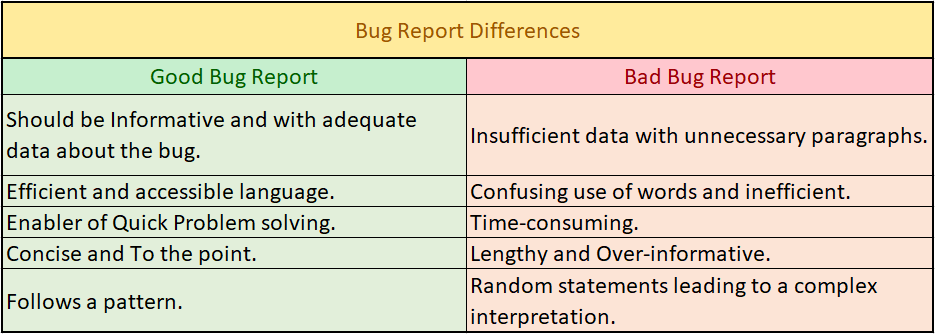
Difference between a Good Bug Report and Bad Bug Report

To make it easy for you, we created a concise table to understand what are the differences between a good bug report and a bad one.

Bug report

Good Bug Report: Pointers

Every bug report might have its conditions but some factors are to be considered while writing a good bug report. Below are some aspects of it which can be included in it.

    • Reporter: Your name and email.


  • Product:


    • Name of the application in which you found this bug.


  • Version:


    • Version of the application if any.


  • Components:


    • Components of the application.


  • Platform:


    • Name of the platform in which you found this bug, such as PC or Mac.


  • Operating System:


    • Operating system in which you found this bug such as Windows, Mac OS, or Linux.


  • Priority:


    • This state how important the bug is and how urgent the bug should be fixed. You can do it by assigning values like #P1 to #P5. With ascending from most important to less.


  • Severity:


    The effect of the bug in the application. What the bug is doing to the application and when and how is it affecting. There are different ways in which it can happen,
    • Blocker: Restricting for further testing
    • Critical: crashing of application
    • Major and Minor: loss of functions
    • Trivial: Needs UI improvement
    • Enhancement: Need a new or addition of a feature


  • Status:


    • The status of the bug. In the process, verified or fixed.


  • Assign To:


    • Information about the developer who was accountable for the bug in question. If you don’t know this, Specify the email address of the manager.


  • URL:


    • URL of the particular bug found in the application.


  • Summary:


    • A summary of the report is not more than 70 words. Add:
      • Reproduction Steps: Precise steps to reproduce the bug.
      • Expected Result: The expected result of the application.
      • Actual Result: Actual result obtained while testing.


  • Report Types:


    This is an optional mention.Various types of reports can be mentioned like Coding error, design error or documentation issue, etc.

Bug Report: Important features

Some of the prominent features of the bug report are listed below. Make sure to add these to your report.


  • Bug ID:


    • To make it more accessible, you can assign a number to each of the bugs which will be unique of its own. By doing this you can easily check on the status of the bug anytime, anywhere.


  • Bug Title:


    • Giving a title to the bug can help easily guess what the bug is about. A keyword of sorts. It should be concise, easy to understand, and relatable. The developer should quickly catch up on it and it should smoothly convey the crux of the bug.


  • Environment:


    • It should be mentioned that in which environment the bug is found by the tester. It saves a lot of work of the developers and makes it easy for them to access the bug and solve it in the respective environment and/or platform.


  • Description:


    • This is the main part. All the information about the bug should be included in the description. This should be precise and informative and not confusing.It is a good habit if you report every bug separately as the confusion gets lessened.


  • Steps of Reproduction:


    • Accurate information about the bug and the proper steps about how to reproduce the bug should be mentioned here. This information is helpful to the developing team. Every step should be precisely specified in this section.


  • Proof:


    Some sort of proof or demo should be given in the report that should prove the developers that the bug you mentioned is valid and real. Taking a screenshot or recording the screen might be helpful.

Tips

Write the bug report as soon as you find the bug. Don’t procrastinate as you might forget things later.

  • Reproduce the bug yourself 3 to 4 times. This will help in writing the reproduction steps and the bug will get confirmed.
  • Write a good bug summary in the bug report. This way the developer can easily understand the bug and can work on it.
  • Proofread your bug and remove unnecessary information.
  • Do not criticize the developer for creating the bug and do not feel powerful upon finding it in the first place. It is not healthy.

We hope this blog helped you in some or the other way. You must write a fine bug report to enhance the whole process of software development and testing. As a tester, it is your responsibility to make the effort to convey the bug report suitably.

How can VTEST help

VTEST works efficiently and precisely towards the fineness of the application. For the test to get success without any obstacle, our testing team works in a way that is communicative, smooth, and easy to understand by all the members working on the project.

Good communication and fine grip over the language are the necessities to produce a good bug report. VTEST provides both of these qualities in a diligent manner.

Don’t just Test, Let’s VTEST

Namrata Shinde — Functional Testing Expert, VTEST

Namrata is a Functional Testing Expert at VTEST with deep experience in mobile, UI, and end-to-end testing. She ensures every release is thoroughly validated and bulletproof before reaching end users.


Related: Software Testing: A Handbook for Beginners

GUI Testing Tutorial for Software Testers

GUI Testing Tutorial for Software Testers

GUI testing: The look test of your software

Before starting with the main subject of the article, first, we need to understand what is the meaning of GUI.

Graphical User Interface

The tech devices we use in our everyday life like Mobile, PC, Tablet, etc. have an element which is common in all the devices but still has a unique touch for each device. It is the things we see on screen. The Homepage of the App you use, your messaging window, Wallpaper, etc. Anything and Everything on the screen. Commonly known as the User Interface. The graphical elements that are seen on screen which enable us to use and indirectly communicate with technology at our hands. It is also called as ‘Graphical User Interface’ i.e. GUI.

GUI Testing

Now, what do we mean when we say GUI testing? In GUI testing, the Interface of the software is tested. It is made sure that it is smooth and seamless in usability. The source code is not visible in this process. The primary playing factors here are the images, Spellings, Design patterns, Alignments, Look and feel and the layout of the UI.

Need for testing GUI

When any user will use your application, the first thing she/he is going to experience is the Interface. It is the first impression and the accessibility provider of the software. If the user experiences any glitch in this first look, he/she will get disappointed by the application. This leads to a decrease in the installation as the market grows on mouth publicity. One bad review and you are done.

To avoid this, GUI testing is necessary. One has to step into the shoes of the user to understand this. The software has to generate interest in the user and therefore has to look fine and give a smooth experience to the user at first glance to keep him/her involved with the app.

UI Test Cases: Factors to be considered

In the GUI testing process, multiple elements are to be considered in the test cases. You don’t want to miss any small element which will cause a minor glitch later while using the app. We made a list for you to check.

  • Relative Position, Height,Size, and Width of the itemson the screen
  • Display of Error Messages. Their color, font, etc. Generally, Red color is used to indicate Errors
  • Readability and Consistencyof the overall application’s text features
  • Verifying Zoom-In, Zoom-Out workability, Same screen with varying resolutions like 640 x 480, 600×800, etc.
  • Color codes for different texts like Hyperlink, error/warning message, etc.
  • Image Quality
  • Language specifications like Grammar, Spellings, and Punctuations
  • Scrollbars
  • Verification of disabled fields
  • Image Size

The basic work here is to make the app look good. The appearance and interface of the app should be smooth and sensible. Users should stay on the app on a longterm basis. Good layout and Design sense is required for this to work.Sometimes the tester even needs to think creatively and take decisions to test the UI of the software by using methods other than the defined test case protocol.

Approaches

There are 2 basic testing approaches to GUI testing.

Manual Testing

This is the common method used by the testing community. As stated in the name, here, everything works manually. The tester is supposed to use the app and experience it as a user would. Step by step using all the software to detect bugs and even to make improvements and suggestions in the existing Interface.

For obvious reasons, this method takes time and the authenticity of the testing is purely based on how creative and sharp the tester is. Afterall, it’s a human method.

Automation Testing

As we all know by now, the testing process can’t be fully done manually and neither fully automatically. The balance should be achieved. So, where to automate the process?

The cases which include manual actions other than the look likeData Entry,Navigations, etc. can be automated. TestComplete, Squish, AutoIT, Silk Test are some of the tools used for this. These tools imitate the user experience which can be used multiple times in the testing process by playing again and again. Technical knowledge of scripting is required for these tools to work.

Challenges

The whole process sounds very easy but there are some challenges involved.

  • The number of test cases can exceed then your expectations. It consumes more time hence can be exhaustive.
  • As far as the quality is concerned, it depends on the tester’s skillset.
  • Automation tools available in the market are limited.
  • Usually, when the testing process starts, the GUI is unstable and hence the testers prefer to test it later in the process. It can give less time to test the GUI properly.
  • It is an overall less prioritized aspect then Functional aspects when it comes to testing.

Conclusion

As we discussed earlier, GUI’s impression on the users should be like love at first sight. It is what is apparent about the software to the users. This appearance should be well tested and designed to be likable and accessible by the mass quantity of the users.

Most of the success and reach of the application depends on the GUI. The tester should think like a user to nail the GUI testing process as it is ultimately being designed and tested for the users. As they say, Consumer is God.

How can VTEST help

Equipped to execute both, Manual and Automated testing in the most efficient ways, VTEST provides the most creative and technically sound testers for testing GUIs.

We understand the need for a GUI to be good and engaging and work tirelessly towards achieving the best test results and even improving the software appearance for our clients’ success. Go through the tips mentioned above and don’t hesitate to contact us for any guidance or collaboration you need in your software’s journey.

VTEST it!


Namrata Shinde — Functional Testing Expert, VTEST

Namrata is a Functional Testing Expert at VTEST with deep experience in mobile, UI, and end-to-end testing. She ensures every release is thoroughly validated and bulletproof before reaching end users.

Creation of a Test Plan: 8 Steps Rulebook

Creation of a Test Plan: 8 Steps Rulebook

In the Software development process, the software can never be said as a fully developed output. A constant process of developing and testing newer versions and updates is a must for delivering a fine product.

After the primary development, software and applications need to test vigorously to detect bugs and sendthem again to the developers’ team to correct the code. Before releasing the product in the market, this happens several times.

To go through the above-mentioned process smoothly and efficiently, Drafting of Test plans is a necessary step taken by the testing team. It is a go-to guide of the test consisting of the objective, resources, estimation, schedule, and strategy of the test to be conducted.

It is an outline of the activities to be conducted while performing a test. It requires timely supervision and control of the testing team.

It is generally written by a member of the testing team who has a managerial sense. He/she needs to have full knowledge of the functionality of the system. The test cases are then submitted to seniors for review.

Significance

Let’s see why drafting a test plan is important.

It helps the team to understand and decide the variables involved in the process and anticipate the efforts required to authenticate the system. It also helps in executing a qualitative analysis of the software under different tests.

The document helps other developers and business managers to gain knowledge about the details of the tests.

It serves as a manual that leads testers throughout the process and allows them to follow the standards. The team can later review and use the plan again for scope, test estimation, test strategy, etc.

Now to the main part. How? Let’s see how to create a test plan for testing an application. Below are the 8 steps,

  1. Product Analysis
  2. Strategy Design
  3. Interpretation of the test objectives
  4. Outlining test criteria
  5. Resource Planning
  6. Defining test Environment
  7. Estimation and Scheduling
  8. Governing test deliverables

1. Product Analysis

For creating a test plan, first, one needs to know all about the product he/she is testing. A proper study of requirements and analysis of the system is the first step.

It involves several things like Client research, End users and their needs and expectations, Product delivery expectations, etc. Consider the following points.

  • The intention of the system
  • Usageof the system
  • Users and Usability
  • Development Requirements

The client can be interviewed to get more detailed insights or if the team has any doubts about the points mentioned above.

2. Strategy Design

Designing the strategy is one of the prominent steps in drafting a test plan. The test manager designs document here which is of high importance in the whole process. It consists of testing objectives and the pointers to attain the objectives by deciding the budget and several other variables.

Mandatory inclusions in this document are as follows:

  • Scope of the test
  • Testing type
  • Document hazards and problems
  • Test logistics creation

3. Interpretation of the test objectives

Interpreting and defining the precise objectives of the respective test is the building block of the process. The obvious objective here is to detect as many bugs possible and remove them from the software. To do this step, there are 2 sub-steps as follows,

  1. Make a list of all the features and functionalities of the software. Include notes about its performance and User interface here.
  2. Target identification based on the above list.

4. Outlining test criteria

Here a rulebook or standard for the test is made. The boundaries get decided. The whole process is supposed to play between this. 2 types of test criteria are supposed to be decided,

  1. Suspension – Specifying critical suspension for a test. When this is fulfilled, the active test cycle is adjourned.
  2. Exit – This criterion states a positiveconclusion of a test chapter.

5. ResourcePlanning

As in the name, here, one is supposed to plan the resources. To make a list and analyze and summarize all the resources required for the test is the gist of this step. This list of resources can consist of anything and everything needed. People, hardware, and software resources, etc.

This step is mainly helpful to the test manager to plan a precise test schedule and estimate the resource quantity more accurately.

6. Defining test Environment

Don’t get worried about the big word here. This ‘Environment’ includes a combination of software and hardware on which the testing is to be performed. It also includes other elements such as the user, servers, front-end interface, etc.

7. Estimation and Scheduling

Continuing from the earlier step, now the main task is to make an estimation and schedule of the testing process. It is a common practice to break down the estimations into small units and then noting the whole estimation while documentation.

While scheduling, many things are to be taken into account while scheduling the test such as Project estimation, Employee deadline, Project deadline, Project risk, etc.

8. Governing test deliverables

This final step includes all the documents, components, and tools that are developed for the testing efforts by the whole team. Most of the time, the test manager gives the deliverables at definiteintermissions of the development.

The deliverables consist ofdesign specifications, error and execution logs, plan documents, simulators, installation, test procedures, etc.

In Conclusion,

We covered the whole drafting of the test plan in these 8 steps. We hope that this will help you or your team to create the test plan. Remember, every software requires different specifications and requirements in the test plan. While making your plan, make sure you are considering all the factors proposed by your specific software.

How can V-TEST help

The executive qualities of the testing team of VTEST are its main benefit. Here at VTEST, we don’t have only geek testers who are new to the industry. We work professionally with ace testers who also have the necessary managerial skillset.

The whole process of testing at VTEST including the drafting of the test plans is as efficient as the abacus and as solid as a rock.

As they say, VTEST it! .


Namrata Shinde — Functional Testing Expert, VTEST

Namrata is a Functional Testing Expert at VTEST with deep experience in mobile, UI, and end-to-end testing. She ensures every release is thoroughly validated and bulletproof before reaching end users.


Related: Software Testing: A Handbook for Beginners

Artificial Intelligence in Software Testing

Artificial Intelligence in Software Testing

Artificial intelligence has been discussed in software testing for over a decade. But the AI being used in QA teams today is fundamentally different from the ML-assisted defect classifiers of five years ago. This post covers the current state of AI in software testing — the real tools, the practical applications, and what enterprises need to understand to use AI effectively in their quality assurance programmes.

The Evolution: From Rules to Reasoning

Early AI in testing consisted of rule-based systems and simple ML models — tools that flagged anomalies in test results, classified defects by severity, or optimised test selection using historical pass/fail data. Useful, but limited. They required large training datasets, months of calibration, and still depended heavily on human-written test scripts to function.

The introduction of large language models (LLMs) — GPT-4, Claude, Gemini, and the open-source models that followed — changed the paradigm entirely. For the first time, a system could read natural language requirements, understand code structure, and generate tests without being explicitly programmed to do so. This capability is now embedded in mainstream developer tools and has moved from research projects to production QA workflows.

Core Applications of AI in Software Testing Today

AI-Powered Test Generation

QA teams can now describe a feature in plain English — or provide a user story, an API spec, or a code diff — and ask an AI assistant to generate a full suite of test cases including positive, negative, boundary, and edge case scenarios. GitHub Copilot, Cursor, and dedicated QA AI tools like Qodo and Octomind do this natively within the development environment.

The impact is significant: test design work that took a skilled QA engineer a day can now be drafted in minutes. The engineer’s role shifts from writing tests to reviewing, curating, and augmenting what the AI produces.

Intelligent Test Execution and Optimisation

Running every test on every build is wasteful. AI-driven test orchestration analyses the code changes in a commit and predicts which tests are most likely to detect failures from those specific changes. Only those tests are run in the fast CI pipeline; the full regression suite runs nightly. Teams using this approach have cut median CI pipeline times from 40+ minutes to under 10 minutes while maintaining equivalent defect detection rates.

Self-Healing Test Automation

The maintenance burden of UI test automation has historically been one of the biggest obstacles to scaling it. Every UI change — a button moved, a class renamed, a step added — breaks existing locators and requires manual script updates. AI-powered self-healing tools (Healenium, Testim, Mabl, Waldo) detect broken element locators at runtime and automatically identify the best matching element using contextual reasoning. Scripts stay green through UI changes without manual intervention.

Visual AI Testing

Computer vision models compare UI screenshots across devices, browsers, and resolutions at scale. Unlike pixel-diff tools that flag every rendering variation as a failure, AI visual testing tools (Applitools Eyes, Percy, Lost Pixel) learn which variations are meaningful visual regressions versus acceptable differences. This makes cross-browser visual testing practical at the speed of CI/CD.

AI in Performance and Security Testing

AI is extending into non-functional testing domains. In performance testing, AI agents dynamically adjust load scenarios based on real-time system telemetry, identifying stability thresholds more intelligently than static ramp-up scripts. In security testing, AI-powered fuzzing tools generate adversarial inputs far beyond what rule-based scanners produce, discovering novel vulnerabilities in APIs and web surfaces that traditional DAST tools miss.

Agentic QA Systems

The most advanced current application is agentic testing: AI agents that orchestrate the entire quality lifecycle autonomously. An agentic QA system can be given a feature brief, spin up a test environment, generate test scenarios, execute them, analyse failures, attempt automated fixes, and produce a quality report — all without a human directing each step. This is not a future concept; early production deployments of agentic QA systems are running at enterprise scale today, though most still operate under human supervision at key decision points.

What AI Does Not Replace

Despite the rapid capability gains, there are important limits to what AI handles well in software quality:

  • Exploratory testing: Finding the bugs that don’t fit any script requires human curiosity, domain knowledge, and the ability to notice that something “feels wrong” even when it technically passes. AI is not good at this.
  • Usability and UX judgment: An AI can verify that a button exists and is clickable. It cannot tell you whether the user journey is intuitive or the copy is confusing. Human evaluation is irreplaceable for experience quality.
  • Test strategy: Deciding what to test, what not to test, and where to focus quality investment requires business context, risk judgment, and stakeholder communication that AI cannot own.
  • Validation of AI-generated tests: LLMs produce plausible-looking but occasionally incorrect tests. A human QA engineer must review AI output critically — the skill shifts from writing to evaluating.

Integrating AI into Your QA Practice: A Practical Starting Point

For organisations that are evaluating where to start with AI in testing, the highest-ROI entry points are typically:

  1. AI-assisted test case generation for new feature development — start with LLM tools in the IDE and build review workflows around AI output
  2. Predictive test selection in your CI pipeline — measurable CI time reduction with minimal disruption to existing tests
  3. Self-healing UI automation — immediately reduces maintenance overhead if you run a Selenium or Playwright suite

Full agentic pipelines are appropriate for teams that have already matured their conventional automation practice and have the engineering capacity to evaluate and govern AI system outputs rigorously.

VTEST and AI-Driven Quality Assurance

VTEST has been embedding AI tools into client QA engagements since 2023. Akbar Shaikh, our CTO, leads the technical direction on AI adoption — evaluating tools, designing integration patterns, and ensuring that AI augments rather than obscures the quality signal. We work with enterprises across domains to implement AI testing capabilities that are governed, measurable, and genuinely improve release confidence — not just impressive in a demo.

If you want to understand which AI testing tools are mature enough for your stack today, and how to build the internal capability to use them well, get in touch.

Akbar Shaikh — CTO, VTEST

Akbar is the CTO at VTEST and an AI evangelist driving the integration of intelligent technologies into software quality assurance. He architects AI-powered testing solutions for enterprise clients worldwide.

Related: Agentic Testing: The Complete Guide to AI-Powered Software Testing

IoT Testing – The Challenge of the Future

IoT Testing – The Challenge of the Future

Software testing has always been a discipline defined by the complexity of what it needs to test. As applications have moved from desktop to web to mobile to cloud, the testing profession has adapted each time. IoT represents a more fundamental challenge than any of those transitions. You are no longer testing a single application running on a predictable platform. You are testing a distributed system of physical devices, communication protocols, firmware, cloud backends, and user-facing interfaces — all of which must work together reliably in environments that testers cannot fully control.

In 2026, the IoT ecosystem has grown well beyond the connected thermostats and smart speakers that defined its early public image. Industrial sensors, medical wearables, connected vehicles, smart city infrastructure, and edge computing deployments have brought IoT into domains where failure has serious consequences. Testing these systems demands a specific and evolving set of skills, strategies, and tools. This post examines the state of IoT testing today: why it is complex, where the hardest problems lie, and how teams are approaching them.

What IoT Testing Actually Involves

IoT testing is not a single activity — it is a collection of testing disciplines applied across an unusually heterogeneous technology stack. At its core, IoT testing validates that devices, networks, and software systems work together as intended. That means testing the firmware running on the device, the communication protocols the device uses to send and receive data, the cloud or edge services processing that data, the mobile or web applications that users interact with, and the integrations connecting all of these layers.

What makes this genuinely difficult is that each layer introduces its own failure modes, and failures often emerge at the intersections. A device that works perfectly on a strong WiFi signal may behave unpredictably on a congested network. Firmware that passes unit tests may expose vulnerabilities only when combined with a specific hardware revision. The complexity compounds quickly, and standard QA approaches — write tests, run them in a controlled environment, ship — need significant adaptation to work in this context.

The Expanded IoT Ecosystem in 2026

The consumer IoT landscape has matured considerably. The Matter protocol, developed by the Connectivity Standards Alliance with backing from Apple, Google, Amazon, and major device manufacturers, has become the dominant standard for smart home device interoperability. A Matter-certified device can, in theory, work with Apple HomeKit, Google Home, and Amazon Alexa simultaneously. In practice, testing that interoperability across ecosystems — accounting for firmware differences, hub firmware versions, and cloud service variations — remains a significant challenge.

Beyond smart home, the ecosystem now spans wearables with medical-grade sensor arrays, healthcare monitoring devices subject to regulatory validation requirements, smart city deployments covering traffic management and utility metering, and connected vehicles running over-the-air update mechanisms that must never fail mid-update. Industrial IoT, or IIoT, has seen particularly rapid growth, with manufacturing, energy, and logistics sectors deploying sensor networks that feed real-time data into operational systems. In these environments, a device failure or data integrity issue is not an inconvenience — it has direct operational and safety implications.

Device Heterogeneity and Protocol Diversity

One of the defining challenges of IoT testing is the sheer variety of hardware and communication standards involved. A single product line might include devices running on different chipsets, with different memory constraints, communicating over WiFi, Zigbee, Z-Wave, Thread, Cellular (NB-IoT, LTE-M, 5G), or LoRaWAN depending on the use case. Each protocol has different range, bandwidth, power consumption, and reliability characteristics, and each introduces its own testing surface.

Thread, for example, is a mesh networking protocol designed for low-power devices in the home — it is the underlying transport for Matter. Testing Thread mesh behaviour means validating how devices route around each other, what happens when a router node drops from the mesh, and how the network recovers. LoRaWAN, used in wide-area IoT deployments for smart metering and environmental monitoring, presents different challenges: very low bandwidth, long range, and a need to validate device behaviour over hours or days of sparse communication. No single testing tool handles all of these, and teams need protocol-specific expertise as well as general IoT testing capabilities.

Intermittent Connectivity and Resource Constraints

Real-world IoT devices operate in network environments that testers cannot perfectly replicate in a lab. Connectivity is intermittent. Signal quality fluctuates. A device may lose its connection to the cloud for seconds or minutes and must handle that gracefully — queuing data locally, resuming synchronisation without loss, and recovering to a known state. Testing these failure scenarios requires deliberate network simulation: throttling bandwidth, introducing packet loss, simulating complete disconnection and reconnection cycles.

Resource constraints add another layer of complexity. Many IoT devices run on microcontrollers with very limited CPU cycles and memory — often measured in kilobytes, not gigabytes. Firmware must be lean, and testing must account for the possibility that memory leaks or inefficient processing will only manifest after days of continuous operation. Long-duration soak testing, running devices for 72 or 96 hours under representative workloads while monitoring memory usage and performance, is not optional — it is how teams catch the failure modes that short test cycles miss.

Edge Computing and Its Testing Implications

Edge computing has shifted a meaningful portion of application logic from the cloud to devices or local gateways. This changes what needs to be tested and where. An application that previously processed all sensor data in a centralised cloud service may now run inference models on a local edge device, sending only summarised results upstream. Testing the on-device logic — its accuracy, its performance under the device’s resource constraints, its behaviour when the upstream connection is unavailable — requires access to the physical hardware or a sufficiently faithful emulator.

Latency-sensitive scenarios are particularly important in edge deployments. Industrial control systems may require sub-100ms response times for feedback loops that would be impossible with round-trip cloud latency. Testing that these latency requirements are met under realistic conditions — with representative data volumes, concurrent processes, and network load — is a distinct challenge from conventional application performance testing. The testing environment must reflect the actual edge deployment topology, not a simplified approximation of it.

IoT Security Testing

IoT security has been a persistent weakness in the industry, and the attack surface continues to expand. The OWASP IoT Top 10 identifies the most critical risk categories: weak, guessable, or hardcoded passwords; insecure network services; insecure ecosystem interfaces; lack of secure update mechanisms; use of insecure or outdated components; insufficient privacy protection; insecure data transfer and storage; lack of device management; insecure default settings; and lack of physical hardening.

Security testing for IoT devices must address all of these. Firmware analysis — extracting firmware images and examining them for hardcoded credentials, known vulnerable libraries, and insecure configurations — is a foundational activity. Network traffic analysis, using tools to capture and inspect the communications between a device and its backend services, reveals whether data is encrypted in transit and whether authentication mechanisms are robust. Testing the update mechanism is critical: an insecure over-the-air update process is an attacker’s path to compromising every device in a deployed fleet.

Default credential testing — verifying that devices do not ship with known-default administrative credentials that users are unlikely to change — remains relevant despite years of industry attention. Many consumer devices still fail this basic check. For industrial and healthcare deployments, where regulatory requirements add additional security obligations, IoT security testing must be systematic, documented, and repeatable.

Performance, Reliability, and Battery Life Testing

Performance testing for IoT differs from web or mobile performance testing in important ways. The relevant metrics include battery life, data transmission efficiency, wake-up latency from low-power sleep states, and the time required for a device to process and respond to incoming commands. For battery-powered devices, even small inefficiencies in power management can translate to weeks of difference in device lifetime — which is a user-facing quality issue with real commercial consequences.

Reliability testing at scale is another challenge unique to IoT. A cloud service that handles a million concurrent users is a well-understood scaling problem. A fleet of a million physical devices, each generating telemetry on its own schedule, with varying firmware versions, experiencing real-world environmental variations, presents a different kind of reliability question. Backend services must handle the full variability of what a real device fleet produces — not just the clean, well-formed messages a test harness sends.

Automation Challenges in IoT Testing

Automating IoT tests is harder than automating web or API tests because the system under test includes physical hardware. You cannot fully spin up an IoT test environment in a Docker container. Real device testing requires physical device labs — racks of hardware that can be remotely managed, reset, and monitored. Maintaining such labs at the scale needed for comprehensive coverage is expensive, and the logistics of keeping firmware in sync across hundreds of physical units are non-trivial.

Simulation and emulation offer a partial solution. Tools like QEMU can emulate certain microcontroller architectures, and some manufacturers provide device simulators for their platforms. Cloud IoT services — AWS IoT Core, Azure IoT Hub, Google Cloud IoT — offer device simulators for testing the cloud integration layer without physical hardware. These approaches reduce the reliance on physical devices for functional and integration testing, reserving the real hardware for scenarios that specifically require it: hardware-specific behaviour, power consumption measurement, radio frequency testing, and long-duration reliability runs.

Test orchestration in IoT environments also requires careful design. Tests must account for device boot time, network join procedures, and the asynchronous nature of device communication. A test that sends a command to a device and expects an immediate synchronous response will not work — IoT testing frameworks must be built around event-driven, eventually-consistent interaction models that reflect how these systems actually operate.

VTEST and IoT Testing

At VTEST, we have built IoT testing practices that address the full complexity of these systems — from firmware validation and protocol testing through to backend performance and security assessment. Our engineers understand that IoT quality cannot be afterthought validation; it must be designed into the development process from the beginning, with testing strategies that match the architecture of the system being built. Whether you are deploying a consumer smart home product, an industrial sensor network, or a healthcare monitoring device, VTEST brings the domain expertise and technical depth to give you confidence in what you are shipping. Contact us to discuss your IoT testing challenges.

Akbar Shaikh — CTO, VTEST

Akbar is the CTO at VTEST and an AI evangelist driving the integration of intelligent technologies into software quality assurance. He architects AI-powered testing solutions for enterprise clients worldwide.

Talk To QA Experts