WordPress Security Testing and Guidelines

WordPress Security Testing and Guidelines

WordPress powers approximately 43% of all websites on the internet — which makes it the single most targeted CMS by attackers. The combination of a large install base, abundant third-party plugins, and the reality that many WordPress sites are maintained by non-technical owners creates a persistent and significant attack surface. This post covers the current WordPress security testing landscape, the vulnerabilities most commonly exploited in 2026, and the guidelines development and QA teams should follow to keep WordPress installations secure.

Why WordPress Security Testing Matters More in 2026

WordPress has evolved from version 5.x to 6.7+ since this post was first published, with significant changes to the block editor (Gutenberg), the Site Editor, and the plugin ecosystem. Each of these changes has introduced new security considerations:

  • The Full Site Editing (FSE) model in WordPress 6.x expands the attack surface by allowing theme and block customisation through the admin UI, increasing the importance of role-based access control testing
  • The REST API, introduced in earlier versions and now central to the block editor’s operation, provides authenticated and unauthenticated endpoints that must be explicitly tested for authorisation vulnerabilities
  • The plugin ecosystem continues to be the primary vector for WordPress compromises — vulnerable plugins account for the majority of successful WordPress attacks

Common WordPress Security Vulnerabilities in 2026

SQL Injection via Plugins

SQL injection remains one of the most exploited WordPress vulnerability classes. When plugins pass user input directly into database queries without proper sanitisation and prepared statements, attackers can extract, modify, or delete database content. WordPress’s database abstraction layer ($wpdb) provides prepared statement methods — plugins that bypass these in favour of direct query construction are a common source of SQL injection vulnerabilities.

Cross-Site Scripting (XSS)

Stored XSS (malicious scripts saved to the database and served to all visitors) and reflected XSS (scripts injected through URL parameters or form inputs) are frequently discovered in WordPress plugins and themes. Attackers use XSS to steal session cookies, redirect users to malicious sites, or inject content into pages. Any input field or URL parameter that renders user-supplied content must be tested for XSS.

Broken Authentication and Credential Attacks

The WordPress login page (/wp-login.php) is a well-known target for brute-force and credential-stuffing attacks. Without rate limiting, CAPTCHA, or account lockout, the login endpoint can be targeted indefinitely. Two-factor authentication significantly reduces this risk but is still not universally adopted. Security testing should verify that login attempts are rate-limited, that default username “admin” does not exist, and that the login URL has been changed or protected.

File Upload Vulnerabilities

Plugins that allow file uploads (forms, media, document management) must validate file types server-side, not just client-side. Attackers attempt to upload PHP files disguised as images to gain remote code execution. Security testing should include attempts to upload executable files with double extensions (.php.jpg), null byte injection (.php%00.jpg), and MIME type spoofing.

Cross-Site Request Forgery (CSRF)

CSRF attacks trick authenticated WordPress administrators into performing unintended actions — changing settings, creating admin accounts, or modifying content — by embedding malicious requests in pages the administrator visits. WordPress nonce (number used once) implementation should be tested on all admin-facing forms and AJAX endpoints to verify CSRF protection is in place and correctly validated.

Insecure Direct Object References (IDOR) via REST API

WordPress’s REST API exposes content and user data through predictable endpoints (/wp-json/wp/v2/users, /wp-json/wp/v2/posts). Security testing should verify that private content, draft posts, and user email addresses are not exposed to unauthenticated API requests. Role-based access control on custom REST endpoints introduced by plugins must also be explicitly tested.

Vulnerable and Outdated Plugins and Themes

The WordPress Vulnerability Database (wpscan.com) and Wordfence’s threat intelligence feed track known vulnerabilities in plugins and themes. Outdated plugins with known CVEs are one of the most common causes of WordPress compromises. Security testing should include an inventory of all installed plugins and themes, cross-referenced against known vulnerabilities, with version currency verified.

WordPress Security Testing Guidelines

Use WPScan for Automated Reconnaissance

WPScan is the standard open-source WordPress security scanner. It enumerates installed plugins, themes, and WordPress version; identifies known vulnerabilities via the WPScan Vulnerability Database; and tests for common misconfiguration issues. Run WPScan as part of every security assessment and integrate it into CI/CD pipelines for continuous vulnerability monitoring. A free API key provides access to the vulnerability database.

Manual Testing with Burp Suite

Automated scanners find known vulnerability patterns. Manual testing with Burp Suite (or OWASP ZAP) finds the application-specific logic vulnerabilities that scanners miss: custom plugin authentication bypasses, IDOR in custom post types, CSRF on custom admin actions. Any WordPress site with significant custom development should receive manual security testing, not just automated scanning.

WordPress-Specific Security Hardening to Test

Security testing should verify that the following hardening measures are in place:

  • WordPress version, plugin versions, and theme versions are not disclosed in HTTP headers or page source
  • The /wp-admin/ directory is protected by IP allowlisting or an additional authentication layer
  • The WordPress login endpoint (/wp-login.php) has rate limiting and optionally 2FA enabled
  • The /wp-json/wp/v2/users endpoint does not expose user email addresses to unauthenticated requests
  • The uploads directory does not allow PHP execution (deny .php files via server configuration)
  • XML-RPC is disabled if not actively required (it has historically been a brute-force and amplification attack vector)
  • Security headers are present: X-Frame-Options, X-Content-Type-Options, Strict-Transport-Security, Content-Security-Policy
  • SSL/TLS is correctly configured with no mixed content

Plugin Security Review Process

Before installing any third-party plugin, a security review should consider: active installation count and last updated date, official WordPress Plugin Directory listing (plugins removed from the directory are often removed for security reasons), known CVEs in the WPScan database, and code review of any plugin handling sensitive operations (payment processing, user data, file uploads). The lowest-risk approach is to minimise the number of installed plugins — each additional plugin increases the attack surface.

Regular Security Scanning in Maintenance

Security testing is not a one-time activity. WordPress sites need ongoing monitoring: automated vulnerability scanning (Wordfence, Sucuri, or WPScan API integration) that alerts on newly discovered vulnerabilities in installed components, regular review of user accounts and access levels, log monitoring for unusual access patterns, and a tested backup and recovery process that can restore a clean site within a defined recovery time objective.

WordPress 6.x-Specific Testing Considerations

WordPress 6.x’s Full Site Editing and block-based themes introduce testing scenarios not present in classic themes:

  • Block editor content input validation — test that block content cannot be used to inject malicious scripts through the block serialisation format
  • Site Editor access control — verify that the Site Editor (/wp-admin/site-editor.php) is accessible only to users with the appropriate role (Editor and above by default)
  • Custom block plugin security — any custom block that renders user input on the front end must sanitise output using WordPress’s escaping functions
  • Reusable block access — verify that synced patterns (formerly global reusable blocks) respect post-level access controls and don’t expose restricted content

VTEST’s WordPress Security Testing

VTEST conducts security assessments for WordPress-powered websites and applications, combining WPScan automated reconnaissance with manual testing for application-specific vulnerabilities. Our assessments cover the OWASP Top 10 as applied to WordPress, plugin vulnerability analysis, security hardening review, and actionable remediation guidance. For organisations running business-critical operations on WordPress, we also provide ongoing security monitoring setup as part of the engagement deliverable.

Namrata Shinde — Functional Testing Expert, VTEST

Namrata is a Functional Testing Expert at VTEST with deep experience in mobile, UI, and end-to-end testing. She ensures every release is thoroughly validated and bulletproof before reaching end users.

Related: Penetration Testing: Definition, Need, Types, and Process

Your Guide to E-Commerce Website and Application Testing

Your Guide to E-Commerce Website and Application Testing

As we all know, there is a rise in technical innovations in the 21st century, and many of the inventions are based on utility. Many thinkers and developers are creating newer applications and software with the basic thought of bringing ease to the day-to-day actions of common people.

E-commerce is one such field of innovations where most of the technical applications are based on the idea of making financial transactions more optimum and easier. In no time from its invention, it became a common phenomenon to use the digital medium and mobile applications for financial tasks.

As this grew, it has become of utmost priority to test E-Commerce Website and Application regularly. As matters here are related to money, the software base is not supposed to fail in any case, and that’s why the testing process can’t be compromised.

This article focuses on various aspects of E-commerce and the importance of testing them in today’s world. First, let’s look at some of the types of E-commerce Websites and Applications.

E-commerce applications/websites – Types

Just like any other industry, there are two primary elements in the e-commerce industry. The party that buys and the one that sells. Based on these aspects, there are five types of eCommerce software. This classification might help one while strategizing the business plan. It helps in deciding where does the company belong.

B2C

B2C means Business to Customers. Here, the primary focus is directed at customers. The digital aspect of this type of model is online stores and websites that offer goods, and customers buy them. Pandora, LinkedIn, Uber, Zillow, Amazon, Facebook, and Twitter are examples.

B2B

B2B means Business to Business. Here, the primary focus is on selling products to other businesses. The digital aspect of this type of model is the websites where goods like computer tables, files, Desks, Chairs, etc., and other services are sold to other businesses.

It is a lesser-known type than B2C. When it comes to supplies, B2C might have some limits, but B2B will be completely reliable on its inventory. 3DXTech, Amazon Business, Alibaba.com are some of the examples.

C2C

C2C means Customer to Customer. Here, the primary focus is on an individual selling the products to other customers. For example, if an individual wants to sell their handmade textile material, they can do it easily with the help of an application or a website.

They need to execute all the other necessary tasks to sell that product like Product listing, Website maintenance, Shipping, etc.

C2B

C2B means Customer to Business. Here, the primary focus is on individuals selling their products to a more prominent organization. All the freelancers like Artists, Writers, Web designers come under this category.

The main con of this is that it is not scalable. That is why C2B sellers often try and shift to the B2C type, but the transition cost here can be heavy.

C2A

C2A means Customer to Administration. Here, the primary focus is on individuals selling their goods/service to a public administration. Booking an appointment with a doctor by using a website can be a C2A type of transaction.

C2C – Transactions based

C2C is again Consumer to Consumer, but it is considered based on transactions. Gpay, Paypal are some of the examples.

The importance of E-Commerce Website and Application Testing

Utility of the e-commerce industry has increased over the years as the field comprises many smaller aspects like marketing, manufacturing, finance, retail and wholesale market, auctions, etc.

According to the United Nations Conference on Trade and Development, the global e-commerce industry is estimated to be worth $22.1 trillion. This is a sign of a constantly growing industry.

For this estimated growth to be safe and sensible, the companies need to realize the importance of E-Commerce Website and Application Testing. Better testing methods should be used to avoid major and minor failures in the utilization of these apps.

Verification of usability, User-friendly nature, and making the software a bug-free experience are some of the main reasons to test E-commerce applications and websites.

Along with this, maintaining quality assurance standards is a must to show your commitment to giving away a quality e-commerce experience to your consumer base. Below, we have listed out 9 key aspects to consider in E-Commerce Website and Application Testing.

1. Testing functionality

In this aspect of any e-commerce application or website, there are four main elements to consider.

  • Main Pages – Product page, Homepage, Privacy Policy page, Press Releases page, About Us page, Special Offers, Sitemap pages, etc.

  • Category / Product Type Pages – There are various options on the product page like Colour, Size, Type, etc. Also, a feature here allows the consumers to sort the products based on the model, price, size, etc. Along with this, the feature of ‘Add to Wishlist’ or ‘Add to Cart’ is also there.

  • Product Description Page – This page consists of aspects like Description, Related products, Product comparison, Product title, Product Images, Add to Cart feature, Additional information about the product, etc.

  • Shopping Cart – Here, there are options like removing the product from the list, selecting delivery options, Pay now options, Products list view, Cash on delivery option, Card payment, etc.

The features discussed above are standard on many software that consists of any e-commerce aspect in its usability. Still, most of these features are changed and customized as per the needs and requirements of respective businesses.

2. Testing the workflow of an E-commerce website

Below is a step-wise workflow of a typical e-commerce website. Have a look,

  • Login and Signup options
  • Search functionality
  • Feature for posting a Product review
  • Feature for Sorting
  • Feature for Applying filters for choosing the desired products
  • Feature for Adding/removing functionality in the shopping cart
  • Checking out process
  • Order number and invoice generation
  • Payment gateway and payment processing

3. Testing Payment Gateway functionality

One needs to conduct multiple tests to confirm the smooth functioning of payment gateways. Also, it is to ensure its proper working and safe transaction. Here are some of the payment and checkout processes that one needs to test.

  • Checking the correct product price, application of VAT, shipping charge, discount codes, thus verifying that the customer is paying the right amount. This can be tested by changing the final list of products accordingly, applying various coupon codes, and also selecting a different region to see the change in shipping charges.

  • Checking whether the payment is processed correctly. This needs to be done by using all the methods such as Credit/Debit card, Net Banking, Paypal, etc. Using dummy accounts or dummy cards is a widely used way. Also, the order cancellation process and sending back the payment ID needs to be checked.

  • Checking the status of emails generated after the payment and Invoice and confirming that they are correctly sent.

    Ensuring the refund process, refund receipt, email, etc., is working correctly.

4. Testing Vulnerability and Security

As we all know, with a sense of security, the E-commerce industry might be the most sensitive one as the matters here are monetary. There is a lot at stake when one makes a simple transaction. These applications hold very valuable personal information about the customers, and that’s why they are very delicate.

This is why it is essential to conduct security and vulnerability tests on this software. Testing methods like Ethical hacks on the login, Payment gateway, register, or SQL injections can be used.

5. Testing compatibility

As the software usage is very much varied and vast, e-commerce applications and websites need to be tested on various browsers. The browser compatibility test is a must for delivering a smooth customer experience.

6. Testing Mobile responsiveness

As the digital world is growing more compact, mobile usage of the world has increased, making it more essential for e-commerce websites and applications to run without any hassle on any given mobile phone. That is why one needs to test the e-commerce app concerning the responsive design of mobile phones and their varied screen sizes.

7. Testing Performance and SEO-related elements

You must have heard about performance testing. It is as important in the e-commerce section of apps as in others. Parameters such as throughput, efficiency, Database performance, error messages, webpage loading speed, data transfer rate, uptime, website traffic load tolerance, etc., are verified in this process.

The search engine visibility of your website must be high to increase the reach of your website to more consumers. It is necessary to increase traffic. By utilizing Search Engine Optimization, i. SEO on your website can be achieved. Strategies such as Meta descriptions, image alt tags, title tags, URL structure, etc., must be tried and implemented.

8. Testing other common things

Other crucial but uncategorized aspects like Webpage format, cookies, adding/deleting content, web standards, changing the shipping settings, website content, website accessibility, social buttons, removing/adding links, analytics, etc. should also be tested for a smooth user experience.

9. Executing Social Media integration

In any E-commerce application or website, social media integration is one of the primary factors which affect the reach of the thing. But, remember, the integration must be in alignment with the website’s workflow and design architecture.

A/B testing can be used to test the social media workflow of your application as it will confirm whether the content is working for a certain bunch of consumers or not.

Integration testing will confirm whether social media API is working fine for your website or not and also, if yes, whether it is doing what it is supposed to do.

To summarize the above points in the list of testing methods, we can say any given E-commerce application must be tested using the following methods.

  • Usability testing
  • Database Testing
  • A/B Testing
  • Functional Testing
  • Performance Testing
  • App Testing

And, here is a list of 11 prominent features in any given E-commerce application that needs to be tested to authenticate the application.

  • Search button
  • Shopping cart
  • Order From page
  • Account pages
  • Category page
  • Home Page hero image
  • Product details page
  • Payment module
  • Login forms
  • Filter for products
  • Social media buttons

Conclusion

No one is happy if some software bug spoils their e-commerce experience. And if you are in the testing field, you certainly would not want a person to experience such catastrophic errors with something that is most personal to them.

That is why E-Commerce Website and Application Testing are a necessity, and doing it correctly is a need of today’s world.

VTEST It!


About VTEST

VTEST is an independent software testing company catering to product and services teams across the globe. We are a team of software testers that are passionate about quality and love to test. We develop an in-depth understanding of the applications under test and include software testing services strategies that deliver quantifiable results. <br>
In short, we help in building incredible software.


Namrata Shinde — Functional Testing Expert, VTEST

Namrata is a Functional Testing Expert at VTEST with deep experience in mobile, UI, and end-to-end testing. She ensures every release is thoroughly validated and bulletproof before reaching end users.

Software Testing: 10 Skills the Future Demands

Software Testing: 10 Skills the Future Demands

The QA engineer of 2021 needed solid manual testing instincts, some automation familiarity, and a good eye for edge cases. The QA engineer of 2026 needs all of that — and a fundamentally different technical profile. Artificial intelligence is reshaping test generation, agentic workflows are automating entire test cycles, and delivery pipelines have accelerated to a pace where quality gates must keep up without becoming bottlenecks.

This shift is not gradual. The gap between engineers who have adapted and those who have not is widening every quarter. Organisations that want to ship reliable software at speed need QA professionals who are as comfortable reading a GitHub Actions workflow as they are writing a test plan. At VTEST, we work with teams across industries and have watched this transformation play out firsthand. Here are the ten skills that define the modern QA engineer in 2026.

1. Test Automation Engineering

Automation is no longer a specialisation within QA — it is the baseline. Engineers who cannot write, maintain, and extend automated test suites are increasingly limited in the roles they can fill. The dominant frameworks in 2026 are Playwright, Selenium, Cypress, and Appium, each serving distinct contexts. Playwright has become the go-to for modern web UI automation thanks to its cross-browser reliability and built-in network interception. Cypress remains popular for component and integration testing in JavaScript-heavy front-ends. Appium continues to lead in mobile testing across iOS and Android.

What matters here is genuine coding fluency, not just the ability to record and replay scripts. Engineers need to design page object models, manage test data, handle asynchronous behaviour, and write tests that are readable, maintainable, and deterministic. A brittle test suite that developers turn off is worse than no suite at all.

2. AI and LLM Literacy

Large language models have entered the QA workflow at multiple points. They assist with test case generation, help draft exploratory charters, surface edge cases from requirements, and increasingly operate as autonomous agents capable of executing multi-step testing tasks. Engineers who understand how LLMs work — their probabilistic nature, their hallucination tendencies, their context window limitations — are far better positioned to use them effectively and critically.

Prompt engineering for test generation is now a practical skill. Knowing how to structure a prompt to extract useful test scenarios from a specification, how to instruct an LLM to generate assertions rather than just happy-path flows, and how to evaluate the quality of AI-generated test output are all part of the modern QA toolkit. Equally important is knowing when not to trust AI output — reviewing generated tests with the same rigour applied to any other code contribution.

3. Programming Fundamentals

The programming languages that matter most for QA in 2026 are Python and JavaScript/TypeScript. Python dominates in API testing, data manipulation, and AI-adjacent tooling. JavaScript and TypeScript are essential for anyone working in front-end automation or Node.js-based testing frameworks. Either or both are non-negotiable for a modern QA role.

Programming fluency means more than syntax familiarity. It means understanding data structures, control flow, error handling, and basic software design principles. It means being able to read application source code to understand what is actually being tested, spot gaps in coverage, and contribute test utilities that the wider engineering team finds useful. QA engineers who can code are genuine collaborators in the development process; those who cannot are increasingly sidelined.

4. API Testing

APIs are the connective tissue of modern software architecture, and testing them thoroughly is one of the highest-leverage activities a QA engineer can perform. In 2026, that means working fluently with REST, GraphQL, and increasingly gRPC APIs. Each has its own testing considerations: REST requires attention to status codes, headers, and payload validation; GraphQL demands schema-aware testing and query depth handling; gRPC testing involves protobuf serialisation and bidirectional streaming scenarios.

The tooling ecosystem spans Postman for exploratory and manual API testing, REST Assured for Java-based contract and functional testing, and k6 which doubles as both a performance and API testing tool. Engineers who can write contract tests, validate error responses, and test API behaviour under edge-case inputs deliver substantially more value than those who test only through the UI.

5. Performance Engineering Basics

Performance testing has historically been treated as a specialist discipline, called in late in the cycle when something obviously breaks under load. That model fails modern delivery. QA engineers in 2026 need at minimum a working understanding of load testing concepts: what throughput, latency percentiles, and error rates mean; how to design a realistic load profile; and how to interpret the results of a test run.

k6 and JMeter are the primary tools. k6 in particular has grown in adoption because its JavaScript-based scripting is accessible to engineers already comfortable in that language, and its integration with CI pipelines is straightforward. Understanding what a p95 response time means, how to identify a database bottleneck versus a network bottleneck, and how to communicate performance findings to developers and product owners — these are skills that elevate a QA engineer from functional tester to engineering partner.

6. Security Testing Fundamentals

Security is no longer purely the domain of dedicated penetration testers. The shift-left movement has brought security considerations earlier in the development cycle, and QA engineers are increasingly expected to participate. That starts with knowing the OWASP Top 10 — the most common and critical web application vulnerabilities — and understanding how they manifest in the applications being tested.

Practical security testing awareness includes understanding SAST (static application security testing) and DAST (dynamic application security testing) concepts, knowing how to interpret the output of tools like OWASP ZAP, and understanding what basic penetration testing activities look like. Engineers do not need to become ethical hackers, but they should be able to write test cases that probe for injection vulnerabilities, broken authentication, and improper data exposure rather than assuming the security team will catch everything at the end.

7. CI/CD and DevOps Fluency

Quality gates only work if they are embedded in the delivery pipeline. QA engineers who do not understand CI/CD pipelines are unable to participate in pipeline design, diagnose flaky test failures in automated runs, or reason about why a build failed in a specific environment. In 2026, this means working knowledge of Git (branching strategies, pull request workflows, resolving conflicts), familiarity with GitHub Actions or Jenkins for pipeline configuration, and a basic understanding of Docker to run tests in containerised environments.

The goal is not to become a DevOps engineer, but to be a productive citizen of the DevOps ecosystem. Understanding how a deployment pipeline works — from code commit to production release — allows a QA engineer to identify where testing should be inserted, what environments need coverage, and how to optimise for fast feedback without sacrificing thoroughness.

8. Cloud Platform Literacy

The vast majority of software deployed today runs on AWS, Azure, or GCP. Testing that software in isolation from its infrastructure produces incomplete results. Cloud platform literacy — understanding services like S3, Lambda, Kubernetes Engine, and Azure Functions at a conceptual level — allows QA engineers to design tests that reflect real deployment conditions.

Cloud-native testing patterns matter here: testing microservices in deployed environments, using cloud device farms like AWS Device Farm or BrowserStack for cross-platform coverage, and understanding how cloud-specific behaviour (network latency, eventual consistency, managed service failures) affects application behaviour. Engineers who can navigate the AWS or Azure console, read CloudWatch logs, and understand what an autoscaling event looks like are meaningfully more effective than those who treat the cloud as a black box.

9. Data Analysis and Observability

Modern software systems produce enormous volumes of telemetry data — logs, traces, metrics — and the ability to read and interpret this data is a core QA competency. Observability tools like Grafana and Datadog surface application behaviour in ways that automated test results alone cannot. An engineer who can read a latency histogram, identify an anomalous spike in error rates from a deployment, or correlate a distributed trace to a test failure is conducting a fundamentally richer form of quality assurance.

Data analysis skills also matter for making sense of test results at scale. When a test suite runs thousands of tests across multiple environments, the ability to query results, identify patterns in failures, and distinguish systemic issues from environmental noise is essential. QA engineers who treat test data as a source of insight rather than a pass/fail verdict add substantially more value.

10. Communication and Quality Risk Articulation

Every technical skill on this list is amplified or diminished by communication ability. The best QA engineers are not just technically rigorous — they are skilled at translating what they find into language that drives decisions. A security vulnerability needs to be explained in terms of business risk, not just CVSS score. A performance regression needs context: what user journeys are affected, what conversion impact is plausible, what the urgency is relative to other work.

Quality risk articulation — the ability to communicate what is at risk, what has been tested, and what remains unknown — is what separates engineers who influence product decisions from those who are consulted only at the last mile. It requires understanding the business context of the software being tested, building relationships with product owners and developers, and developing the confidence to raise concerns early rather than only documenting them in test reports after the fact.

Building for the Future of QA

These ten skills are not a checklist to be completed in sequence. They form an interconnected competency profile: automation without programming fundamentals produces fragile scripts; AI literacy without critical thinking produces blind trust in generated output; security awareness without communication skills produces findings that never get fixed. The engineers who will define the next decade of QA are those who develop breadth across all ten areas while building genuine depth in several.

The encouraging reality is that these skills are learnable. The tooling is more accessible than ever, the community resources are extensive, and the demand for engineers who combine technical rigour with quality thinking has never been higher. The shift that began with agile and accelerated with DevOps is continuing with AI — and QA engineers who adapt will find themselves more central to software delivery, not less.

At VTEST, these are not aspirational skills — they are the working competencies of our engineering team. From Playwright-based automation to AI-assisted test generation, from k6 performance suites to security-focused test charters, VTEST engineers bring the full spectrum of modern QA capability to every engagement. If you want to see what a high-calibre testing team looks like in 2026, let’s talk.

Shak Hanjgikar — Founder & CEO, VTEST

Shak has 17+ years of end-to-end software testing experience across the US, UK, and India. He founded VTEST and has built QA practices for enterprises across multiple domains, mentoring 100+ testers throughout his career.

Game Testing: A Mini-Guide to the inner workings

Game Testing: A Mini-Guide to the inner workings

The gaming industry is on a boom, and the pressure and responsibility on the software industry to keep up with the quality is ever-increasing. The target consumer group, in this case, includes professional gamers, hence it cannot be treated casually.

As every game and the platforms are different, a fixed manifesto cannot be applied to the testing process. All the elements of a game testing like Usability, Regression, Compatibility, Content, Recovery, Functionality, Multiplayer functionality, Endurance, Performance, Hardware, and Localization must be verified and checked before the release. It is much similar to a regular Software Testing Cycle.

Let’s see in detail what are the basic stages in the testing process of gaming software.

Collecting basic requirements

As it is a gaming software, the software testers must have a basic understanding of the design of a game. Aspects like Game structure, Characters, Rules, Levels, Storyboard, Game features, Concept, Game points, etc. are a must for a tester to know. This is a general plus point while designing an efficient test plan.

Deciding and Designing a game testing strategy

A proper design of the game-testing strategy always includes all the aspects of testers, in-scope (Mandatory elements to test), types of testing that are to be executed, service level agreements, Bug-finding process, testing timeline, Number of testing cycles, Out-scope (Mandatory elements to NOT test), Testing for risks, Risks, and mitigation, Reporting Process, etc.

Although it is software testing, Hardware should also be checked and verified. Components like Console, Joy-stick, Wi-Fi devices, etc. must be tested.

Drafting test cases

Remember, while drafting the test cases, design both kinds of pf test cases, Negative and Positive. Some of the effective methods to create test cases are Exception path testing, Equivalence partitioning, Boundary value analysis, Error guessing, etc.

Performing game test cases

This is the main part of a game testing process. The tester is supposed to verify and detect the bugs and defects in the gaming software in this stage. Also, testing the game for a certain age group helps to improve gaming design comfort. Performing Beta and Alpha testing is also helpful.

In this stage, one must not forget about content testing. It is the basic filter that verifies if the content of the game is understandable and right for the users.

Recording the test results

The list of defects found and an overall test conclusion report must be produced after the test. This makes it easy for the user to understand the patterns and general behavior of the software, which ultimately helps in building good gaming software.

Cataloging the defects

The defects and bugs found here must be prioritized and categorized. This is a generally good practice to later easily work on the defects.

Conclusion

After the testing process, the defects and bugs in the design are rectified, and the game is reviewed by a focus group of target customers and feedback is reported. Considering this feedback, the game is further enhanced, and then finally after rechecking, it gets released in the market.

We hope this blog is helpful for you to understand how game testing works and what are the main stages of its process.

How VTEST can help

With a dynamic range of software testers who can think like an end-user and can detect the most unusual bugs, VTEST also has the upper hand in hardware. With good machines, the testing experience at VTEST gets smoother and faster, resulting in an optimum software product.

VTEST it!

Vikram Sanap — Test Automation Expert, VTEST

Vikram is a Test Automation Expert at VTEST with deep expertise across multiple automation tools and frameworks. He specialises in transforming manual workflows into efficient, reliable automated test suites.

Penetration Testing Tutorial

Penetration Testing Tutorial

In the wide range of types of software testing, Penetration testing is one of the most prominent facets of software security testing. It is the prediction and simulation of security breaches and cyber-attacks that hamper the software workings.

Also known as Pen testing, it allows a tester to assess the risks involved if any potential threat to software security takes place. By knowing the risks involved, testers not only detect vulnerable elements of the software security code, but also exploit them.

As the name suggests, here, the software is tested by penetrating a breach into it and observing the software behavior and hence rectifying the security code. It can also be said as an aspect of ethical hacking. It is a must when it comes to security testing and someone who is in the field of software testing must have a proper sense of how it works.

In this article, we dig deeper into its workings, needs, and methods.

Penetration testing – Need

  • To gain knowledge about the hidden complex vulnerabilities within the respective network system.
  • To have a sense and overview of the system’s potential exploitable vulnerabilities and consequently improve the system by recommendations on how the protection levels can be optimized.
  • To gain insights about unexplored problems in the system.
  • To protect the brand image, prevent potential business loss and interruptions.
  • To detect software and hardware problems in the system that are untapped before and can be identified and rectified with the help of automation.
  • To analyze and authenticate the efficacy of the system’s defense mechanisms.

Penetration Testing – Stages

Like every other testing type, there are several stages in the process of penetration testing that are all important in the given order. Let’s have a look.

1) Plan and Decide the Goal:

Here, one must decide and articulate the scope and scale of the test which is to be carried out. It includes addressing the system on which the test is being carried out and drafting the steps of how it should be done. Also, one must have a good sense of the network, domains, and the server to know how the system works on potential weak links.

2) The Scanning Phase:

This is where it becomes clear to the tester that how the respective software will behave when the threat is penetrated. There are 2 ways to do this,

  1. Static Analysis: Reviewing the software’s code to observe its performance in a running state.
  2. Dynamic Analysis: Reviewing the software’s real-time view of its performance.

3) Select the right Pen-testing tools:

Cone must have a proper sense of how to select the correct Pen-testing tools. It is not always about quality. It must be verified that the selected tool is perfect for that particular task. Likewise, it could be the case that it is not used popularly, but it helps you exactly in the way you want it to. Also, always check if it is containing any malware or hacking code as this could directly affect the system.

You see, there are many tools available in the online market right now that are free. The real gig here is to select the correct tool that does not contain any shady code and malware. It is a general observation that the best penetration testers always go for self-writing codes, as they don’t believe in the credibility of free sources.

Eg: Air crack-ng, Burp Suite, Nmap, Wifiphisher, OWASP ZAP, etc.

4) Gain Access:

Here, web apps like cross-site scripting, SQL injections, Back doors, etc. are used to reveal the potential weaknesses of the system. Once these vulnerabilities are detected, the ester’s job is to rectify them by escalating privileges, intercepting traffic, or sometimes by stealing data.

5) Maintain the Access:

Here, the testing of whether the vulnerability can be used to have a tenacious presence in the system. This helps in imitating the advanced breaches that remain present in the system for months or sometimes even years to steal the sensitive and private data from the respective organization.

6) Analyze the System:

This is the stage where the statistical analysis of elements like the Intensity of the sensitive data that could have been accessed, the Number of vulnerabilities exploited, the Total time the penetration tester could spend within a system without being detected is done. Proper documentation of all this is done.

Penetration Testing – Types

There are various factors on which the process of penetration testing can be divided into 3 types. Factors like Internal and external sources, Scope of the goal to be achieved, the simulation of testing against the employee, etc. matter while knowing about these types. Below are the 3 types.

  • Black Box Testing: Here, the tester is supposed to collect all the information related to the project before starting the actual process.
  • White Box Testing: Here, the tester is given all the basic details about the system like Source codes, IP addresses, OS details, etc.
  • Grey Box Testing: Here, the tester is given partial details about the system.

Penetration Testing – Methods

As there are multiple methods to breach any given system, there are indeed many more to tackle these attacks. Below is a list.

1) External Testing:

Targeting the aspects of an organization that are visible on the web. The main goal here is to gain access and extract data.

2) Internal Testing:

Testing with accessing the software behind its firewall. This one is generally simulated by a breach by a spiteful insider.

3) Blind Testing:

Here, the tester is only briefed with the name of the respective organization. This way, the security person can observe the real-time behavior of the app while the attack takes place.

4) Double-Blind Testing:

Here, the security person within the organization is given no brief regarding the attack, and hence a ‘similar to real-life breaches’ experience is invoked.

5) Targeted Testing:

Here, the penetration tester and the security person are both supposed to work together on the weak code links. This is a relatively good method as it offers quick recommendations from the hacker’s perspective.

Penetration Testing – Tools

The tools that the penetration testers use to test the systems can be widely categorized into different categories. Let’s see how that classification is done, how does it matter.

1) Port Scanners:

For collecting personal information and data about a particular target from a remote environment.

2) Vulnerability Scanner:

For detecting that if there is any vulnerability in the targeted system. There are 2 types in this,

  • Network-based
  • Host-based

3) Application Scanner:

For verifying the weaknesses within the web applications like E-commerce software.

Here is a list of tools that are used and can be used for tasks ranging in their complexity. Some are free and some need license payment. Check it out.

1) Aircrack-ng:

A full suite of a wireless assessment tool that works for attacking (cracking WAP & WEP) and packet capture.

2) SQLmap:

An automated SQL injection and database tool. It is common and widely used in platforms like MySQL, PostgreSQL, MSSQL,Access,SQLite, etc.

3) THC-Hydra:

A network-login-cracker. It supports many services and is easy to handle.

4) Metaspoilt:

Based on the idea to exploit, here, you pass on a code that causes breaches and gets an entry into the system. It is one of the many popular and advanced frameworks known in the software testing industry.

5) Nessus vulnerability scanner:

Identifies malware, vulnerabilities that breaches utilize against the system, and also policy-violating configurations.

6) Wire Shark:

A network analysis tool. It captures packet in real-time and displays the output results in readable-by-human format codes. It is also widely known as Ethereal and is widely used.

Conclusion

To explore this subject further, see our complete guide on penetration testing.

Currently, the rate at which the amount of cyber-crimes is increasing has no limits. This can be a problematic situation for the coming years as the world is getting more and more digital. Every day there is some news of a high-profile software security breach and that is why the world needs a better sense of testing these apps with the right methods.

We hope this blog helped you in giving any insights regarding Penetration testing.

How VTEST can help

There is increased involvement in the rectification strategies of software glitches in the world today, and VTEST is here to help. With the right tools and innovative methods, VTEST is changing the software testing game by unprecedented degrees.

VTEST it!

Namrata Shinde — Functional Testing Expert, VTEST

Namrata is a Functional Testing Expert at VTEST with deep experience in mobile, UI, and end-to-end testing. She ensures every release is thoroughly validated and bulletproof before reaching end users.

Software Testing: A handbook for Beginners

Software Testing: A handbook for Beginners

As we all know, in the current digital world, software and applications are the tools used to execute any task. The apps we use on our mobile phones, the websites we surf are all software. From the multiple stages of creating this software, software testing is one of the most important and necessary stages.

Software testing not only fixes all the bugs but also helps to build a strategy that can help to improve the accuracy, reliability, and usability of the product.

This article discusses the various elements that go into the process of software testing.

In Software testing, there are two aspects to consider,

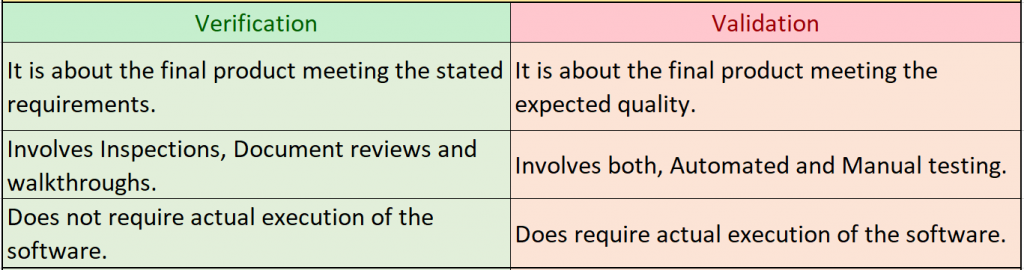
1. Verification

Verifying the tasks that allow and make the product run in its real-time comes under this aspect. It includes inspections, reviews of test cases, and documentation.

2. Validation

Authenticating various pre-specified tasks that make sure the product is matching with the requirements of customers comes under validation. It includes running scripts, automated testing, and verifying functional dependencies.

There are some differences in both of these aspects. Check out the table below.

Software Testing– Types

There are 2 basic types of software that one must know to survive in the testing field. Automated testing and Manual testing. Let’s discuss each of these in detail.

Manual Testing:

As the name suggests, in manual testing, the whole process of testing is carried out by the testers manually. The whole process is carried out here without any automated script or tools. These tests include a bunch of test cases that are decided by the tester. Each of these test cases is then verified for its respective functions.

To execute this, the tester needs to follow the following steps,

1. Analyzing Requirements

One should know the needs and requirements of the application to execute manual tests. The basic knowledge of what the application is about and a sense of its behavior is a must. A proper study and analysis of its requirements should be done. When this is done, one gets the idea of what is being tested and makes the whole process more optimal.

2. Writing Test Cases:

When a test case is written properly, the test can be run properly and smoothly. A well-written test case, guides the tester through the whole process. Currently, there are a whole lot of softwares that helps in tipping down those test cases. Just remember, while writing the test cases, think like an end-user as they are going to use it in the end.

3. Regulate the Test Cases

When you write all the test cases, execute them, and run them by monitoring them. Note the results in terms like, Passed, Failed, Skipped. Leave the rest of the cases to be fixed by the developers.

4. Logging of Bugs

When test execution is done, you will identify bugs. Make sure that a proper way of communication is established between you and the development team so that the bugs can be conveyed to them. Many developers prefer add-ons to browsers like Mozilla Bugzilla while rectifying the bugs.

5. Reporting

Finally, a report must be made It mentions any additional conditions or assumptions that couldn’t be marked earlier. You can also mention suggestions to improve processes and validations.

Automation Testing

It’s in the name. Automation testing is all about automated ways to test the software. Here, the tester is supposed to use automation scripts to run the tests. It has taken a good grip on today’s testing strategies.

Generally, these tests are conducted on larger projects. This is done because larger projects would normally take more time if done manually. There are also cases where companies perform automation testing after manual testing just to ensure that all the test cases are covered. Before conduction,an automation test, follow the following steps for a better procedural experience.

  1. Study and then finalize which tests to automate.
  2. Test regularly.
  3. Select the correct tool for automation testing.
  4. Ensure the contribution of each test towards the efforts.
  5. Keep quality data in hand.
  6. Make sure that the automated scripts that you have created can accommodate changes done in the user interface.

Automation testing – When should it be done

Below are some of the conditions listed that should be considered as situations in which one should go for automation testing.

  1. If the given project is complicated and large in size and scale.
  2. If the given project is requiring regular testing in the same area.
  3. If there are any time constraints.
  4. If the software of the given project is stable about manual tests.

Tools for automation tests:

  • Visual Studio Test Professional
  • SilkTest
  • Selenium
  • Test Complete
  • LoadRunner
  • Testing Anywhere
  • WATIR
  • HP Quick Test Professional
  • IBM Rational Functional Tester
  • WinRunner

Software Testing – Techniques

Now, after knowing about the types and their aspects of software testing, let’s have a look at the techniques used in this process. There are 2 primary techniques of software testing, Black Box Testing, and White Box testing.

1. Black-Box Testing

Black Box Testing mainly focuses on the internal features of the system. In this case, only the system coder has the access to the source code. This is why the tester here needs to perform the tests under the supervision and guidance of a proper developing team for inputs and outputs.

In the case of black-box testing, the perspectives of testers and developers get separated. That is why it is the best suitable option for large code segments. But the side effect of this being the complication increased in designing the test cases.

2. White-Box Testing

White Box testing mainly focuses on the structure or workings of the system and the program logic. To go ahead with this, one has to first comprehend the internal workings of the code. This is a lot easier than working with the code.

In this case, as the user is having proper knowledge of how the code is functioning, it becomes easier to detect the data to be tested. This is the reason behind it also having names like open -box testing or Glass-box testing.

Software Testing – Levels

Also, during testing, some levels need to be considered. These levels are briefly divided into 2 types. Functional testing and Non-functional testing. Let’s have a look at them in detail.

Functional Testing

This is performed at the level of the actual development of the software. This makes sure that all the requirements are fulfilled. Also, the execution of the test takes place only when a piece of a certain module is complete.

It is a 5-step process,

  1. Define the functionality which is to be tested.
  2. Draft and design proper test cases.
  3. Compare the output bases on the designed test cases.
  4. Execute the test cases and write scenarios.
  5. Compare the actual results and the expected ones.

Below is a list of the tests that come under the level of functional testing.

1) Unit Testing:

The tests that are performed before handling the program to the testing team for executing test cases.

2)Integration Testing:

The tests that are performed to verify if the parts of the software are functioning well when put together.

3) System Testing:

The test that authenticates the whole system as one. It is performed when all the components of the application are put together. It checks the behavior of the whole to be at some quality standards.

4) Regression Testing:

A lot of times, there are some unplanned bugs in the system. These can cause trouble in other parts of the system. Here, Regression testing helps.

5) Acceptance testing:

Executed all along by the Quality assurance team, this verified the final specification meeting the requirements. This is considered as one of the important partsof functional testing.

6) Alpha Testing:

This one combines all the above-mentioned tests for a final review before testing by the end-users. This is performed by the developers and the QA team.

7) Beta Testing:

You must have heard this from any techno-geek. This is the final test before the release of the application. This is done by a chosen set of customers. It could be anyone from any non-technical team or any new user. Here, the application is run in real-time to check its behavior.

Non-functional Testing

This level of testing focuses on the errors caused by external factors such as Database processing, Network, Client-side downtime, etc. This includes the following testing types.

1) Performance Testing

Performance testing is about detecting bugs that harm the stability, speed, and reliability of the software. Based on its quantitative and qualitative elements, this type can be further divided into Stress testing and Load testing.

2) Security Testing

This type checks for flaws in the security code of the program. It focuses on Validations for inputs, scripting, confidentiality, attacks due to SQL insertions, virus attacks, etc.

Conclusion

If you are a newbie in the field of software testing and reading this blog, now you know it! These were just some of the basics of software testing which we tried to gather along in this blog.

Things can get geekier and more complicated if you choose them to be. But if you follow some simple methods and steps, this field will be a piece of cake for you.

How VTEST can help

With a team ranging from absolute newbies who are confident and enthusiastic to experienced pro players who excel at what they are doing, VTEST is all set to change the game of software testing. At VTEST, a stable and cheerful work culture enhances the quality of work and helps us in achieving a fine and happy output.

VTEST it!

Further Reading

Related Guides

Shak Hanjgikar — Founder & CEO, VTEST

Shak has 17+ years of end-to-end software testing experience across the US, UK, and India. He founded VTEST and has built QA practices for enterprises across multiple domains, mentoring 100+ testers throughout his career.

Defining Scalability testing: Needs and Stepwise execution

Defining Scalability testing: Needs and Stepwise execution

When testing software, one of the important factors to consider is the scalability of your app. There are various ways to go about verifying the scalability of a given software. It is the meter to decide how much one can scale the product with the increasing workload.

Let’s take an example. If the users of the given software increase by 2 times the load it can carry, we will have to increase the degree of the server’s performance as well as decrease the server’s response time for a good experience with the user interface.

By doing scalability testing, one eliminates all the minor anxious issues in the system. It is the answer to several questions like,

  • When the software and hardware are changed, how does the server perform?
  • In this situation, Can the system’s productivity be increased and capability upgraded?

Scalability Testing – Need

There are several reasons why scalability testing is important in the testing process. Firstly, It helps one decides the software’s behavior when the load is increased. Secondly, It gives clear insights about the total number of end-users it can carry.

All this aside, the primary reason behind this is to comprehend the point at which the software starts lagging and to analyze the potential solution’s to these lagging challenges.

Scalability Test – Creation

Scalability testing is executed by performing several load tests, one by one, with complementary software and hardware changes, and by keeping all the other variables unchanged. Also, it tests multiple elements in the system like,

  1. Network/Memory Usage
  2. Load with several end-users using the software
  3. Request and Response Time
  4. System Throughput
  5. Performance Measurement
  6. Screen Transition
  7. Hits/Transactions Per Second

The execution of the scalability test should be systematic to ensure that all the elements are getting tested and all the necessary data is collected. For obvious reasons, the type of load differs from software to software. It depends upon users, web servers, and type of software. When performing, try to think about all other variables that might affect when the load is increased.

Scalability Test – Essential requirements

Now, let’s discuss some basic prerequisites that are needed before performing scalability testing.

Memory:

The memory requirements for all virtual users using the software must be evaluated.

Processor:

The respective processor requirements must be verified before initializing the process.

Operating System:

Verification of the OS acting as an agent and testing the load must be done.

Load distribution capability:

A centralized system in which all the results are gathered and analyzed from various machines and individuals must be in place.

Scalability Test – Stepwise Creation

  1. First, create all the scenarios and regulate them.
  2. Change the scenarios and look for the elements that are affected by that change.
  3. Re-verify the scenario to ensure their performance to be the same every time.
  4. Decide and define a group of virtual users for testing the software.
  5. By clearly specifying the settings that permit you to analyze the performance of the application, create the load tests.
  6. Execute the tests.
  7. If you find any lags, make the respective changes to the server and repeat the execution of the tests.

Analyzing the Test Results

When you execute the test cases, what you are doing is deciding just 40% of your performance testing goals. The important part here is the analysis and correction of the results. The analysis of the results gained in the scalability tests can be done in several ways. Some of them are as follows.

1. Virtual Users v/s Response time

Many organizations use this method by deciding a specific time interval. Let’s say it is 2 minutes. Now, they increase the number of users for that specific server load and then verify the software behavior. They test the software’s response time for a given number of users.

2. Users v/s Latency

This is the type where the latency of the network on which the users are operating is checked.

3. Hits v/s users

The observation of hits per second is done after 3 minutes of response. After this, the latency time starts.

4. Users v/s errors

Errors and bugs created by the software when under load are tracked and compared with the number of users at that time.

Conclusion

Once the testing is done, keep in mind to check that you have all the data in the record for further increasing the capacity of the load in the future.

In general, it is a good habit to keep the data backup for the planning of the tests so that when you perform the same tests in the future, you will have a meaningful and relative reference.

How VTEST can help

At VTEST, we have employed individuals who not only excel at their software testing skills but are also creative and open-minded in the strategic decisions. We take it as our utmost priority to enhance software reliability and usability in every way possible.

VTEST it!

Imran Mohammed — Salesforce Expert & Scrum Master, VTEST

Imran is a certified Scrum Master and Salesforce testing specialist at VTEST. He brings structured agile discipline to test planning and delivery, ensuring every project is executed with precision and quality.

Related: An All-in-One Guide to Performance Testing

Unit Testing and Coding Best Practices for Unit Tests

Unit Testing and Coding Best Practices for Unit Tests

It is necessary to understand that in software testing, there are different aspects by which the process is handled. Unit testing is one of the most prominent processes involved in the whole architecture of software testing.

In this article, we discuss what is unit testing and what are its various stages. After that, we will mainly focus on the various practices that a good software tester must follow to execute a fine unit testing session.

So first, let’s dig into the definition of unit testing and its stages.

Unit Testing – Definition

A unit testing session verifies every minor functionality and feature of your software. It authenticates the behavior of every element of the software individually. The process of unit testing mainly comprises of 3 parts. They are as follows:

1. Initialization:

A minor element of the application which is to be tested is initialized. The application under test is generally called System under Test i.e. SUT.

2. Stimulus:

After the first stage of initialization, a stimulus is triggered by the system under test. Generally, it is done by invoking a method that will have the code that is required to test the functionality of the system under test.

3. Result:

After the second stage, the result comes. There is a process of comparison here between the expected result and the actual result. If this comparison is satisfactory, then it can be said that the functionalities of the system are working fine. If not, one needs to diagnose the system in more detail.

Now, let’s have a look at some of the best practices followed by a good software tester while executing unit testing. These are the qualities a newbie in the testing field must follow. Let’s go!

Unit Testing Best Practices that should be followed while writing Unit Tests:

  • Tests should be isolated

While writing unit tests, it is important to keep in mind that the unit tests are written individually from each other. The arrangement of the cases might vary from person to person. The clusters also can be defined by your own choice. Just note that each test must be orthogonal in a certain way that it must be different from other test cases.

If not, any change in the execution of a certain test case might affect the behavior of the other test cases. That’s why remember; don’t try to add unnecessary assertions.

The assertions must be those that match the specific execution behavior of the software. They must be isolated and executed individually without any dependencies on external factors.

This verifies the addition of zero to a number. In this stage, multiplication functionality assertions should not be covered in this step.

Unit Testing Best practices to be followed while executing Unit Tests:

1. High Speed

Unit tests are planned by developers to be executed repeatedly to make sure that there are no errors and minor bugs in the system.

If the time taken to execute these tests is more and the speed is slow, it will consequently increase the execution time of the test cases. Even the speed of one slow test case will have an impact on the overall speed of execution of the test cases.

That’s why, developers must use the best coding methods to lessen the execution time of every test case, which will result in an overall decrease in the execution time.

Using stream concepts in the writing of unit test code is a good practice to increase the execution speed. If not, the whole process becomes exponentially slower.

2. High Readability

The readability of any unit test must be very easy and high. The test has to be clear and readable. One must be able to understand the functionality error the test is explaining only by reading it.

It must properly state the scenario that is going under test and if it is failing, it should mention the reasons for the failure in a clear way.

One should be able to know and comprehend the problem in no time and that’s why the design of the test cases must not be complex. To make comprehension easy, they should be well-structured.

A proper name must be given to the test case and its every variable. This name should also include the functionality and the operation that is being tested.

The naming style should not be anything fancy or overly irrelevant. For example, a name like ‘Show logical exception’ won’t work as it doesn’t mean anything specific and is kind of vague.

3. Good Designing of Tests

Just like the designing process of production tests, the process of designing these tests should be intense and careful. The framework used here must be good and qualitative.

Let’s say, the coupling between test code and production code should be low. The dead code must be cleared to gain more test efficiency.

The management of memory should be done well along with the efficiency of time. If you have a good codebase, it will make your maintenance and re-factoring very easy in the subsequent stages.

4. High Reliability

The unit tests that you are designing must be reliable in design. They should only fail when there is a bug or error present in the system. If they fail on these events, the whole testing process becomes useless.

Sometimes, when you run a test individually, it gets cleared but when ran in the test suite, it fails. Also, many a time, when tests are migrated to a continuous integration server, the tests fail. This is the sign of some design flaws in the system.

A fine unit test must always be independent of external factors like environment or hardware technical base etc.

Conclusion

These were some of the Unit Testing best practices that a software tester must follow to execute reliable and flawless unit tests. A reliable, confident, and efficient work ethic will always lead to optimum output.

How VTEST can help

Efficiency in the work culture is always promoted at VTEST. It is the basis on which the whole environment of VTEST runs. Using the time and resources most efficiently to gain an output which is both, seamless and improvised is what VTEST stands for.

Work with us and you see the difference yourself.

VTEST it!


Vikram Sanap — Test Automation Expert, VTEST

Vikram is a Test Automation Expert at VTEST with deep expertise across multiple automation tools and frameworks. He specialises in transforming manual workflows into efficient, reliable automated test suites.

Related: Software Testing: A Handbook for Beginners

10 things to consider for successful Test Automation

10 things to consider for successful Test Automation

With automation rising in every industry, software testing has also implemented it on different scales. Starting from smaller implementations in the software development life cycle to bigger uses in the testing process. Though the implementation is quick, the quality is not always good.

Poor implementation of test automation does not help in building a good testing system. Rather it blocks the way to execute many things smoothly. Many big organizations fail to do it smoothly and this is a bad thing because if used rightly, Automation technology might be the future of software testing.

So, what are the factors to attempt a successful execution of automation testing? In this article, we will discuss 10 things to consider while automating any testing process.

1. Build a Dedicated Team –

The first thing one needs to start with is building a dedicated team. A team that devotes its total creative and intellectual energy to the testing process. Employing newly graduated smart students’ local institutes might help. Younger employees like these students have more theoretical knowledge and have a knack of the ongoing digital scene.

The staffing must be preferably flexible as it gets easy to make changes in the team as per the business demands. For reference on solutions to eliminate the recruiting process, check out various sites that offer this. These sites will offer you the best people in business at an affordable price.

2. Selecting Tool:

A selection method that is completely tailored as per your needs is the best way to go forward. If you don’t evaluate and analyze the utility of the automation testing tool beforehand, it may have poor consequences on selecting a tool that is not compatible with your requirements. Identifying the needs and requirements and then choosing the best tool accordingly is one of the essential things to do in the testing process. If a wrong tool is selected, it will cost you money, time, and efforts.

Wait, Apache JMeter, Selenium, Wapt, etc. are some of the best automation testing tools in the market right now. Look for these tools as per your requirements, and you will get the best suited for your process right away.

3. Automation Framework:

Even if one selects the right tool, the process doesn’t end. You cannot automate anything even with the correct tools. Just like all other processes, a proper framework must be made to implement the tool.

Ina framework, there are certain guidelines by which one should execute the process of automation. It is like a rule book. It maintains testing consistency and hence minimal changing of code. Reusability is improved by this.

There are 4 types of frameworks in automation testing –

  • Keyword-driven automation framework
  • Hybrid automation framework
  • Data-driven automation framework
  • Modular automation framework

Choose the appropriate framework, and you are good to go.

4. Measure Metrics:

To measure the success of automation by comparing it with the manual work is pointless. It should be measured in different variable metrics like Productivity improvement, percent of errors found, etc.

These things matter to industry persons and all the people as it justifies investments and Quality assurance.

Initially, the analysis of the amount of time one gets from a manual test and the money saved per annum should be done. After that, there are certain things that one must look for. Such as –

  • Defect reduction (reduce production defects by 60%)
  • Accelerate time to market
  • SAP transport impact analysis
  • Improve productivity with automation

5. Finding the Right Tool:

When anyone thinks about automated testing, selecting the right tool and framework is the topic that takes up most of the focus. Choosing the correct framework and tools is the basis for a healthy automation process.

There is hardly any example of a company that aims at full automation and is successful. One must have a good plan with balancing strategies.

Hence, one must think properly and take the time to decide how automation is going to help their particular testing plan. It will make the whole process more optimum and valuable and will increase the success rate.

6. Budget Cost and Process:

Going over budget or having a surplus amount at the end are both signs of a bad costing plan. Budgeting should be precise in the case of automation testing, involving costing for different aspects including development, training, test tool, and resources.

Also, a maintenance cost is involved while we talk about automation testing. As the testing process defines test-coverage, it must be well-defined and precise in defining the quality control and process and execution of the test. Also, the test criteria must be defined at each stage.

7. Preference of Tool Selected:

The technology used for the development of the application is one of the major impacting factors in the selection process of the testing tool.

To take an example, Informatics won’t be supported by QTP, hence it won’t be used for testing informatics applications. To conduct proof of concept of the respective tool on AUT sounds like a sensible idea.

Many a time, choosing the right tool can be a complex and tricky task. If you do the research right, you will find some essential criteria that will help you in selecting the best tool. Which scripting language the tool uses is one of them.

Also, it will support numerous types of tests including test management, Functional, mobile, etc. and will sustain the support for different testing frameworks.

8. Automation cannot be Done for Everything:

Before initiating the process, the scope of automation must be determined in detail. To select which test cases are to be automated, there are certain criteria. Check out the list below.

  • Tests that are difficult to perform manually.
  • High-risk business
  • Tests that are executed on a regular repeated basis.
  • Tests that are time-consuming.

However, for eliminating the tests from the automation list, there are other criteria. These factors determine which tests are not suitable for automation. Check out this list below.

  • Tests that have changing requirements.
  • Tests that are not executed manually and are newly designed.
  • Tests that are executed on an Ad-HOC.

9. Reducing Time for Testing and Test Automation:

Another important goal of the software testing process is to reduce the testing time. But generally, the part of the process which is time-consuming does not have anything to do with automation.

The main time-taking task in the testing process is the detection of bugs. The detection and correction of bugs take place in a repeated manner. In the case of automation testing, maintenance, Execution, and Step-up may take longer compared to manual testing. Also, Analysis of Clear-ups and failures may take more time. In an ideal scenario, all these activities will take less time if the right kind of matured automation process is executed.

All in all, it is not easy to reduce the testing time using automation, but it is not impossible. One must consider it as a long-term goal to achieve.

10. Automated Maintenance:

The scripts of these automation tests must be added to the system that is under test with successive cycles. For each release cycle, they have to be thoroughly verified and maintained.

Maintenance is one of the primary factors that help improve the effectiveness of automation scripts.

Try using automation in simple routine tasks like cleaning out temp files, Restarts, and Defrags. Assurance of the up-to-date nature of your client’s machine with the latest software patches and assurance of a stable system can be confirmed by automating patch management.

You can either upload your script or run scripts from the library. Plan a proper schedule to execute tests on a certain date. You can also trigger them to run automatically after a failed monitoring check.

Even if anyone is not familiar with these scripts, various communities provide useful scripts like Fixit scripts, etc.

Conclusion

Considering all the aspects of software testing, one must figure out the prominent factors that play into the process of automation testing. The testing process, Selection of the right and most compatible automation tool, etc. are some of the crucial factors that matter.

How VTEST can help

By researching and executing both the software testing methods with perfect balance, VTEST carries out the automated tasks with fine precision. Knowing the Pros and cons of automation testing, VTEST executes it on the right processes and in the right amount.

VTEST it!

Vikram Sanap — Test Automation Expert, VTEST

Vikram is a Test Automation Expert at VTEST with deep expertise across multiple automation tools and frameworks. He specialises in transforming manual workflows into efficient, reliable automated test suites.

Related: Best Practices for Test Automation Framework

Benefits of a Bug Tracking System

Benefits of a Bug Tracking System

By now, all of you must know what a bug is. A bug is a word used in slang which means any error caused in the system and its various aspects like Requirements, Coding, Design, Specifications. The scale of this error can be anything from a basic typo to a serious coding issue.

Bug tracking is one of the fundamental processes in a software development life cycle. Without it, the whole process becomes more time-taking and inefficient.

There are various advantages of it like it helps to save money, to maintain good quality, etc. In this article, we will discuss the various benefits of Bug tracking. Having a correct bug tracking tool at hand helps in many ways. Below are some of them.

1. Delivering a Quality Product

The primary purpose of a bug tracking system is to detect bugs and assuring to remove them. A tracking system helps in developing a fine product by controlling the work of all team members in detecting and fixing every single bug. This reduces the probability of losing out on any minor or major bug as there is a checking system in place.

2. Reduces the cost of development, hence resulting in an improved Return on Investment (ROI)

In a bug tracking system, the bugs get prioritized and the issues are assigned. This way, the development team can focus on important issues and prioritize the correction process of the bugs. This results in a decrease in development time, efforts, and consequently the budget of development. The Return on Investment and Productivity gets improved by this.

3. Efficient Teamwork, Smooth Communication, and Connectivity

As we know, A bug tracking system is a system with various features like email notifications, chat interfaces, etc. This promotes easy communication between the team members and helps in increasing good connectivity in the system. Due to this decreased communication gap, a smooth workflow comes in place. Also, due to a centralized data system, real-time data can be accessed. This helps in exploring the software, attempting newer bugs, and drafting concise and fine reports.

4. Detect Issues Earlier and Understand Defect Trends

The whole system of Bug tracking subsequently results in proper documentation of the bugs and errors that occurred in the system through time. This documentation helps in keeping track of all the defects and hence the team can analyze the defects to come to a conclusive study on how should the process be improved to reduce the errors.

The detection of bugs takes place in the formal testing stage. This results in the creation of bug-free data in the production stage.

5. Better Customer Service and Client Satisfaction

This system also involves end-user reporting issues and bugs directly on their respective applications. Through smaller product modifications, regular issues can be analyzed and solved. Many tools regarding this system are designed in the most user-friendly way. Any newbie in the field with a basic technical can use these tools.

An automated response is provided to the users. Alerts are designed to give them constant updates and the respective status of development.

Consequently, this results in better customer service and good communication with customers as it allows them to give suggestions and feedback’s.

Conclusion

These are some of the benefits of having a proper bug tracking system. Bug tracking system helps in executing the actions of a Software Development Life Cycle more efficiently. This efficiency then results in a cost-friendly budget plan which provides the company with a more profitable business.

It helps in understanding the work environment in a better way and hence improving the fineness of individuals working in the developmental and testing stages of the process.

How VTEST can help

VTEST employs a good number of software testers who excel at software testing with implementing fine bug report systems. This makes the whole work ethic at VTEST faster and more optimum. A more Productive and cost-saving process makes VTEST the best option to test your software!

VTEST it!

Namrata Shinde — Functional Testing Expert, VTEST

Namrata is a Functional Testing Expert at VTEST with deep experience in mobile, UI, and end-to-end testing. She ensures every release is thoroughly validated and bulletproof before reaching end users.

Related: Software Testing: A Handbook for Beginners

Talk To QA Experts