Hackers Don’t Send Warning Emails: Stay Ahead of Threats

Hackers Don’t Send Warning Emails: Stay Ahead of Threats

In the ever-evolving world of cybersecurity, one thing is clear: hackers don’t send warning emails. The notion that cybercriminals will give you a heads-up before launching an attack is not just naive—it’s dangerous. In reality, the most damaging breaches often occur without any prior notice, leaving organizations scrambling to mitigate the fallout. This is why proactive measures like vulnerability scanning, penetration testing, and continuous monitoring are no longer optional—they are essential.


Why Cybersecurity Should Be Your Priority

Every device, application, and system connected to the internet is a potential target. Hackers don’t discriminate—they look for the easiest way in. Whether you’re a small business owner or running a large enterprise, securing your digital assets isn’t just an option, it’s a necessity.

  • Financial damage is real. Data breaches cost businesses millions every year—not just in recovery expenses but also in lost customer trust.
  • Regulations are tightening. Many industries now require strict cybersecurity compliance, and failing to meet standards can lead to penalties.
  • Your reputation is at stake. Customers and partners want to know their data is safe. A single breach can erode years of trust in an instant.
  • Cyberattacks are becoming more sophisticated. Modern hackers use AI, automation, and social engineering to break into systems faster than ever.


Steps You Can Take to Protect Your Business

1) Scan for Weaknesses Regularly
Hackers exploit vulnerabilities, and many businesses don’t even know they exist until it’s too late. Running frequent vulnerability scans helps detect and fix these security gaps before they become entry points for attackers.

2) Test Your Defenses Like a Hacker Would
Would your system survive an actual attack? Penetration testing simulates real-world hacking attempts to expose weak spots. It’s like hiring an ethical hacker to break in before a criminal does.

3️) Monitor in Real Time
Cyber threats don’t follow business hours. Continuous monitoring helps detect suspicious activity as it happens, allowing businesses to respond immediately instead of after the damage is done.

4️) Use AI for Smarter Security
Artificial Intelligence enhances threat detection, spotting patterns that human analysts might miss. AI-driven security can stop attacks before they escalate, reducing the risk of breaches.

5️) Train Your Team
Most cyberattacks succeed because of human error. Phishing emails, weak passwords, and unsafe browsing habits can all open doors to hackers. Regular security awareness training for employees is one of the best defenses.

Cybersecurity is a Shared Responsibility

Many businesses assume cybersecurity is just an IT issue. In reality, it affects every department—from finance and HR to customer service and marketing. Strong security policies, safe online habits, and advanced security solutions all play a role in keeping your business protected.
Taking the right steps today can save you from disaster tomorrow. Don’t wait for a warning that will never come. Start securing your business now!

Related: Penetration Testing: Definition, Need, Types, and Process

Shak Hanjgikar — Founder & CEO, VTEST

Shak has 17+ years of end-to-end software testing experience across the US, UK, and India. He founded VTEST and has built QA practices for enterprises across multiple domains, mentoring 100+ testers throughout his career.

How to test on multiple device?

How to test on multiple device?

In today’s fast-paced digital world, software quality assurance (QA) and testing play a crucial role in delivering reliable and high-performing applications. Whether you’re building a mobile app, a web platform, or enterprise software, ensuring that it functions correctly and efficiently is key to user satisfaction and business success.

What is QA and Software Testing?

Quality Assurance (QA) is a systematic process designed to ensure that a software product meets specified requirements before release. It involves a combination of testing techniques, process improvements, and standards adherence to minimize bugs and enhance software reliability. 
Software testing, a critical part of QA, is the process of executing a program with the intent of identifying defects. It ensures that the software functions as expected and is free of critical issues that could impact user experience or business operations.


What is Testing Consultation?

What is Testing Consultation?

In today’s fast-paced software development landscape, ensuring software quality is more critical than ever. Organizations need robust testing strategies to identify defects early, optimize performance, and ensure security. This is where Testing Consultation comes into play. Testing consultation involves expert guidance, assessment, and implementation of software testing strategies tailored to a company’s specific needs.

1. Understanding Testing Consultation

Testing consultation is a specialized service where experienced professionals analyze an organization’s testing processes, identify gaps, and recommend best practices. Consultants work closely with development and QA teams to improve testing efficiency, integrate automation, and establish quality assurance frameworks.

2. Why is Testing Consultation Important?

Many organizations struggle with ineffective testing processes, leading to delayed releases, poor software performance, and security vulnerabilities. Testing consultants help streamline workflows, adopt modern testing methodologies, and ensure compliance with industry standards. Their expertise can significantly reduce costs by preventing defects before deployment.

3. Key Services in Testing Consultation

A testing consultation service typically includes:

  • Test Strategy Development: Designing a roadmap for functional, performance, security, and automation testing.
  • Test Process Assessment: Evaluating current testing methods and identifying inefficiencies.
  • Automation Strategy: Recommending tools and frameworks to accelerate testing cycles.
  • Performance and Security Testing: Ensuring applications are scalable and resilient to cyber threats.
  • Continuous Integration & Deployment (CI/CD) Implementation: Integrating testing within DevOps pipelines for faster releases.

Conclusion

Testing consultation is a valuable service that helps businesses improve software quality, optimize testing processes, and stay ahead in a competitive market. Whether you’re a startup or an established enterprise, investing in expert testing consultation can lead to better software reliability, security, and overall customer satisfaction.

Related: Software Testing Outsourcing: 15 Points to Consider

Shak Hanjgikar — Founder & CEO, VTEST

Shak has 17+ years of end-to-end software testing experience across the US, UK, and India. He founded VTEST and has built QA practices for enterprises across multiple domains, mentoring 100+ testers throughout his career.

Software Testing for Startups [2025 Guide]

Software Testing for Startups [2025 Guide]

TL;DR: Software testing for startups, done early and lean, cuts post-release bug costs ~30×, protects user trust and speeds scaling. This 2025 guide shows every step, tool and checklist you need.


In today’s hyper-competitive tech landscape, startups face the constant challenge of releasing fast without compromising product quality. With limited resources, rapid development cycles, and constant pivots, quality assurance (QA) often takes a backseat. Yet, startups that embed QA into their development DNA early on are far more likely to deliver stable, scalable, and user-loved products.

In this updated 2025 guide on software testing for startups specially crafted for decision-makers at startups looking to implement lean, efficient, and effective software testing strategies. It unpacks the practical approaches, tools, and common pitfalls while emphasizing how startups can achieve agility and quality without overextending their resources.


Why Software Testing Matters for Startups

According to industry benchmarks, fixing a bug after release costs up to 30 × more than catching it during development. Neglecting QA leads to:

  • Broken user experiences that drive early adopters away
  • Product instability that erodes stakeholder confidence
  • Mounting technical debt that delays scaling
  • Reputational risk that deters investors and partners


On the other hand, effective QA empowers startups to:

  • Deliver faster feedback to development teams
  • Improve customer satisfaction and retention
  • Minimize costly rework and technical debt
  • Build trust with investors, partners, and enterprise clients


In today’s product-driven economy, QA is not a luxury—it’s a survival strategy for startups aiming to ship fast, scale smart, and stand out.


Unique Testing Challenges Faced by Startups

Startups face a distinct set of software testing challenges that set them apart from large enterprises. Traditional QA processes—built for scale, time, and budget—often fail to match the startup pace. Here are the core obstacles:

1. Limited Resources: Time, Budget & Team Size

Most startups can’t afford to hire a dedicated QA team or invest in enterprise-level testing tools. Testing often falls on developers or product managers, increasing the risk of missed defects.

2. Constant Product Evolution & Agile Pivots

Frequent changes in product direction, features, and MVP scope mean that test cases become outdated quickly. Startups need flexible, modular test plans that adapt fast to change.

3. Compressed Timelines & Fast GTM (Go-To-Market)

Speed is critical in the early stages. In the rush to launch, testing is often deprioritized—leading to bugs that can damage user trust and increase post-launch costs.

4. Lack of Mature Testing Infrastructure

Unlike enterprises, startups often lack CI/CD pipelines, version control best practices, or automation suites. This can delay bug detection and slow down release cycles.

5. High Risk of Technical Debt

Skipping structured QA early often leads to compounding bugs, unstable builds, and scalability issues—costing startups much more in the long term.


How to overcome these hurdles

  • Prioritise critical user flows
  • Adopt affordable/open-source automation tools
  • Implement CI/CD with automated smoke tests
  • Keep regression suites updated every sprint:contentReference[oaicite:3]{index=3}


When Should Startups Start Testing?

The best time for startups to begin testing is as early as the ideation and prototyping stage—long before the product is launched. Early testing helps identify major flaws, reduce technical debt, and avoid expensive rewrites after launch.

Delaying QA until after MVP can lead to:

  • Undetected functional issues
  • Poor user experience
  • Increased cost of bug fixing
  • Missed market opportunities due to unstable releases


Recommended Testing Timeline for Startups

Stage Recommended Tests Purpose
Prototyping                       Smoke Validate basic flows & UI
MVP Build Unit + Integration Catch code-level issues early
Post-launch Regression + Performance                      Maintain stability every release
Pre-scale User Acceptance Gather real-world feedback


Why adopt a Shift-Left strategy?

“Shift-left testing” means testing earlier in the development lifecycle. This is especially beneficial for startups, as it:

  • Detects bugs sooner, when they’re cheaper to fix
  • Keeps development cycles lean and iterative
  • Reduces technical debt and future rework
  • Improves product quality from the first release

Pro Tip: For agile startup teams, integrate testing into every sprint to maintain speed without sacrificing quality.


Types of Software Testing Most Relevant to Startups

  • Unit Testing – functional accuracy
  • Integration Testing – component coordination
  • Automated Testing – speed & CI/CD support
  • Performance Testing – scalability checks
  • Security Testing – data protection & compliance


Manual vs. Automated Testing: What Should Startups Choose?

Manual Testing: Useful for exploratory, usability, and ad-hoc scenarios. Faster to start but doesn’t scale well.

Automated Testing:Ideal for regression, smoke, and performance testing. Requires upfront investment but pays off long-term.

Startups should adopt a hybrid approach—automate where feasible and supplement with targeted manual efforts.


Building a Lean Yet Effective QA Strategy

  • Focus on business-critical MVP features
  • Adopt risk-based testing
  • Leverage Selenium, Jest, Cypress
  • Consider partnering with VTEST for expert scalability

Remember, software testing for startups isn’t a luxury—it’s the safety net that keeps rapid product iterations from imploding.


Real-World Impact: How Startups Accelerate Growth with Structured QA

At VTEST, we collaborated with a fast-scaling B2B SaaS startup that was struggling with unstable deployments and growing technical debt. Their rapid release cycles often introduced bugs into production, affecting client trust and on boarding.

We implemented a lightweight, agile QA framework tailored for their sprint-based development.

Results Within Just 60 Days:

  • 58% reduction in post-release defects
  • 40% fewer user-reported bugs
  • 3× increase in deployment frequency

By integrating early testing, automation, and structured regression cycles, the startup was able to:

  • Ship features faster without sacrificing quality
  • Win and retain enterprise clients who demanded stable, reliable releases
  • Minimize costly bug rollbacks and firefighting

This case proves that early QA investment isn’t a cost — it’s a growth enabler.


Common Mistakes Startups Make in Testing

  • Postponing QA until scale
  • Relying solely on developers
  • Ignoring UX/accessibility
  • Skipping documentation & planning


Tools for Startup Software Testing


Purpose Tool Suggestions
Unit Testing                        Jest, Mocha, NUnit
Automation Selenium, Cypress, TestCafe
CI/CD GitHub Actions, Jenkins
Performance k6, JMeter
Bug Tracking Jira, Bugzilla


How VTEST Supports Agile Startups

Our tailored QA solutions for startups focus on:

  • Modular, scalable testing frameworks
  • Expert-led manual and automation support
  • Seamless integration with agile workflows
  • Transparent pricing, rapid onboarding

Whether you’re testing your MVP or preparing for a funding round, VTEST helps ensure quality is never compromised.


FAQs About Startup Software Testing

1. When should a startup begin software testing?

Startups should begin testing during the prototype or wireframing stage. Early testing helps identify major usability or logic issues before development costs rise. This “shift-left” approach accelerates validation and reduces rework.

2. Should startups use manual testing or automation?

A hybrid testing strategy is ideal.

Automate repetitive and regression tests (e.g., login, checkout flows)

Manual testing is best for exploratory, UI/UX validation, and one-time features.

3. Can a lean startup outsource its QA testing?

Yes. Outsourced QA is cost-effective for startups. It offers skilled testers, tool access, and flexible scale—without hiring a full in-house team. It also helps founders focus on product development and speed.

4. What’s the real cost of poor QA in startups?

Skipping testing can lead to:

  • Buggy product experience
  • Loss of user trust
  • Negative reviews and poor retention
  • Increased technical debt
  • Investor concern over product quality
    In some cases, it can even derail early traction.


5. Is software testing really necessary for MVPs?

Absolutely. An MVP (Minimum Viable Product) is your first impression. Even basic bugs can damage user trust and reduce conversions. Lightweight QA ensures a stable MVP without slowing down your go-to-market timeline.


Take Your Testing to the Next Level with VTEST

Ready to implement professional software testing for your startup? VTEST offers comprehensive testing solutions tailored specifically for growing companies:

Why Choose VTEST?

  • Expertise: Our team specializes in startup-focused testing strategies
  • Scalability: Solutions that grow with your business
  • Cost-Effectiveness: Professional testing without enterprise pricing
  • Quick Implementation: Get started with testing in days, not months

🚀 Special Startup Offer: Book a free consultation with our testing experts and receive a customized testing strategy for your product.

Contact VTEST Today to learn how we can help ensure your product’s quality and reliability.

Let VTEST be your partner in building high-quality software that your customers will love.

Related: Software Testing Outsourcing: 15 Points to Consider

Shak Hanjgikar — Founder & CEO, VTEST

Shak has 17+ years of end-to-end software testing experience across the US, UK, and India. He founded VTEST and has built QA practices for enterprises across multiple domains, mentoring 100+ testers throughout his career.

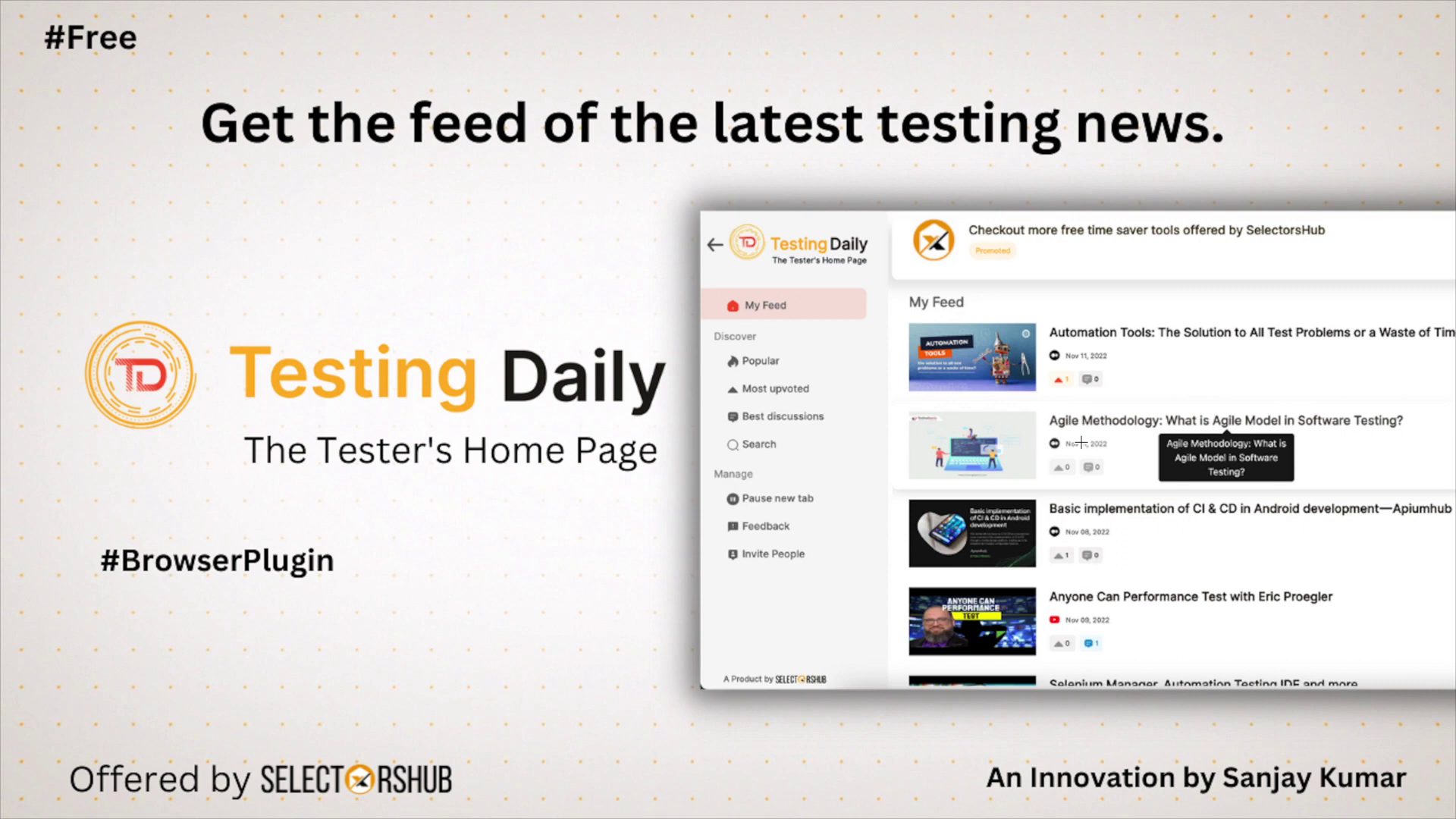
Testing Daily – The Must-Have App for Testers

Testing Daily – The Must-Have App for Testers

Are you a tester who wants to keep up with the latest testing news, trends, and best practices but find it overwhelming and time-consuming to keep track of everything? Do you squander your free time browsing through social media channels that add no value to your life and career? If so, you’re not alone.

Introducing Testing Daily – the app that brings together the latest testing feeds from various platforms into one place, making it easy for you to access and stay informed. With Testing Daily, you no longer have to spend hours scrolling through different websites, blogs, and forums to find the information you need – it’s all here, in one user-friendly app.

But Testing Daily is more than just a news aggregator. It’s a tool that enhances your knowledge, skills, and career prospects by using the latest NLP techniques to deliver personalized content and recommendations based on your preferences and behavior. The more you use Testing Daily, the better it becomes at delivering content that’s relevant and engaging to you.

Testing Daily is available on multiple platforms, including the Play Store, App Store, and as a browser plugin, so you can access it from anywhere and on any device.

So, if you’re serious about software testing and want to stay ahead of the game, download Testing Daily today. It’s the ultimate app for anyone who wants to enhance their knowledge, skills, and career prospects in software testing. Don’t waste your time on social media feeds that add no value – use Testing Daily to invest in your future.

Ready to download Testing Daily? Click on the links below to get started:

Testing Daily for Android
Testing Daily for iPhone
Testing Daily for Chrome Webstore

Join the community of testers who are already benefiting from Testing Daily, and take your career to the next level. Download Testing Daily today and start your journey towards becoming a better tester.

If you still have any questions, you can learn how to use Testing Daily by watching the video tutorial on YouTube at the following link: Testing Daily | The Tester’s Home Page | What & How to use


Practical Guide on Continuous Integration for automation tests

Practical Guide on Continuous Integration for automation tests

What is Continuous Integration?

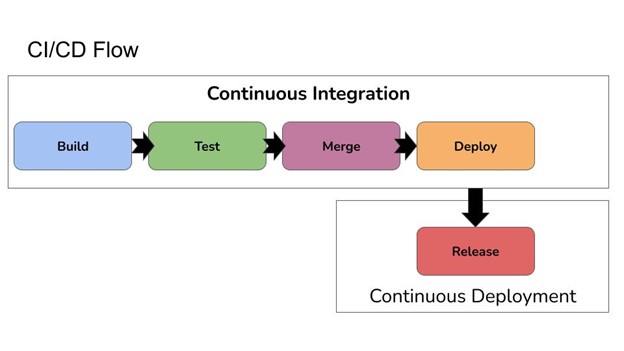
Continuous integration (CI) is a development practice that involves frequently merging the changes in the code. A development team member may merge the code multiple times frequently in the day. Every integration change that is pushed in the code repository is verified by an automated test which runs as soon as the code change is pushed, this provides with the faster feedback on the code committed and gives a fair insight whether the merged code works as expected.

Continuous Integration is becoming an essential part of Agile and DevOps environments as it speeds up development cycles, reduces manual effort and improves code quality.

Automated testing is a fundamental part of the CI process, not only it helps in providing the faster feedback but also enables teams to detect bugs and errors early and ensure only high-quality code is deployed to the pipeline which eventually leads to production.

What is an Automated test?

An automated test script is a set of instructions written in a programming/scripting language. It is designed to test the functionality of a software product as per the business validation. Automated test scripts are usually based on a set of test requirements and carry out tests on the software which would otherwise need to be completed manually. Automated tests help in quick verification of the functionality in less time and provides us with the timely feedback on the code changes pushed to the repository.

Why write Automated tests?

If we look at the traditional SDLC (Software Development Life Cycle), whenever a member from the development team used to merge the code in the repository, the QA team was required to check if the code was working as expected by running the manual regression tests. This actually had multiple drawbacks like lots of manual efforts involved, late feedback on the code changes, no continuous testing of the build. This all eventually led to an increase in the development cost and time to production.

By writing automated tests we can get the feedback on builds quickly, reduce the manual efforts on testing and it also serves as a documentation for the functionality as tests once written will be modified only if there is change in the feature otherwise it is expected to run and pass. Automated tests also make it easier to test across multiple platforms, browsers and devices without having to manually re-run tests

Automated tests also help in running the regression test cycles quickly, so we don’t have to put in lots of manual efforts. Hence, automated tests serve as a safety net by verifying that new changes to the code don’t break existing functionality.

After writing the automated tests we need to integrate it into the automated pipeline so it performs the tasks to run the tests. Let’s now discuss the automated pipeline as it is a building block for CI/CD.

What is an Automated Pipeline?

An automated pipeline is a process of software development which helps in building, testing and deploying the code. It helps in minimizing the manual efforts and thereby removing the human errors and provides a consistent process to release the software to different development environments and finally to production.

Hope now you have a basic understanding of Continuous Integration, automated tests, and automated pipeline. Let’s now move towards discussing how we can integrate the automated tests in the continuous integration workflow and get best output on our builds.

How to integrate automated tests with Continuous Integration workflow?

The following guide provides an overview of how automated tests can be integrated within a Continuous Integration workflow

Defining Testing Strategy

Before we can start creating automated tests, we need to define the testing strategy. The objective of defining a test strategy is to:

  • Explain what the tests are intended to achieve.
  • Create Different Test environments.
  • Running different tests like Unit, Integration, Systems and End to End Tests.
  • Deployment of the builds in different environments.
  • Automated deployment of Build to UAT/Production.
  • Planning for Separate pipeline to run performance tests.
  • Planning for running security checks to test for the vulnerabilities in the code.

Test Strategy document should outline how the software development will progress. It should also provide an overview of the QA Process.

Choosing a Test Automation Framework

After finalizing the testing strategy, we need to pick an appropriate automation testing framework. Now, for choosing an automation framework following points can be taken as a recommendation:

  • Tech Stack of the Software under development: It is good to choose the framework which has the same programming language as the tech stack of the software under development, as this gives the benefit of getting help from the developers as well while writing automated tests.
  • QA Team’s knowledge on programming language: Now, this is a point which can be taken up after discussion with the team. It emphasizes choosing a framework which is built in the programming language which majority of the QA Team members are familiar with. This way we might get quality code written for the tests as well as easy implementation of the framework. The other perspective to look around this point is, if the suggestion is to choose a framework which is robust and popular and has a large community however the team is not much familiar with the programming language it uses, then it should be seen what the learning curve is, if the team is ready to learn the new language and adapt it and implement the framework and how much time it will take for implementation. Decision should be taken after discussion with the team to choose a framework must be taken after consideration of the mentioned points.
  • Community Support and ease of use: These are the basic points that should be checked when considering a framework for writing tests. How easy it is to configure and write tests. Does the framework have good community support in case there is an issue faced by the team implementing it. How can it be configured and run in the automation pipeline, are the points which can be thought upon and accordingly a choice should be made.
  • Cost: There are a variety of tools and frameworks available, so you need to consider the environment and application requirements when selecting an appropriate solution. It’s important to evaluate the cost associated with each tool. Check the pricing and the license cost and also about the long term offerings the tool has to make.
  • Open-Source automation framework: If an Open-Source automation framework is to be chosen, it must be checked if there are any issues open which are related to security vulnerability, as it might indirectly affect the application under development. Also, point to be noted here is if the project or framework is actively maintained by its owners, precaution should be taken to not choose a framework which is archived or not actively maintained as it may create a blocker for implementation if any issue is found, and since it is not actively maintained, it would be easy to fix the issue.

Once we choose the automation framework, we should follow the best practices so it caters to the news of the organization.

Creating Test Scenarios/ Test Cases

We need to write the test scenarios and respective test cases for scenarios. Test Scenarios/cases should be created after analyzing the requirements. A list of pre conditions that needs to be followed should also be generated to test the application. Most importantly, scenarios and cases should be segregated correctly based on which tests can be automated and which ones can be tested using manual exploratory tests.

Writing Automated Tests

In this step we will be writing the automated tests. This involves creating scripts that can be executed when new code is pushed to the repository. It should be noted that appropriate assertions should be performed in each test which should provide us with right feedback about the feature under development. Automating your tests will help to reduce the time and effort for running the regression tests and also ensures that new code is properly tested before it is deployed.

Execution and Reporting

Test Execution

We need to decide how we are going to execute the tests. Hence, we need to keep the following points in consideration:

  1. Test Environment
  2. Automated Pipelines
  3. Ensure proper logging of errors/ warning/ debug to monitor the test execution.

Test Reporting

A detailed test execution report helps in providing the correct situation of the respective build, if it is good or has issues. Test Reports should include description of the tests that were executed, test data used for executing the tests, information on any bugs that were detected, as well as performance metrics.

Summary

CI/CD has become an integral part of the Software Development Life Cycle. With Continuous Testing we can always be production ready and reduce the manual efforts and improve the code quality as well.

To integrate our automation tests in CI/CD pipeline we should define a test strategy, create test cases and scenarios which can be used for writing automation tests, choose an appropriate test automation framework by discussing with your team.

We should also make sure that we have appropriate knowledge about the framework we are choosing, be it a commercial one or an open source, and how that framework will be integrated with the CI/CD pipeline. Finally, we should check out how the tests will be executed and reports will be generated which can come handy for showing the overall picture of the automation test run to the Stakeholders.


Vikram Sanap — Test Automation Expert, VTEST

Vikram is a Test Automation Expert at VTEST with deep expertise across multiple automation tools and frameworks. He specialises in transforming manual workflows into efficient, reliable automated test suites.

Related: Best Practices for Test Automation Framework

DevOps Testing

DevOps Testing

DevOps testing is a type of software testing that combines traditional software engineering and Quality Assurance methods with the test automation, process automation, and the combining practices of DevOps. But before we move towards discussing “DevOps Testing” in detail, let’s first understand What is DevOps?

What is DevOps?

DevOps is the combination of Dev(Development) and Ops(Operation). It is a collaboration of people, process and technology within the Software Development teams for faster development and delivery of the software to market. It also helps in providing faster feedback on the builds and fixing the issues that arise as development progresses.

Previously Teams like Operations, Security, etc used to work separately from the Software development teams which created a gap between these teams and the releases and after release processes were hit. DevOps ensures that all the teams work in an engaged mode to ensure faster feedback and deliver quality products.

Purpose of DevOps Testing

The purpose of DevOps testing is to ensure that the application and its environment are stable, accurate and secure. This type of testing integrates automated test scripts with the core software development and deployment process, allowing for more rapid testing, more reliable results, and quicker feedback to development teams.

The main objective of DevOps testing is to reduce the time it takes to develop a solution without compromising on quality. It involves automating the process of testing, which helps in increasing the speed of delivery and provides more timely feedback. Additionally, the scope of DevOps testing can be used to identify the vulnerabilities and defects in the code that are not detected by traditional software testing approaches.

Furthermore, integration testing, performance testing and security testing can also be part of DevOps testing in order to ensure the application meets the desired criteria. Lastly, DevOps testing offers several benefits such as faster time to market, improved reliability and reduced cost of delivery.

DevOps LifeCycle

Devops Lifecycle consists for 5 important phases, those are listed below :

  1. Planning.
  2. Development
  3. Testing
  4. Deployment.
  5. Operations.


Let’s discuss these phases in detail.


Planning

The crucial factor in deciding the delivery is the plan. It helps in getting the answers to the common question like:

  1. What is to be developed?
  2. When it is to be developed?
  3. Who will be working on what?
  4. When will it be delivered?

In this phase, teams sit together and discuss the features to be developed, the business goals, defining the entry and exit criteria for the features, and timelines to release the product to market.

Clients are involved in this planning phase as well to ensure the transparency between the stakeholders and the development team. Hence, in case there is something that needs to be prioritized can be discussed in this phase and accordingly adjustments can be made to the plan.

Once the plan is finalized, following action items needs to be worked upon:

  1. Creating Backlogs
  2. Prioritizing the features.
  3. Creating Agile Dashboards to monitor progress of projects.
  4. Delivery Dates.
  5. Working towards coordination with Third Party Vendors.

Development

This is the main phase where the actual development of the software takes place. In this phase the team works towards the following:

  1. Selecting/Creating Development Environment.
  2. Writing the code to develop features.
  3. Perform Static Code analysis and review the code.
  4. Write Unit, Integration, Contract and Component test.
  5. Use version control, like Git, to collaborate on code and work in parallel.
  6. Build and deploy the code to different environments.

Testing

Testing is the most important part of the DevOps LifeCycle as it is involved in every phase of the LifeCycle from Planning to Deployment. Without Continuous Testing, DevOps can not succeed.

In the Planning phase testing is done by checking if we are heading into the right direction by asking right questions and getting all the clarifications about the product in development.

Once the developer commits the code to the repository, the automated pipeline starts running the scheduled tasks for Unit tests, Integration tests, System tests and End to End Tests. Any failure in any of the stages breaks the pipeline and team is required to fix the broken stage and rerun the tests. Hence, the development and testing happen in parallel and the team gets faster feedback on every code commit.

Deployment

This is the phase which is of most importance from the Operations point of view and many times in my experience, I have seen that even after performing multiple test checks, running Automation regression tests thoroughly, the deployment had failed and the build is of no use from the end user’s perspective. Hence, DevOps Testing ensures that whatever build we generate is stable and can be deployed to any environment successfully.

It is recommended to have different environments for checking the stability of the builds, like once the development is completed and all the automated checks are performed on the build, the build should get deployed to QA Environment and then to UAT and after the UAT sign off, finally to production.

This deployment is done automatically as soon as all the tests staged in the automated pipeline passes.

Operations

This phase involves maintaining, monitoring and troubleshooting applications in the production environment. Automated logs and events generated in production could be great help in diagnosing the issues and fixing them quickly. Continuous Testing and Automated Deployment helps in providing the faster feedback in the builds which eventually helps in actual production to deployment.

Following the Test Pyramid in DevOps Testing

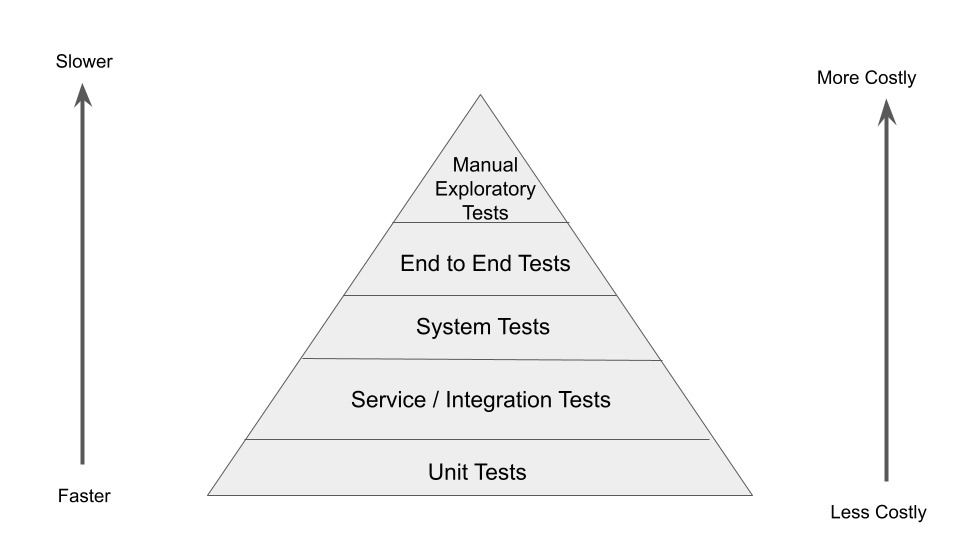
Test Pyramid is a process that can help the development and testers to build and deliver high quality software.

The lower section of the pyramid helps in getting faster feedback as the issues we find in the lower section of the pyramid are less costly to fix.

The main aim is to get faster feedback on the builds. As we move in the upward direction of the Test Pyramid, the feedback is slower and issues are more costly to fix.

Let’s discuss the Test Pyramid that can be followed for practicing Continuous Testing in DevOps.

Unit Tests: This stage runs the unit tests as soon as the code is committed by the developer to the repository.

Service/Integration Tests: These tests are executed after the Unit Tests are successfully run. The main idea behind these tests is to check the different components/Services of the system are communicating and working correctly in sync.

System Tests: These tests are run once the unit and integration test checks are successfully run. These tests check the integrated system as a whole.

End to End Journey Tests: These are the end to end user journeys which QA team normally write. These are regression tests for the system. These tests ensure that the system is working correctly from the end user’s point of view.

Manual Exploratory Tests: The tests which can not be covered as a part of Automated tests can be tested in this stage. In this stage, manual exploratory testing of the application is done to find out the stability and the working of the application. Here, functional and non functional both kinds of testing can be done to check the quality of the application.

Conclusion

With the businesses demanding frequent quality releases, it is necessary to bake the quality within the product. The traditional practices of Software Delivery has been replaced by DevOps where automated pipeline helps in Continuous Testing and Automated Deployment to deliver the product to the end users frequently with quality.


Vikram Sanap — Test Automation Expert, VTEST

Vikram is a Test Automation Expert at VTEST with deep expertise across multiple automation tools and frameworks. He specialises in transforming manual workflows into efficient, reliable automated test suites.

Related: Best Practices for Test Automation Framework

Best Practices for Test Automation Framework

Best Practices for Test Automation Framework

Test automation frameworks are the backbone of any scalable software quality programme. A well-designed framework enables teams to write tests once and run them everywhere — across browsers, devices, environments, and on every commit. A poorly designed framework becomes a maintenance liability that slows teams down more than it helps them. This guide covers the current best practices for building, maintaining, and evolving test automation frameworks in 2026 — including how AI-assisted tooling is changing what “best practice” looks like.

What Is a Test Automation Framework?

A test automation framework is a set of guidelines, tools, practices, and conventions that govern how automated tests are written, organised, executed, and maintained. It is the infrastructure layer that sits between your test scripts and the application under test — handling configuration, test data, reporting, environment management, and execution orchestration.

A framework is not a single tool. It is an architecture decision that combines one or more automation tools (Playwright, Selenium, Appium) with patterns (Page Object Model, screenplay pattern), infrastructure (CI integration, cloud execution grids), and process conventions (review standards, naming conventions, coverage targets).

Choosing the Right Automation Tool in 2026

The tooling landscape has evolved significantly. The dominant frameworks for different testing contexts:

Playwright (Web — Recommended for New Projects)

Playwright has become the leading choice for new web automation frameworks. Built by Microsoft, it supports Chromium, Firefox, and WebKit (Safari) natively, provides built-in parallelism, auto-waiting (eliminating the explicit wait anti-patterns that plague Selenium suites), and first-class support for modern web patterns (SPAs, shadow DOM, iframes, service workers). Playwright’s trace viewer and video recording make test debugging dramatically faster. Its TypeScript/JavaScript, Python, Java, and C# bindings cover most team tech stacks.

Selenium (Web — Established Suites)

Selenium 4 with the BiDi protocol addresses many of the performance and reliability concerns of earlier versions. For organisations with large existing Selenium suites, migrating to Selenium 4 and adopting the Page Object Model consistently is more practical than a full migration to Playwright. Selenium’s ecosystem maturity — extensive documentation, community support, and third-party integrations — remains a genuine advantage.

Cypress (Web — Component and E2E)

Cypress excels for applications where tests and application code share the same JavaScript/TypeScript stack. Its component testing capability (testing UI components in isolation without a full browser) is a distinctive advantage for React, Vue, and Angular applications. Cypress’s real-time test runner makes debugging efficient. The main constraint is that it only supports Chromium-based browsers natively (Firefox support exists but is less stable).

Appium 2.x (Mobile)

Appium 2.x with its plugin architecture is the standard for cross-platform mobile automation. Pair with WebdriverIO or the Appium Java client for the best developer experience. For iOS-focused teams, XCUITest via Xcode is faster and more reliable for CI. For Android, Espresso provides the fastest execution. Appium bridges both platforms with a unified API at the cost of some speed.

k6 / Gatling (Performance)

For performance test automation, k6 (JavaScript-based, CI-friendly, cloud-scalable via Grafana k6 Cloud) has become the modern standard for teams that want performance tests as code integrated into the same repository as functional tests. Gatling (Scala/Java, excellent reports) remains strong for enterprise Java teams with complex performance testing requirements.

Core Best Practices for Framework Architecture

1. Page Object Model (POM) or Screenplay Pattern

Separate the “what to test” from the “how to interact.” Page Objects encapsulate element locators and interaction methods for each page or component, so when the UI changes, you update one place — the Page Object — rather than every test that touches that element. The Screenplay Pattern (used in Serenity/JS) extends this by modelling actors, tasks, and interactions, which scales better for large suites with many personas.

2. Test Data Management

Hard-coding test data in test scripts is one of the most common causes of flaky, brittle automation. Best practice: separate test data from test logic using data providers, fixtures, or factory methods. For dynamic test data, use API calls or database seeding to set up state before tests run rather than relying on UI flows. Ensure test data is isolated between parallel test runs to prevent interference.

3. Explicit Configuration Management

All environment-specific values (base URLs, credentials, feature flags, timeout values) should be externalised into configuration files or environment variables — never hard-coded in test scripts. This enables the same test suite to run against development, staging, and production environments by changing configuration only, without modifying tests.

4. Independent and Idempotent Tests

Each test should be independent — it should set up its own preconditions, not rely on the state left by a previous test, and clean up after itself if necessary. This enables parallel execution and makes individual test failures meaningful. Tests that depend on execution order are a maintenance nightmare and make root-cause analysis difficult.

5. Deterministic Waits — Eliminate Arbitrary Sleeps

Hard-coded sleep statements are the primary cause of flaky tests and slow suites. Replace all sleeps with explicit waits: wait for element visibility, wait for network requests to complete, wait for application state to change. Playwright and modern Selenium both provide auto-waiting capabilities that handle most cases automatically. Where explicit waits are still needed, use polling with a maximum timeout rather than a fixed sleep.

6. Meaningful Test Reporting

Test results must be actionable. Good reporting includes: test name and description clear enough to understand without reading the code, precise failure location and assertion message, screenshot or video capture on failure, execution time per test (to surface slow tests for investigation), and trend data over time (is flakiness increasing?). Allure Report, Playwright’s HTML reporter, and ExtentReports are widely used for this.

7. CI/CD Integration as a First-Class Concern

Automation that doesn’t run in CI is not delivering value. Tests should run automatically on pull requests, with results blocking or flagging merges based on configurable quality gates. Keep the CI test run fast — target under 10 minutes for the fast PR-gate suite using parallel execution and test selection. Slow CI pipelines are the most common reason teams abandon automation investment.

8. Flakiness Management

Flaky tests — tests that pass and fail non-deterministically for the same code — erode trust in automation more than any other factor. Establish a zero-tolerance policy: when a test is identified as flaky, it is either fixed immediately or quarantined (removed from the main suite and tracked separately) until the root cause is resolved. Never allow flaky tests to remain in the main suite with retry logic masking the underlying problem.

AI and Automation: What’s Changed in 2026

AI-Assisted Test Generation

LLM-powered tools (GitHub Copilot, Cursor, dedicated QA AI assistants) can generate Playwright, Cypress, or Selenium scripts from natural language descriptions, user stories, or existing application code. For standard CRUD operations and form interactions, AI-generated scripts with human review cut test authoring time by 60–70%. Engineers now spend more time reviewing, refining, and extending AI output than writing from scratch.

Self-Healing Locators

AI-powered locator healing (Healenium, Testim, native Playwright capabilities) detects broken element selectors at runtime and automatically identifies the best replacement. This has materially reduced the maintenance overhead of UI automation suites and is now a standard capability expectation for enterprise automation frameworks.

Agentic Test Execution

The frontier in 2026 is agentic automation: AI agents that receive a test objective in natural language and determine the execution path themselves, without a pre-written script. Platforms like Octomind and early GitHub Actions integrations with LLMs can execute exploratory test sessions against web applications with minimal human scripting. This capability is not yet mature enough to replace scripted automation for critical regression coverage, but it is expanding the scope of what automated testing can reach.

Common Framework Anti-Patterns to Avoid

  • Over-automation: Automating every test case regardless of stability or ROI. Focus automation on stable, high-value scenarios — not everything that can be automated should be.
  • No review process: Treating test code as a second-class citizen that doesn’t need code review. Test code has the same complexity and maintenance burden as production code — review it accordingly.
  • Monolithic test suites: A single test project that runs everything serially. Structure tests for parallel execution from the start; retrofitting parallelism into a monolithic suite is painful.
  • Environment dependency: Tests that only work in one specific environment. Use configuration management and environment abstraction from day one.
  • Ignoring test execution time: Letting the suite grow without monitoring execution time until it becomes a multi-hour CI bottleneck. Set and enforce execution time budgets per suite tier.

VTEST’s Approach to Test Automation Frameworks

Vikram Sanap and our automation engineering team have designed and implemented automation frameworks for clients across a wide range of tech stacks — from legacy Java enterprise applications to modern TypeScript SPAs to React Native mobile apps. We build frameworks that are maintainable, CI-integrated from day one, and designed for the team that will own them after we hand over. We can assess your existing framework, identify the changes with the highest maintenance-reduction ROI, and implement them — or build a new framework architecture from scratch if the existing one is beyond economical repair.

Further Reading

Related Guides

Vikram Sanap — Test Automation Expert, VTEST

Vikram is a Test Automation Expert at VTEST with deep expertise across multiple automation tools and frameworks. He specialises in transforming manual workflows into efficient, reliable automated test suites.

How Santhosh Tuppad Tests for Security – Part 2

How Santhosh Tuppad Tests for Security – Part 2

What tools can be a value-add for your security testing activity?

The famous tool that I use is “Brain” and it’s greatest “Capabilities”

Note that, I explore a lot of tools during the journey of penetration testing as I come from a context-driven school of hackers.


A. Understanding the business(Heuristics to learn)

  • Talk to the key people
  • Communicate with cross-functional teams
  • Take a look at the specifications document
  • Use the software if its available on the web in order to learn
  • Read about similar businesses
  • Browse through exploits-database if similar businesses had any kind of serious “hacking stories” in order to learn from them and also utilise the ideas in the project.
  • Software tools like “Passive Recon(naissance) add-on”, “Netcraft Site Report”, Maltego XL (If I have the licence), Whois, NMap, Fingerprinting tools, WayBackMachine (To check how was the evolution of a particular web application),GoogleDorks(I love this).


B. Creation of the Report

  • Videos for Proof of Concept (I use many different screen recording software based on the context of the operating system that I am using. Mostly malware free software/ open-source based on my due diligence)
  • Screenshots wherever applicable (For web: FireShot / GreenShot /Or even Print Screen feature J)
  • Detailed description covering minute aspects of the vulnerabilities
  • Add my contact details and availability (If required. Usually, a night-crawler. However, I prefer to be available during the client’s time-zones if insisted).

If you perform manual tests please specify

Well, I never understood what “manual” tests are. I have never heard of “manual programming” or anything like that. Everything comes from the brain and applying various thinking skills.

I use a tool-assisted exploratory approach to perform security / penetration tests and sometimes it is without any tool-assisted, but the brain itself can be a tool to me. For example: I can run OWASP Top 10 using scanners, but they are merely instructions and cannot really come up with creative and intelligent attack vectors or payloads in order to discover the potential vulnerability

So, my answer is:

I use mixed approaches which includes Scanners ONLY + Brain Assisted Tests for OWASP Top 10 or any other kinds of attacks + Scanners and Tools Assisted Exploratory Testing.

What kind of vulnerabilities have you found in websites? Please specify

Starting from encryption based vulnerabilities to SQL injection, Authentication based weaknesses / vulnerabilities, Authorization, Buggy SSL implementation,Man in the Middle Attacks, Network Interception, Reverse Engineering, Cross-site Request Forgery, Arbitrary unvalidated inputs, code injection, Database HiJacking, Out of Memory, dDoS (I wouldn’t really call this as a vulnerability though), finding sensitive data captured in the logs (Log file analysis), HTTP requests and response related vulnerabilities and anywhere my brain could think of finding a loophole. They also could be a sequence of activities performed on the victim or target or a software in order to achieve the hacking goals.

Have you ever tried to test if vulnerability in a website that you find is really exploitable?

Yes, I do that always with mental modelling and then writing an exploit to demonstrate the severity of the discovered vulnerability.

I would love to share an experience of exploitation which I performed in a website. This was an education platform (New York based NGO) and it had a lot of features and various roles / authorisations.

Roles: Student, Teacher and Administrator

Authorisation Levels: Pretty good implementation

Identification: I found out cross-site scripting vulnerability in the TinyMCE editor image insert feature which was integrated within the application.

After identification: I started to think what can I do with this vulnerability? How can I show the severity or damage potential of this XSS vulnerability that I have found. I started to use my feature touring mindmap to identify the features that connect me to different roles in the application. Well, I saw the “MESSAGING” feature in the application where you can send a message to the administrator or teacher being a student. The exploit I was thinking of goes this way — Write AJAX / JavaScript (Malicious) which will force the administrator to create a new administrator or delete all users or add more users and any function that I wanted to execute being a student role

AJAX Snippet of Code Writing: Here, I took the help of my team member who has programmer skills in writing AJAX scripts. I shared my idea of exploit and he helped me in writing this AJAX script in few minutes (less than 15 minutes) which was capable of executing the XSS via Messaging System / Feature for Administrator Role and then creating a new administrator with the given credentials in the AJAX request embedded in the XSS exploit

In short, “Logon as a Student” → “Create malicious AJAX XSS exploit” → “Send the exploit script to Administrator through the TinyMCE editor / Messaging Feature” → “Administrator opens the message and sees a popup box which says, Welcome to the Mail 2.0” (This message is set to not make the victim feel sceptical about this exploit) → And once the popup shows up, it means that our script has or is running in stealth mode (which means, nothing is shown on the UI so that administrator will feel doubtful or something fishy is going on).

Result: I logged in with the credentials of new admin created (the exploit) and I have gained access to the full application and I can do anything now. In short, “I am the Supreme / Super Admin”.


About Author – Santhosh Tuppad

Santhosh Tuppad has played different roles in his life which include being a passionate entrepreneur, liar, lover, boyfriend, thief, software tester, blogger, reader, trainer, coach, black-hat hacker, white-hat hacker, grey-hat hacker and what not. In this amazing journey of life, he has experienced his salvation. Not to forget that “Salvation comes at a price” and of course he has paid that price. Before he was known for being merciless, ruthless, unkind, evil etc. And today he is known for kindness, humbleness, and some people call him “Privacy Fighter”. Santhosh is also one of the OWASP Cheat Sheet Contributors and shares his knowledge on Security and Testing unconditionally. The world finds his ways “Unconventional”, but he thinks that it’s the best 😉


How Santhosh Tuppad Tests for Security – Part 1

How Santhosh Tuppad Tests for Security – Part 1

Have you ever carried a PT in which the starting point was “outside” of the company network? (i.e. social engineering/ web app PT etc.) If so please describe.

I mainly perform two ways of attacking. Firstly, from outside the network so that I am not biased from internal networks or access. Secondly, I would also like to perform it from inside the network because that can be faster in discovering and fixing the vulnerabilities found.

I was hired to perform penetration testing from outside the company network and this also included social engineering the employees of that particular company because the Director of the company was also interested in inside security and weaknesses in the people working.

Platform: Web / Mobile / Internet of (Every)thing

My key tasks:

  • Identify the rogue insiders
  • Perform elicitation on the employees by social engineering
  • Perform OWASP Top 10 Attacks
  • Go beyond OWASP Top 10
  • Provide counter-measures in terms of algorithm
  • Suggestions to improve security controls and making it harder for the bad guys

Social Engineering: I found the author names from the javascript files and I tried gathering information about the author (programmers in this context) and found their phone numbers from the public records. Once found, I dialed their number and spoke to them addressing their name and the work they were doing at that company. I also mentioned, I am a new employee and I need some quick help. It’s urgent as I need to send the reports to the Director of the Company. I also took the Director’s name to make myself sound more confident and be persuasive.

With this simple telephone call, I got following information:

  • Firewall (Third-Party)
  • Version of the Firewall
  • Admin login URL path
  • Credentials to the production database (Ha ha, this was crazy)
  • Other team members who were working on “X” features

All of this was just in one call. This mission was solved and my report said, “Training the employees about cyber security is a must”. And I also was hired to conduct training for all staff”.

I performed OWASP Top 10 Attacks across all the features while I automated some of the features with the same payloads. Not only I addressed OWASP Top 10 attacks, but also spoke to them about smaller vulnerabilities turning out to be nightmares. For example: In the domain who.is information, I found out the name of the admin, phone number, email address and office address. I told them, instead of hacking your application, someone may hack into the email address of the web administrator and bring down the domain or delete all the files.

 I also did a missing security headers scan and told them why “X” headers are important to improve your security and harden the security layers. I insisted they not show the “Administrator Login Webpage” to the whole world, but just allow such sensitive pages to be rendered / loaded only when the URL is accessed by a specific static IP address or company IP network range. I told them, the cost of investigation during a hack is less compared to when your sensitive webpage is publicly accessible around the globe. Maintaining the whitelist of IP addresses to access sensitive pages improves security.

During the end of 10 days of web application pen testing, I was able to find at least 30 Vulnerabilities out of which 2 were 0-day vulnerabilities and others included critical ones and minor ones. The list included CSRF mixed with XSS, Directory Listing, Authentication wasn’t encrypted, SSL certificate misconfiguration, Mixed content allowing a hacker to see the credentials plainly as login form was integrated in HTTP page and not HTTPS, SQL Injection bringing down their server down (but no access to data) by looping and many others.

Please describe the method you use to perform a Penetration Testing.

Here are some of the high-level ways on how I approach penetration testing.

  • Agreements like Non-Disclosure, Explicit Written Permission in order to perform Pen Testing related activities (In addition, I would also like to quickly understand the cyber laws of what’s legal and what’s illegal because I don’t want my biased nature as laws change based on jurisdiction).
  • Understand the Business
  • Understand the Application by using Touring Heuristics
  • Create a Feature Map using Mind-Maps
  • Identify the Pen Testing Objectives / Goals and Establish a Context
  • Perform Threat Risk Modeling
  • Identify Vulnerabilities in the System
  • Write Exploits / Do Vulnerability Advocacy through Risk Analysis
  • Use Vulnerability Scoring System that suits the context (DREAD / STRIDE or CVSS is what I use in my work, but I can tweak these models in order to suit the context of the client and project)
  • Create a Report that matters to the various stakeholders of the project


About Author – Santhosh Tuppad

Santhosh Tuppad has played different roles in his life which include being a passionate entrepreneur, liar, lover, boyfriend, thief, software tester, blogger, reader, trainer, coach, black-hat hacker, white-hat hacker, grey-hat hacker and what not. In this amazing journey of life, he has experienced his salvation. Not to forget that “Salvation comes at a price” and of course he has paid that price. Before he was known for being merciless, ruthless, unkind, evil etc. And today he is known for kindness, humbleness, and some people call him “Privacy Fighter”. Santhosh is also one of the OWASP Cheatsheet Contributors and shares his knowledge on Security and Testing unconditionally. The world finds his ways “Unconventional”, but he thinks that it’s the best 😉


Talk To QA Experts